Administration
Threat Prevention monitors events in real‐time, gathers and processes event data, and then outputs that data in usable ways. Use Threat Prevention components to create and configure policies to control what is monitored, where to look in the network, and when. You can also create and control responses to event data via reports, alert notifications, analytic triggers, as well as take actions with scripts.
The following components make up Threat Prevention:
- Software Components
- Analytics
- Policies & Policy Templates
- Database Components
Software Components
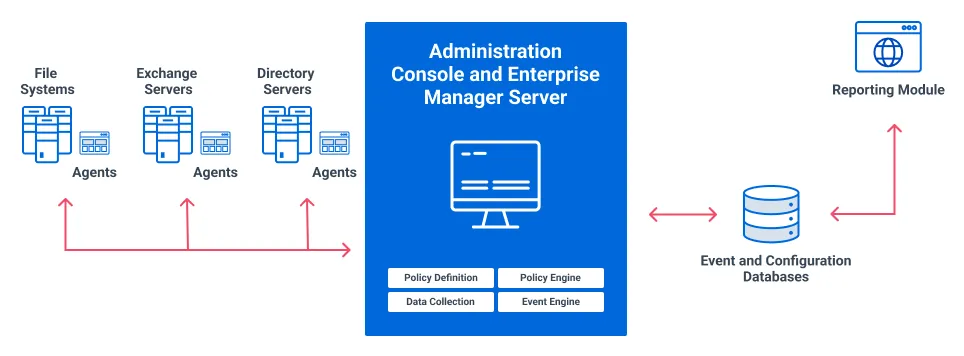
Threat Prevention consists of a number of components that work together to monitor and report on activity on a network:
- Threat Prevention Enterprise Manager
- Threat Prevention Win Console (Administration Console)
- Threat Prevention Agents deployed across the environment
- Netwrix Threat Manager Reporting Module
Threat Prevention Architecture
Threat Prevention Enterprise Manager
The Threat Prevention Enterprise Manager stores and maintains policies and policy templates, as well as receives and processes all captured events. Only one Enterprise Manager is needed for any environment.
Threat Prevention Administration Console
Use the Threat Prevention Administration Console to create and manage policies and their associated alerts and actions. Threat Prevention supports multiple instances of the Administration Console.
Threat Prevention Agents
The Threat Prevention Agents retrieve configuration data from the Enterprise Manager, monitor network activity, and report events to the Enterprise Manager. The events collected by an Agent are those specified by the policies that are active in the system. There must be an Agent deployed on every server being monitored. See the Agent Information topic for information on where to deploy Agents and supported platforms. See the Agents Interface section for deployment procedures.
Netwrix Threat Manager Reporting Module
The Netwrix Threat Manager Reporting Module application provides a way to generate and to view reports for the event data that the Agent collects and stores in the event database. You can generate reports for specific time frames and save them as comma-separated values (CSV) or JavaScript Object Notation (JSON) files. You can download or email these files. See the Reporting Module topic for additional information.
Analytics
Threat Prevention’s Analytics engine identifies patterns based on observed activities that may indicate that a security incident is in process or being attempted. For example, the frequency of an event over a particular time period or a combination of events with one or more correlating attribute could indicate that a security risk incident is in process. See the Analytics Interface topic for additional information.
Policies & Policy Templates
For Threat Prevention to monitor activity on a network, you must configure it to monitor the activity you want. Most of this configuration is done with Threat Prevention policies.
A policy describes the types of event data to monitor. As events occur, if an event meets all the filters described in a policy, Threat Prevention captures the event data and sends it to the reporting database. You can also define policies to block events that meet all filters, and Threat Prevention sends information about the attempted change to the reporting database.
A Threat Prevention policy is a specification, configured in the Administration Console, for events that provide evidence of a high‐level policy violation. For example, if there is an organizational policy stating only members of the Administrators group can create user accounts, then you can configure a policy to detect when someone other than a member of the Administrators group creates a user account.
Policies
A Threat Prevention Policy has many attributes which define the activities and objects it monitors, where on a network that policy applies, and when it is active. See the Policy Configuration topic for additional information.
General
General components include the name and description of the policy, policy creation and modification information, policy schedule, whether the policy is sending alerts, and whether the policy is enabled.
The schedule controls when the policy is active. For example, if you want certain activity monitored more closely outside of regular business hours, you can create a policy and schedule it to be active only outside of regular business hours.
Event Type
Event Type components indicate what kind of events the policy monitors or blocks. A single policy can contain multiple event types, even from different event sources. For example, a policy might monitor the creation of user accounts in Active Directory.
Each event type has an optional set of filters associated with it. The available filters vary depending on the event source.
Actions
Use Actions components to process and respond to events once Threat Prevention captures them. A policy can include one or more actions (or event consumers). It can also have no actions, but this isn't recommended. Actions are policy specific, and you can't share them between policies. However, you can export them with a policy.
Policy Templates
A policy template is an inactive policy specification that you can use to create active policies. Policy templates contain one or more event types that match a set of related events.
Some settings in a policy template are necessarily generic. For example, you may need to refine the filters associated with the event types of a template to refer to a particular local domain, container, or group.
A policy template usually has no actions associated with it, because installations typically customize actions—for example, the name of a text file or the connection information for a local SMTP server.
See the Pre-Created Templates and Template Configuration topics for additional information.
Database Components
Threat Prevention needs to store event data and configuration information for several components. It uses the following SQL Server databases to store this information:
- NVMonitorConfig database
- NVMonitorData database
The Threat Prevention Enterprise Manager installation process creates both these databases. See the Application Server Install topic for additional information.
NVMonitorConfig Database
This database contains configuration information for the Threat Prevention product. The Threat Prevention Enterprise Manager maintains and shares this information with the Agents, primarily policy configuration information.
NVMonitorData Database
This database contains the event activity data captured by Threat Prevention policies. Agents capture these events, as defined by policies, and send them to the Enterprise Manager. The Enterprise Manager receives, processes, and stores the data in the events database.