Restrict SQL Server Maximum Server Memory
For SQL Server 2012+, restrict the maximum server memory value to 60-70% of the total physical RAM to prevent SQL Server from consuming all available memory and starving other applications.
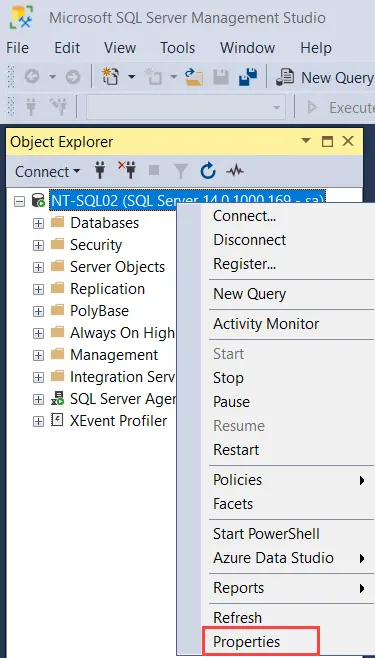
Step 1 – In Microsoft SQL Server Management Studio, right-click the SQL Server’s entry in the Object Explorer pane and select Properties.
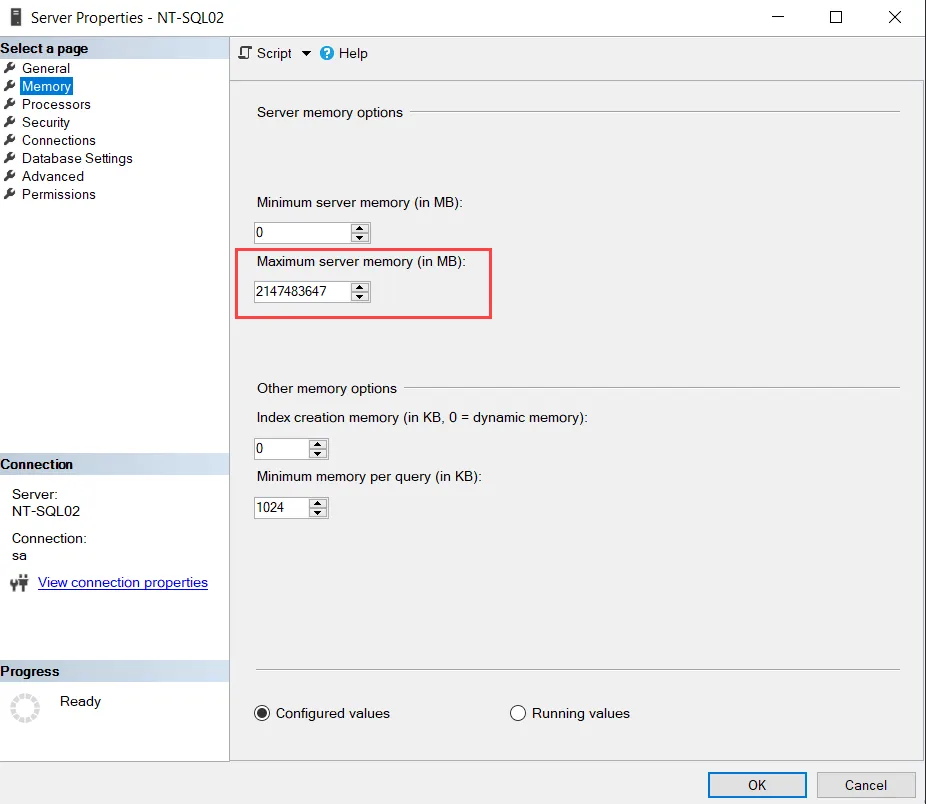
Step 2 – On the Memory page of the Server Properties window, modify the Maximum server memory (in MB) value to be 60-70% of the total physical RAM. For example, if the server has 20 GB RAM, then scope the maximum server memory value to 12-14 GB (12000-14000 MB). Then click OK to save the modification.
The SQL Server is now limited in its memory usage. When lowering maximum server memory, the change in the amount of memory being used by SQL server may not be immediately apparent. The SQL Server releases any used memory beyond the newly set maximum gradually.
See the Best Practices and Troubleshooting topic for additional information.