AD Changes Dashboard
The AD Changes dashboard contains the following cards:
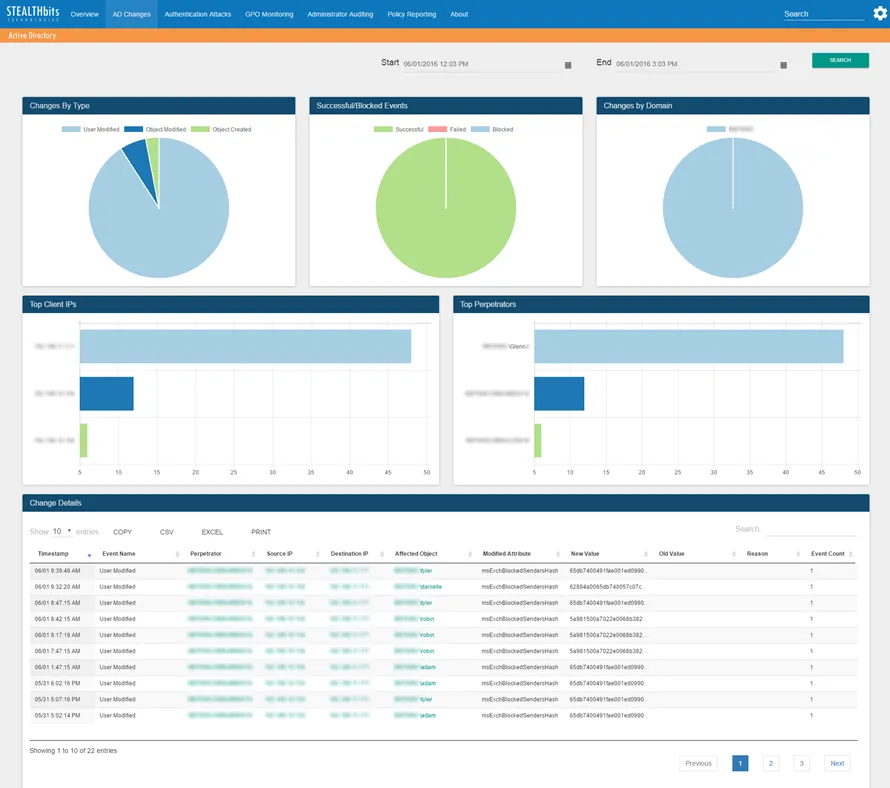
- Changes by Type – Breakdown of changes by event type in the specified timeframe. See Graph Card Features for details.
- Successful/Blocked Events – Breakdown of changes by successful, failed, or blocked status in the specified timeframe. See Graph Card Features for details.
- Changes by Domain – Breakdown of changes by domain in the specified timeframe. See Graph Card Features for details.
- Top Client IPs – Shows the top five client IP addresses associated with events in the specified timeframe
- Top Perpetrators – Shows the top five perpetrator usernames associated with events in the specified timeframe
- Change Details – Tabular format of all Active Directory change events in the specified timeframe. See Table Card Features for details.
The time interval is identified in the upper-right corner in the Start and End boxes, which default to the past three hours. To search a different timeframe, enter the start and end dates and times, or use the calendar buttons to select them. Click Search to refresh the card data.
Searches using a time interval longer than 12 hours split the database query into multiple mini-queries. The dashboard display resets at the end of each mini-query until all data for the selected timeframe is retrieved.