Service Accounts
The Service Accounts dashboard provides visibility into service account usage across the environment, enabling you to identify, classify, and assess non-human accounts that operate outside typical user authentication behavior. It includes accounts that have a defined servicePrincipalName, account type reflective of a service account, or repeated authentication patterns. The dashboard uses machine learning to identify pattern-based authentication.
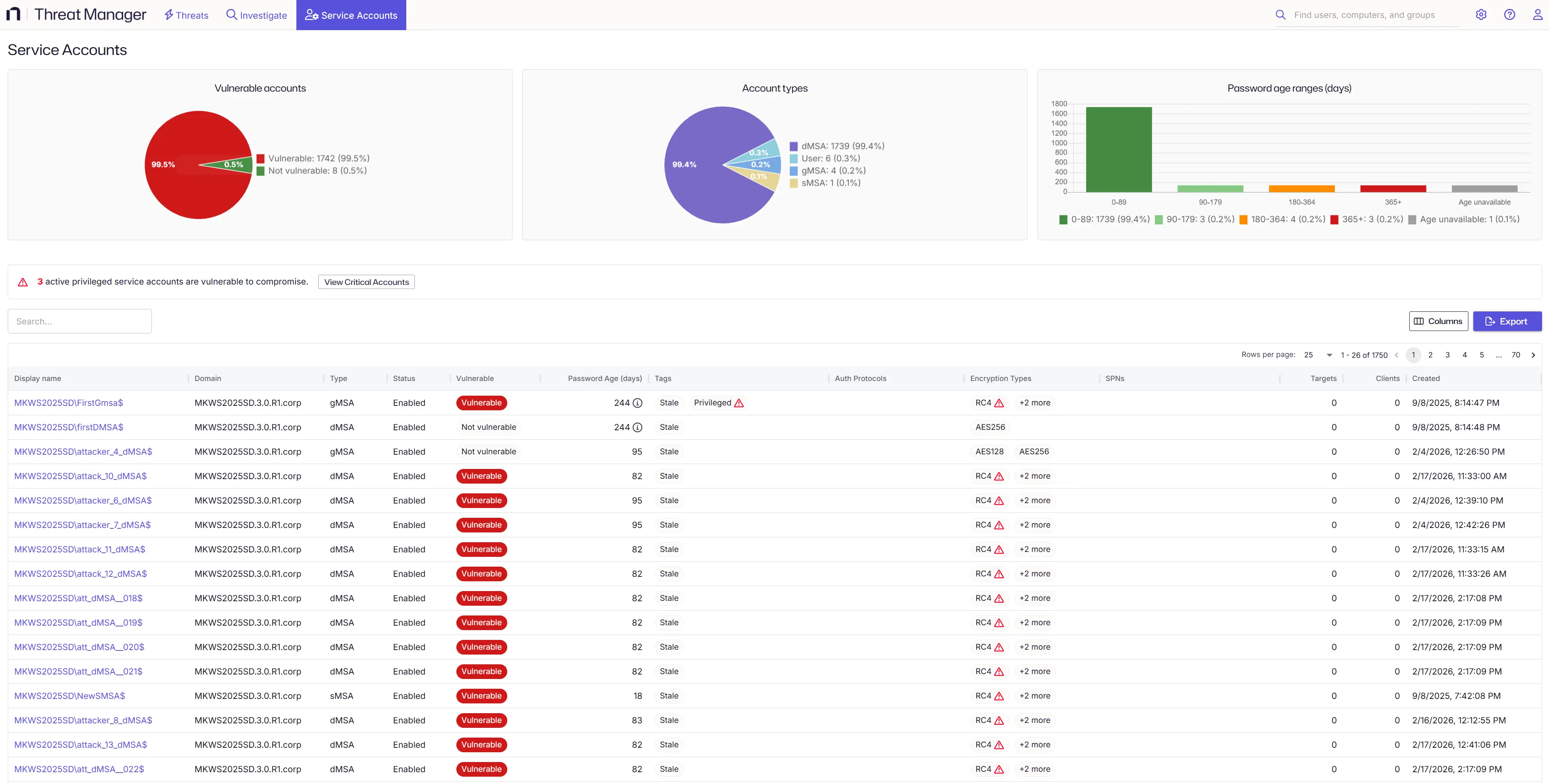
There are three types of service accounts:
- dMSA, gMSA, and sMSA — Group / Delegated / Standalone Managed Service Account
- Accounts marked with servicePrincipalName (SPN)
- Those discovered by machine learning
If privileged service accounts are vulnerable to compromise, a warning banner appears at the top of the dashboard. Click View Critical Accounts to filter the table to those accounts.
Use the Columns button to show or hide columns, and Export to download the table as a CSV.
Summary Charts
Three charts appear at the top of the dashboard and reflect the data displayed in the table.
Vulnerable accounts — A pie chart showing the count and percentage of accounts classified as Vulnerable versus Not Vulnerable.
Account types — A pie chart showing the distribution of account types: dMSA, gMSA, sMSA, and User.
Password age ranges (days) — A bar chart showing how many accounts fall into each password age bucket:
| Range | Color |
|---|---|
| 0–89 days | Dark green |
| 90–179 days | Light green |
| 180–364 days | Orange |
| 365+ days | Red |
| Age unavailable | Gray |
Column Definitions
Display Name
The primary identifier for the service account. Displays the account's display name (if available) or NT account name. This column is clickable and links to the detailed user information page.
Domain
The Active Directory domain to which the service account belongs.
Type
The type of service account. Possible values include:
- User (0) — Standard user account used as a service account
- sMSA (1) — Standalone Managed Service Account
- gMSA (2) — Group Managed Service Account
- dMSA (3) — Domain Managed Service Account
Status
Indicates whether the service account is enabled or disabled in Active Directory.
Vulnerable
Indicates the vulnerability status of the service account based on its supported encryption types. An account is Vulnerable if RC4 or DES appears in the msDS-SupportedEncryptionTypes attribute, which makes it susceptible to Kerberoasting. An account is Not vulnerable if neither RC4 nor DES is present, or if the attribute is empty.
Password Age (days)
The number of days since the account's password was last set. An icon next to the value indicates the password age status:
| Condition | Icon | Tooltip |
|---|---|---|
| Age unavailable | Info | "User must change password at next logon. Age unavailable." |
| 180–364 days | Info | "Consider scheduling a password rotation." |
| 365+ days | Warning | "Account with password not rotated for X days — rotate password immediately." |
Tags
Custom tags associated with the service account for organization and categorization. Displays up to 2 tags visibly with an overflow indicator for additional tags. Each tag includes a name and description (shown on hover).
Auth Protocols
Authentication protocols supported or used by the service account (for example, Kerberos, NTLM). Displays up to 2 protocols visibly with an overflow indicator for additional protocols.
Encryption Types
Encryption types supported by the service account for Kerberos authentication (for example, AES128, AES256, RC4). Displays up to 2 encryption types visibly with an overflow indicator for additional types.
SPNs
Service Principal Names associated with the service account. SPNs are unique identifiers that Kerberos uses to associate service instances with service accounts. Displays up to 2 SPNs visibly with an overflow indicator for additional SPNs.
Targets
The number of target systems or resources that this service account accesses or authenticates to.
Clients
The number of client systems or applications that use this service account for authentication.
Created
The date and time when the service account was created in Active Directory.
Service Account Details
Click any row in the table to open the details blade for that service account. The blade is organized into four sections.
Account Information displays the display name, domain, account type, enabled status, security identifier (SID), and any tags assigned to the account.
Authentication shows the authentication protocols in use, supported encryption types, and whether Kerberos pre-authentication is required for the account.
SPNs lists all Service Principal Names configured for the account. If the account has many SPNs, the list is expandable.
Activity Summary shows the number of clients and target hosts associated with the account, and the account creation time.
To investigate the account for potential abuse, click Investigate in the blade. This opens the Investigate page with the account set as the perpetrator.