Password Complexity Page
The Password Complexity page is accessible from the Navigation pane under Policy > Platforms. It shows configured password complexity policies that can be applied to platforms.
When Privilege Secure creates a managed account on a local system or domain it also sets the user password. The password that is generated follows the complexity rules configured in the related password policy associated with that platform. The Default policy is used if a password policy can't be determined. See the Platforms Page topic for additional information.
Password complexity requirements must adhere to any domain or local password policy applied to the target resource. If there is a conflict between the password policy on the target resource and the password policy set in Privilege Secure, the managed account can't be created and the session fails .
Create password policies and configure the password complexity requirements on this page. The password policy only applies to managed accounts created by Privilege Secure.
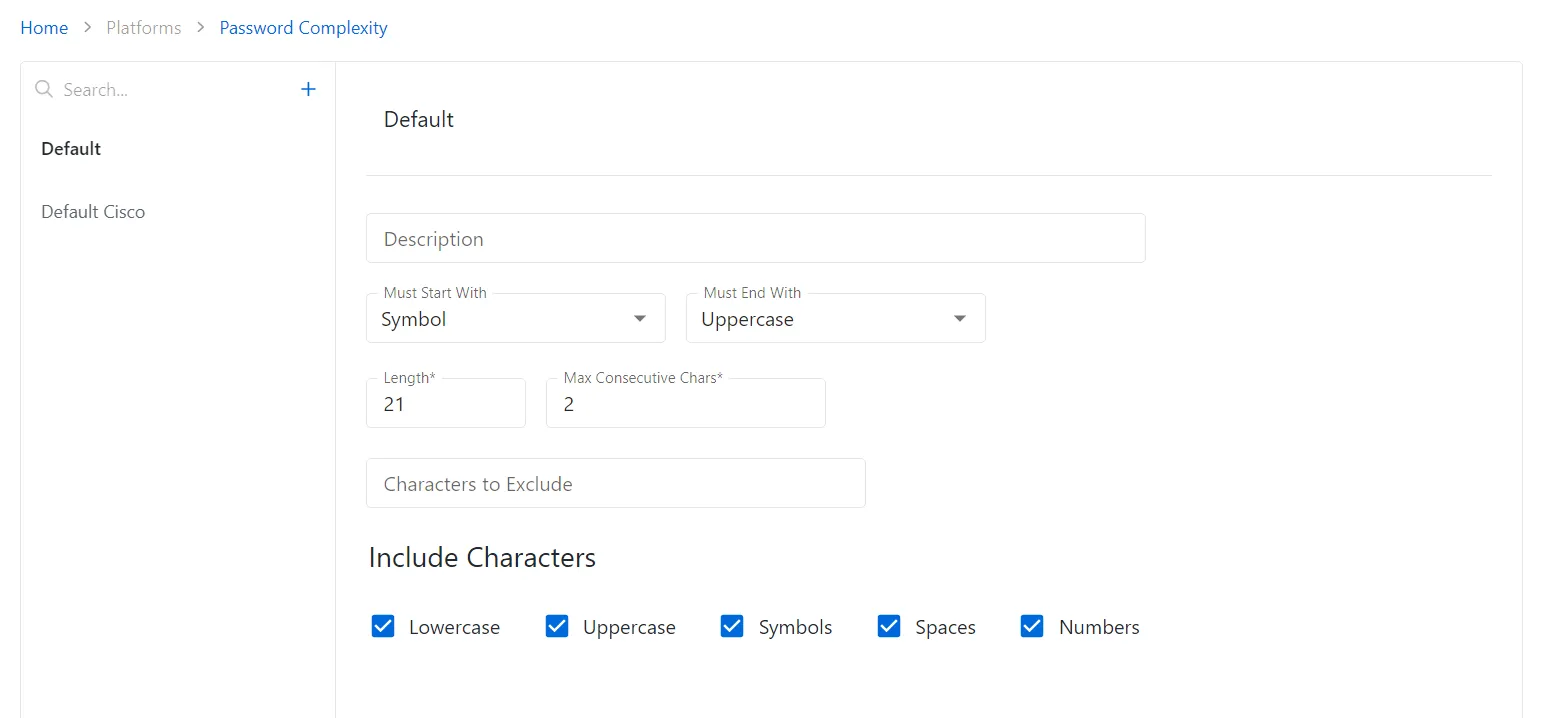
The pane on the left side of the page displays a list of the configured password complexity policies. This pane has the following features:
- Search — Searches the table or list for matches to the search string. When matches are found, the table or list is filtered to the matching results.
- Blue + button — Create a new password complexity policy. See the Add Password Complexity Policy topic for additional information.
- Copy icon — Create a new password complexity policy based on the current selection. Icon appears when policy is hovered over.
- Trashcan icon — Deletes the password complexity policy. Icon appears when policy is hovered over. A confirmation window displays.
The default password policy can't be deleted.
The selected password complexity policy details display in the main pane:
-
Name — Displays the name of the policy
-
Description — Description of the policy
-
Must Start With / Must End With — Lists cases the password complexity policy enforces. This list contains the following options:
-
None
-
Lowercase
-
Uppercase
-
Numeric
-
Length — The maximum number of characters the password complexity policy enforces
-
Max Consecutive Chars — The maximum number of consecutively occurring characters that the password complexity policy allows
-
Characters to Exclude — Custom characters the password complexity policy excludes.
-
Included Characters — Check boxes containing additional inclusive parameters for the policy:
-
Lowercase — At least one lowercase character in the password
-
Uppercase — At least one uppercase character in the password
-
Numbers — At least one number in the password
If any of these settings are modified, Save, and Cancel buttons appear. Click Save to commit the modifications. Click Cancel to discard the modifications.