Activity Log Page
The Activity Log page shows the activity logs for users and resources. From here, search, and investigate the records.
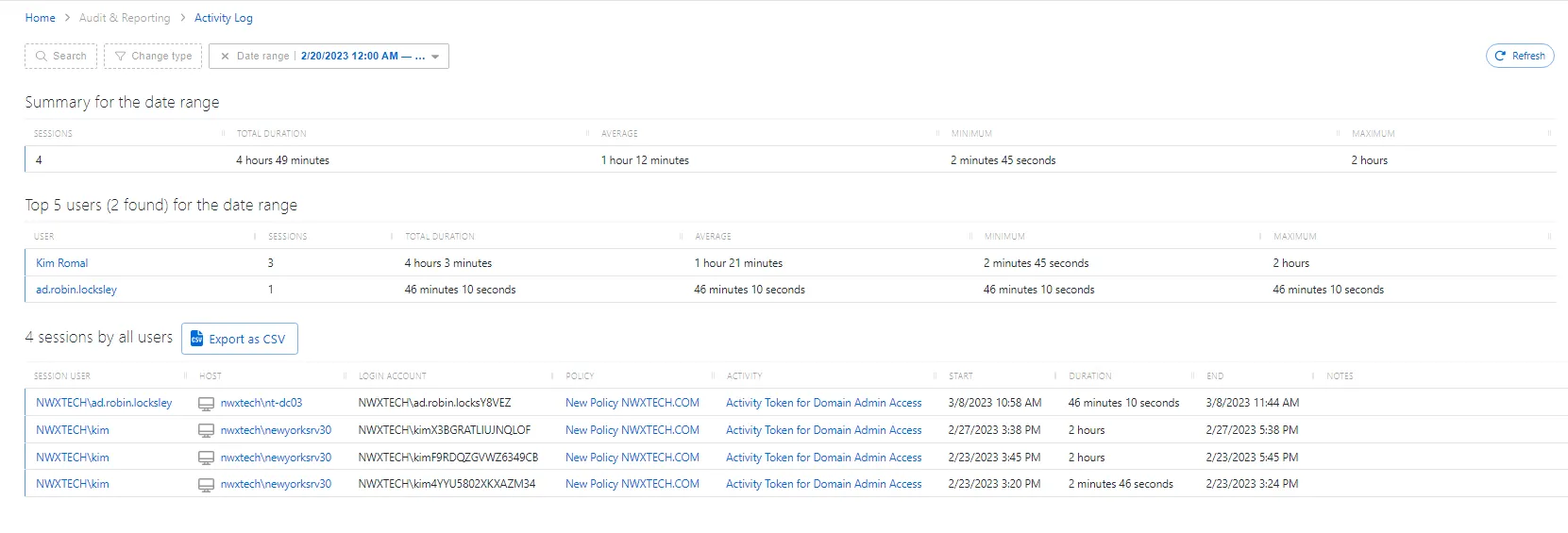
The Activity Log page has the following features:
-
Search — Searches the table or list for matches to the search string. When matches are found, the table or list is filtered to the matching results.
-
Additionally, filter by table and date
-
Change type — Filter by change type:
-
All Users
-
Top 5 Users
-
Top 10 Users
-
Date range — Filter by date range. Enter a start date and end date.
-
Refresh button — Reload the information displayed
The Summary for the Date Range table shows combined information for all the logs:
-
Column headers can be resized and sorted in ascending or descending order::
-
Sessions — Total number of sessions
-
Total Duration — Total duration of all sessions combined
-
Average — The average duration of a session
-
Minimum — The minimum duration of a session
-
Maximum — The maximum duration of a session
-
Export as CSV – Allows exporting the Activity Log as a CSV file
The Top 5 Users for the Date Range table lists the users with the most sessions:
-
Column headers can be resized and sorted in ascending or descending order:
-
User — The user logged in to the session. Click to open the User, Group, & Application Details Page.
-
Sessions — Number of sessions per user
-
Total Duration — Total duration of all sessions per user
-
Average — The average duration of a session per user
-
Minimum — The minimum duration of a session per user
-
Maximum — The maximum duration of a session per user
The Sessions by All Users table lists all user sessions:
-
Column headers can be resized and sorted in ascending or descending order:
-
Session User — The user logged in to the session. See the User, Group, & Application Details Page topic for additional information.
-
Host — The resource the session is using. The details vary based on the type of resource. See the Resources Page topic for additional information.
-
Login Account — Account user is logged in with
-
Policy — Policy associated with the session. See the Access Policy Page topic for additional information.
-
Activity — Activity associated with the session. See the Activities Page topic for additional information.
-
Start — Start time of the session
-
Duration — Duration of the session
-
End — End time of the session
-
Notes — Any notes that were entered when the session was created
-
Ticket Number — Any ticket numbers that were entered when the session was created