AWS KMS Key Rotation
Organizations using AWS Key Management Service (AWS KMS) can configure Netwrix Privilege Secure to rotate security keys. When creating an AWS KMS protection key for Privilege Secure, configuration must start by creating a policy in AWS. After you create an AWS policy, you can configure a connection to the AWS policy using Privilege Secure Rotate AWS Key tool.
The AWS KMS key encrypts the key that encrypts the secret key.
Rotate the AWS key
To rotate an AWS KMS Key.
-
Locate the KeyTools folder in the installation directory.
C:\Program Files\Stealthbits\PAM\KeyTools -
Run the
SbPAM.RotateAwsKeyexecutable to launch the Rotate AWS Key wizard.
-
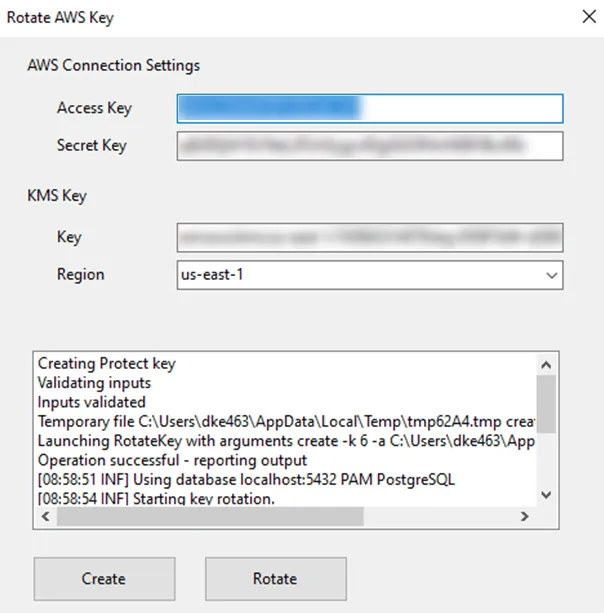
Enter the Access key and Secret key created for the AWS user assigned to the AWS KMS key into the AWS Connection settings fields.
-
Enter the KMS key ARN into the KMS Key field.
-
Select the appropriate AWS region from the dropdown list.
-
When all fields are completed, click the Rotate button to update all encrypted values in the Privilege Secure system.
The tool takes a few minutes to run (especially on larger systems) and the log window shows the results of the rotation.
If the AWS KMS key is rotated, there is no need to rotate the NPS key. Encrypted values will continue to be decrypted and any new encryption will use the updated AWS KMS key. If the AWS user Access Key is rotated it will be necessary to rotate the NPS key to update it to use the new Ids. Best practice for use of access keys is to rotate them regularly. Don't delete the AWS user Access Key without rotating the NPS key first.
- Create a new access key.
- Rotate the NPS protect key to use the new access key.
- Delete old access key.
The KMS Key has been rotated.