Sessions Tab for Website
The Sessions tab shows information about the sessions of the selected resource.
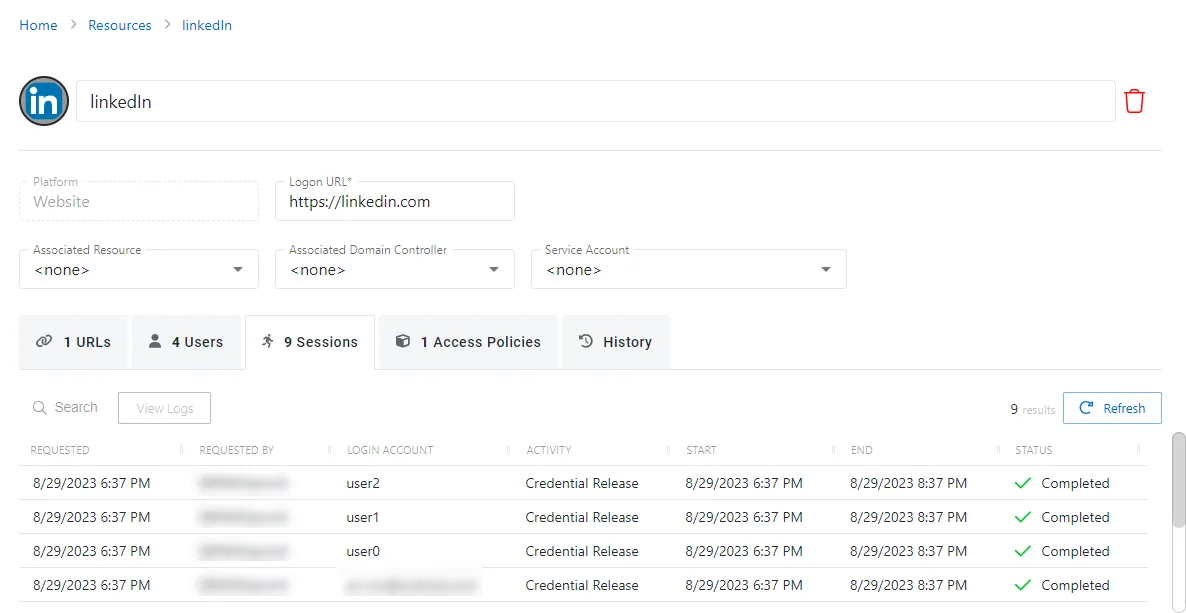
The Sessions tab has the following features:
- Search — Searches the table or list for matches to the search string. When the search finds matches, the table or list shows only the matching results.
- View Logs — Opens the Session Logs window to view the action log for the selected session. See the Session Logs Window topic for additional information.
- Refresh — Reload the information displayed
The table has the following columns:
- Requested — Date and time of when the session was created
- Requested By — User who requested the session. Click the link to view additional details. See the User, Group, & Application Details Page topic for additional information.
- Login Account — Displays the account used to log onto the resource
- Activity — Displays the name of the activity. Click the link to view additional details. See the Activities Page topic for additional information.
- Start — Indicates when the activity started. This refers to when Privilege Secure executed the activity’s actions, not when the user logged on to the resource.
- End — Indicates when the session is scheduled to end the activity, which is determined by the start time plus the maximum session duration set by the access policy Connection Profile
- Status — Shows status information for the session:
- Waiting for Approval — The session requires approval to begin. See the Approvals Dashboard topic for additional information.
- Approval Denied — Requested session was denied
- Approval Failed — Approval request has encountered an error
- Pending — Session scheduled start time is still in the future, session is waiting to start. See the Scheduled Dashboard topic for additional information.
- Available — The activity session is ready. Click the icon to begin the session, or log in through a client. See the Start Activity Session topic for additional information.
- Completed — Activity either reached the end of its scheduled end time or was canceled early by the requestor
- Canceled — The session expired, or the user or a Privilege Secure administrator canceled it manually.
- Failed — Pre-Session stage of the Activity has encountered an error
- Locked — An Privilege Secure administrator locked the session. See the Lock Session topic for additional information.
You can resize the table columns and sort them in ascending or descending order.