Add Activities Window
The Add Activities window provides a list of Activities that have been created. Activities are created in the Activities Page.
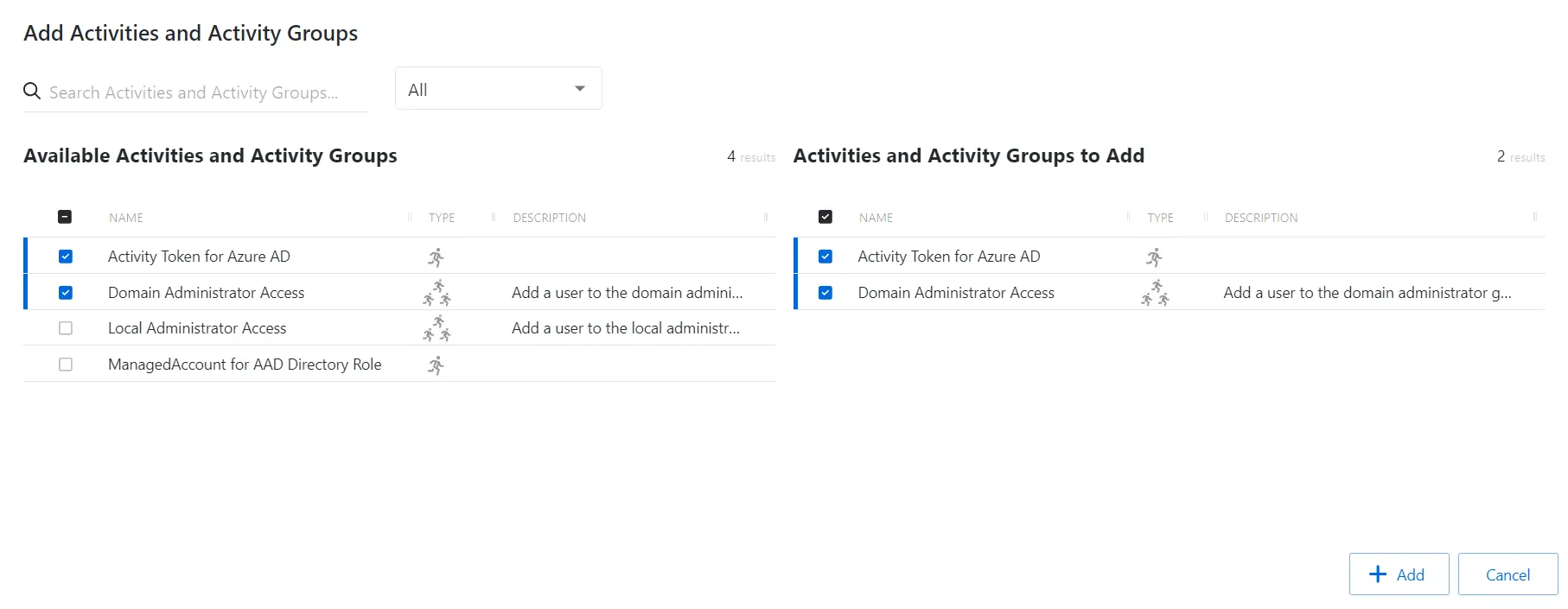
The window has the following features:
- Search — Searches the table or list for matches to the search string. When matches are found, the table or list is filtered to the matching results.
- Available Activities — Shows all available activities
- Activities to Add — Shows selected activities
- Add button — Closes the window
Both tables have the following columns:
- Checkbox — Check to select one or more items
- Type — Classification of the activity
- Name — Displays the name of the activity
- Description — Description of the policy
- Created — Date timestamp when the item was created
Add activities
To add activities to an activity group.
-
Navigate to the Policy > Access Policies page.
-
In the Activity Groups list, select the name of the activity group.
-
Click Add to open the Add Activities window.
The Add Activities and Activity Groups window has the following features:
- Search — Searches the Name and Operating System columns to match the search string. When matches are found, both tables are filtered to the matching results.
- Available Credentials and Groups — Shows all Credentials and Groups that are added to the console
- Credentials and Groups to Add — Shows the Credentials and Groups to be added to the protection policy
- Column headers can be sorted in ascending or descending order
- Name — The name of the activity
- Type — The type of activity, individual, or group
- Description — Additional details for the activity
-
To add an activity to the activity group, click a row in the Available Activities list and it is immediately moved to the Activities to Add list.
-
(Optional) Click a row in the Activities to Add list to move it back to the All Activities list.
-
Click Add to add the activities to the activity group.
The activities are added to the activity group.