SSH Command Restriction
The SSH Command Restriction page is accessible from the Navigation pane under Policy > Access Policy > Command Restriction. Groups of SSH command restrictions can be created and then applied to connection profiles.
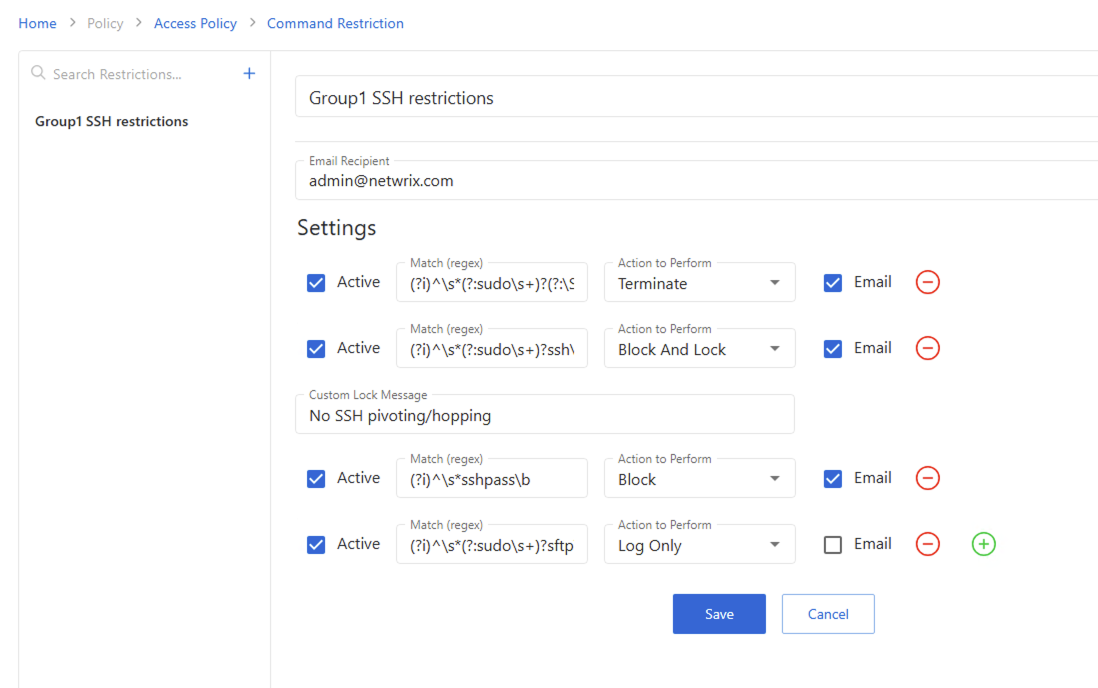
The pane on the left side of the page displays a list of the configured connection profiles. This pane has the following features:
- Search — Searches the table or list for matches to the search string.
- Blue + button — Create a new set of command restrictions.
- Trashcan icon — Deletes the SSH command restriction group. Icon appears when profile is hovered over. A confirmation window displays.
SSH command restriction fields
- Name — provide a name for this group of command restrictions
- Email Recipient — email address to be notified if any command is observed and the email box is checked.
- Active checkbox — command restrictions can be activated/deactivated here
- Match (regex) — enter a regular expression that defines any commands you want to observe
- Action to perform — Select in the dropdown from:
- Log only — the command is logged
- Block — the command is blocked from being executed
- Block and lock — Privilege Secure blocks the command from being executed and locks the session. If you select this option, then you can craft a message that Privilege Secure sends to the locked user as well.
- Terminate — session is ended
- Email checkbox — if the command is observed and this is checked, then an email is sent regardless of action
- Plus and minus icons — remove or add more command restrictions
- Save and Cancel icons (only show up when there is an edit) — retain or discard any edits since last save