Approvals Dashboard
The Approvals Dashboard displays requested sessions that require approval. Users and group members designated as approvers see the pending sessions queued here. An approver must approve the session before the requestor can log in to it. See the Connection Profiles Page topic for additional information on Approval Workflows.
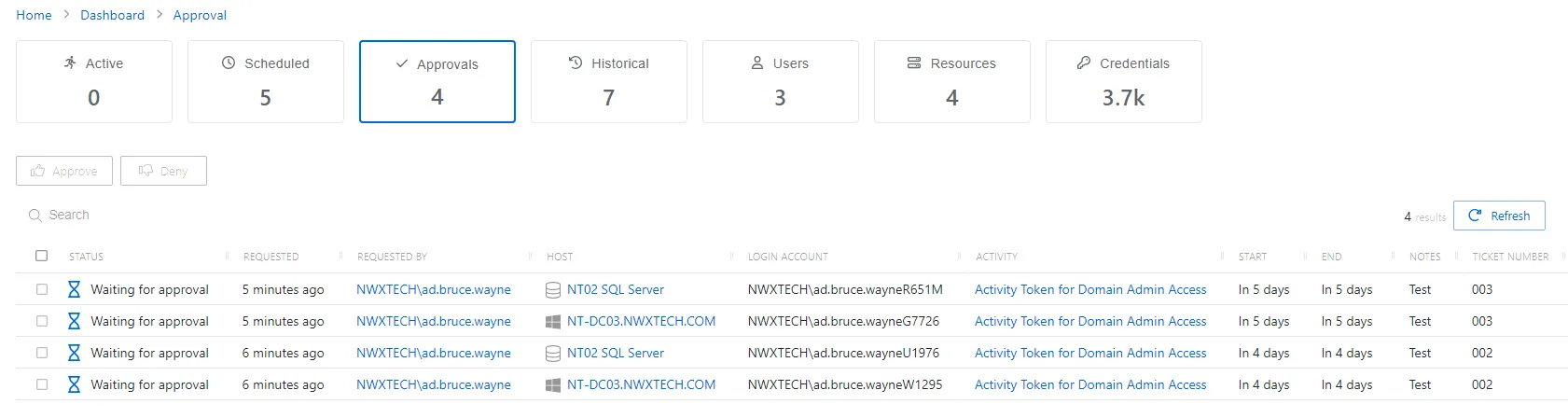
The Approvals Dashboard has the following features:
- Search — Searches the table or list for matches to the search string. When it finds matches, the search filters the table or list to the matching results.
- Approve — Approves the selected sessions
- Deny — Denies the selected sessions
- Refresh — Reload the information displayed
The table has the following columns:
- Checkbox — Check to select one or more items to complete a bulk action
- Status — Shows status information for the session:
- Waiting for Approval — The session requires approval to begin.
- Canceling — The session expired, or the user or a Privilege Secure administrator canceled it manually.
- Requested — Date and time of when the session was created
- Requested By — User who requested the session
- Host — Resource that the user runs the activity on
- Login Account — Displays the account used to log onto the resource
- Activity — Displays the name of the activity. Click the link to view additional details. See the Activities Page topic for additional information.
- Start — Indicates when the activity starts. This refers to when the activity’s actions run, not when the user logs on to the resource.
- End — Indicates when the session is scheduled to end the activity. The end time is the start time plus the maximum session duration that the access policy Connection Profile sets.
- Notes — Any notes that were entered when the session was created
- Ticket Number — Any ticket numbers that were entered when the session was created
You can resize the table columns and sort them in ascending or descending order.