Activity Log Page
The Activity Log page shows the activity logs for users and resources. From here, search, and investigate the records.
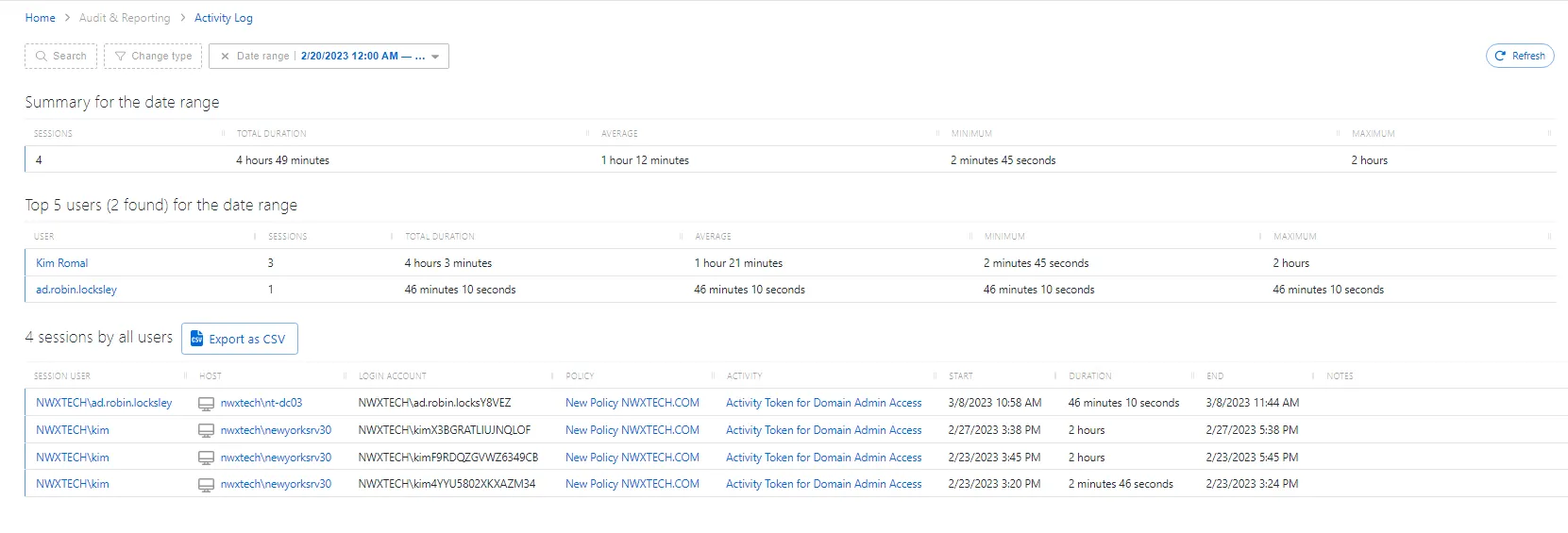
The Activity Log page has the following features:
- Search — Searches the table or list for matches to the search string. When it finds matches, it filters the table or list to the matching results.
- Change type — Filter by change type:
- All Users
- Top 5 Users
- Top 10 Users
- Date range — Filter by date range. Enter a start date and end date.
- Refresh button — Reload the information displayed
The Summary for the Date Range table shows combined information for all the logs:
- You can resize column headers and sort them in ascending or descending order:
- Sessions — Total number of sessions
- Total Duration — Total duration of all sessions combined
- Average — The average duration of a session
- Minimum — The minimum duration of a session
- Maximum — The maximum duration of a session
- Export as CSV — Exports the Activity Log as a CSV file
The Top 5 Users for the Date Range table lists the users with the most sessions:
- You can resize column headers and sort them in ascending or descending order:
- User — The user logged in to the session. Click to open the User, Group, & Application Details Page.
- Sessions — Number of sessions per user
- Total Duration — Total duration of all sessions per user
- Average — The average duration of a session per user
- Minimum — The minimum duration of a session per user
- Maximum — The maximum duration of a session per user
The Sessions by All Users table lists all user sessions:
- You can resize column headers and sort them in ascending or descending order:
- Session User — The user logged in to the session. See the User, Group, & Application Details Page topic for additional information.
- Host — The resource the session is using. The details vary based on the type of resource. See the Resources Page topic for additional information.
- Login Account — Account user is logged in with
- Policy — Policy associated with the session. See the Access Policy Page topic for additional information.
- Activity — Activity associated with the session. See the Activities Page topic for additional information.
- Start — Start time of the session
- Duration — Duration of the session
- End — End time of the session
- Notes — Any notes the user entered when creating the session
- Ticket Number — Any ticket numbers the user entered when creating the session