Configuration
Click Start >[All] Programs > PPE Web Configuration Console to open the Password Policy Enforcer Web Configuration Console.
General Tab
Use the General tab to maintain the list of managed domains, and to configure Password Policy Enforcer integration. See the Password Policy Enforcer topic for additional information.
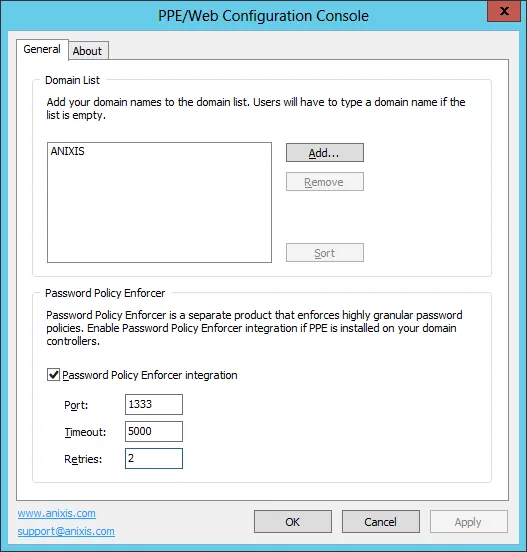
Domain List
When Password Policy Enforcer Web is first installed, the Domain List is empty and users must type their domain name. You can configure Password Policy Enforcer Web to display a list of domains instead of an empty text box.
Add Domain
Follow the steps to add a domain to the list.
Step 1 – Click the Add... button.
Step 2 – Enter a NetBIOS (NT Compatible) or DNS domain name.
Step 3 – Click OK, the click Apply.
Put the most frequently used domain first in the list — it is the default. You can rearrange the domains by dragging them to another position. You can also click Sort to sort them alphabetically.
Remove Domain
Follow the steps to remove a domain from the list.
Step 1 – Select the domain name from the Domain List.
Step 2 – Click Remove, then click Yes when asked to confirm.
Step 3 – Click Apply.
Password Policy Enforcer
Password Policy Enforcer is a configurable password filter that enforces granular password policies with many advanced features. Password Policy Enforcer Web can integrate with Password Policy Enforcer to help users choose a compliant password.
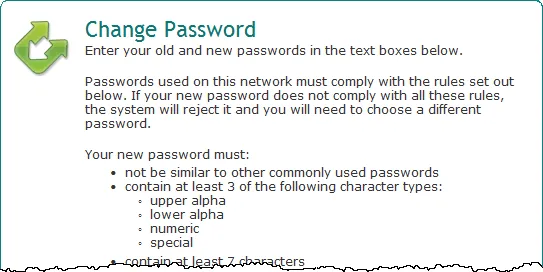
Password Policy Enforcer Web displays the Password Policy Enforcer password policy message when a user is prompted for their new password, and the Password Policy Enforcer rejection message if the new password doesn't comply with the password policy. Select the Password Policy Enforcer integration checkbox if you have installed and configured Password Policy Enforcer on your domain controllers.
You can also set the Port, Timeout, and number of Retries for the Password Policy Protocol if the defaults aren't suitable.
A Password Policy Enforcer Web license doesn't include a Password Policy Enforcer license. See Netwrix Password Policy Enforcer for licensing information.
About Tab
The About tab contains version and license key information.
To install a new license key.
Step 1 – Copy the entire license e-mail to the clipboard.
Step 2 – Click Get license from clipboard.
Step 3 – Click Apply.