History Rule
The History rule rejects passwords that are identical to recently used passwords. Password reuse should be avoided because it defeats the purpose of regular password changes. Password Policy Enforcer can stop users from reusing passwords for a specified number of password changes or a number of days.
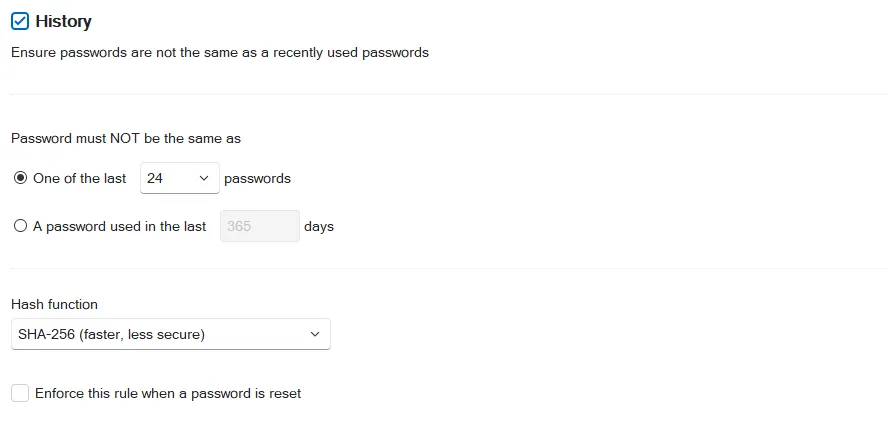
Select the History checkbox to enable the History rule.
Select one of the options:
One of the last option to stop passwords from being reused for a specified number of password changes. Choose the number of password changes from the dropdown list.
A password used in the last option to stop passwords from being reused for a specified number of days. Enter the number of days in the text box.
Choose an item from the Hash function dropdown list. Argon2 is recommended for best security. The Argon2 option uses 100,000 times more computing power to create a hash, so an attacker needs 100,000 more computing power to crack Argon2 hashes. Argon2 increases password change times by 400%, so a domain controller that can handle 1,000 password changes a minute with SHA-256 can be expected to handle 250 password changes a minute with Argon2. All numbers are approximate. Use Argon2 if your domain controllers can handle the load.
Changing the Hash function doesn't modify existing history records. It sets the function to be used for new password history records. If a user has Argon2 and SHA-256 hashes in their password history, then Password Policy Enforcer calculates both the Argon2 and SHA-256 hashes during a password change to ensure the new password isn't in the password history.
The History rule is normally not enforced when a password is reset. Select the Enforce this rule when a password is reset checkbox to override the default behavior. You must also select the Enforce policy when password is reset option in the PPS Properties page to enforce this rule when a password is reset.
Click the Messages tab to customize the Password Policy Client rule inserts.
The History rule isn't enforced when testing passwords from the Test Policies page.
Password Policy Enforcer updates a user's password history whenever their password changes. The password history is updated even if Password Policy Enforcer or the assigned policy is disabled. A user's password history is deleted if the user doesn't have an assigned policy, or if the History rule is disabled at the time of the password change.
Password Policy Enforcer's password history is stored in Active Directory for domain user accounts, and in the registry for local user accounts. You can create a new Active Directory attribute for the password history, or configure Password Policy Enforcer to use an existing attribute.
Disable Password Policy Enforcer's History rule if you don't want Password Policy Enforcer to store the password history.
Password Policy Enforcer doesn't store passwords in the password history, it only stores the Argon2 or SHA-256 hashes. A salt protects the hashes from precomputed attacks, including rainbow tables. If you don't want Password Policy Enforcer to store a password history, then leave the History rule disabled. You can use the Windows History rule together with Password Policy Enforcer's other rules to enforce your password policy.
Password Policy Enforcer can store up to 100 password hashes for each user, but it only stores the minimum needed to enforce the current password policy. For example, if Password Policy Enforcer is configured to reject the last 24 passwords, then only the last 24 password hashes are stored. Reconfiguring Password Policy Enforcer to reject the last 30 passwords won't have an immediate effect because only 24 password hashes are stored. The full effect of the new configuration is realized after users change their passwords six more times, at which point Password Policy Enforcer has 30 stored password hashes for each user.
Leave both the Windows and Password Policy Enforcer History rules enabled when transitioning from one to the other. This allows the old rule to enforce the policy until the new rule has built up its password history. The old rule can be disabled after users have completed the required number of password changes to enforce the new rule.
As Password Policy Enforcer is limited to storing the last 100 password hashes, it is possible for the History rule to run out of storage space before the specified number of days. Use the Minimum Age rule to avoid this problem. For example, if the History rule is configured to not allow password reuse for 365 days, then set the minimum password age to four or more days. Even if a user changes their password every four days, they can only perform 91 password changes in 365 days.
Creating a New Attribute for the Password History
Windows stores a domain user's password history in two Active Directory attributes, but these attributes can't be used by other applications. Password Policy Enforcer can store the password history in a new or existing attribute. A new attribute is recommended, but you can use an existing attribute if you don't want to extend the AD schema. An AD attribute is only needed for domain user accounts because the password history for local user accounts is stored in the registry.
Password Policy Enforcer's password history attribute is confidential to stop authenticated users from accessing the password history of other users. See the Microsoft Article Mark an attribute as confidential in Windows Server 2003 Service Pack 1 Microsoft article for additional information. Confidential attributes have additional protection in Active Directory, but they aren't as well protected as the Windows password history attributes. There is a higher risk of unauthorized access to the password history if it is stored outside the Windows password history attributes.
Follow the following steps to create a new Active Directory attribute for the password history.
Step 1 – Log on to the server holding the Schema Operations Master role with an account that is a member of the Schema Admins group.
Step 2 – Open a Command Prompt window to the Password Policy Enforcer installation folder.
(\Program Files (x86)\Password Policy Enforcer)
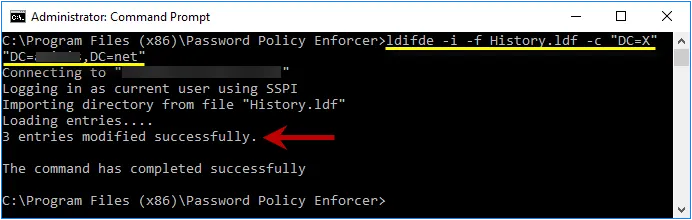
Step 3 – Enter the following command:
: ldifde -i -f History.ldf -c "DC=X" "DC=yourdomain,DC=yourdomain"
Replacing the last parameter with your domain's DN.
Step 4 – Press ENTER and check the output for errors.
Using an Existing Attribute for the Password History
Password Policy Enforcer can store the password history in an existing attribute. The desktopProfile attribute is well suited because it isn't used by Windows. Other attributes are also suitable if they aren't being used. Contact Netwrix Support if you would like to use an existing attribute for the password history.
Password Histories for Local User Accounts
The password histories of local user accounts are stored in the HKLM\SECURITY\PPE Password History
registry key. Users aren't granted access the HKLM\SECURITY\ registry key by default, so a user
can't read the password history of any user (including themselves). This is also true for members
of the Administrators group, but administrators can change the default permissions. If an
administrator accesses the password history they might be able to extract the hashes for cracking,
but they can't extract the passwords directly because the password history doesn't contain any
passwords.
The password history of a local user account isn't automatically deleted when the user account is deleted. If a local user account is deleted, then another local user account is created on the same computer with the same username, the new user will inherit the deleted user's password history. The default registry permissions stop users from accessing their own password history, so it is difficult for the new user to use this information. They could try to guess the deleted user's password during a password change to see if it is rejected by the History rule, but they would only have a few attempts to guess correctly before the old hashes are overwritten with new hashes. The user's current password is validated, and the Windows Minimum Age rule is enforced before the password history is checked, so every compliant and incorrect password guessed will overwrite one hash in the password history. This information applies only to local user accounts. The password history for domain user accounts is deleted when users are deleted.