Assigning Policies
Password Policy Enforcer uses policy assignments to decide which policy to enforce for each user. Domain policies can be assigned to users, groups, and containers (Organizational Units). Local policies can only be assigned to users. See the Domain and Local Policies topic for additional information.
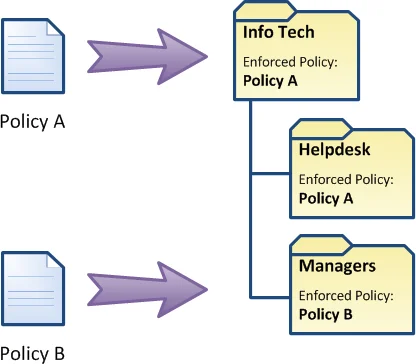
When a policy is assigned to a group, Password Policy Enforcer enforces the policy for all members of the group as well as any nested groups. For example, if the Helpdesk group is a member of the Info Tech group, then any policy assigned to the Info Tech group also applies to the members of the Helpdesk group. If this behavior isn't desired, then you can assign a different policy to the Helpdesk group.
When a policy is assigned to a container, Password Policy Enforcer enforces the policy for all users in the container as well as any child containers. For example, if the Helpdesk and Managers OUs are children of the Info Tech OU, then any policy assigned to the Info Tech OU also applies to the two child OUs. If this behavior isn't desired, then you can assign a different policy to a child OU.
When a domain policy is assigned to a user or group, Password Policy Enforcer stores the user or group SID in the configuration. The assignment remains valid even if the user or group is renamed. When a local policy is assigned to a user, Password Policy Enforcer stores the username in the configuration. The assignment is invalidated if the user is renamed.
Assign a Password Policy
Step 1 – Click the Policies item to display the Policies view.
Step 2 – Click the policy you want in the right pane of the management console.
Step 3 – Click Properties in the right pane of the management console.
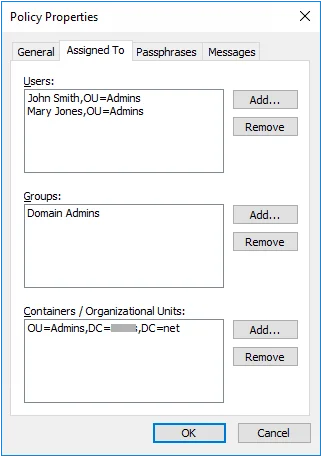
Step 4 – Click the Assigned To tab.
Step 5 – Click the Add... button corresponding to Users, Groups, or Containers / Organizational Units.
Step 6 – Select the user, group, or container you want, then click OK.
Step 7 – Click OK to close the Policy Properties page.
Remove a Password Policy
Step 1 – Click the Policies item to display the Policies view.
Step 2 – Click the policy you want in the right pane of the management console.
Step 3 – Click Properties in the right pane of the management console.
Step 4 – Click the Assigned To tab.
Step 5 – Select the policy assignment that you want to remove.
Step 6 – Click the appropriate Remove button.
Step 7 – Click OK to close the Policy Properties page.
You can use different assignment types for a single policy. For example, you may assign users to a policy by both OU and group at the same time.
Policy Assignment Conflicts
A policy assignment conflict occurs when more than one policy is assigned to a user. Password Policy Enforcer can resolve these conflicts and choose one policy for each user.
Password Policy Enforcer first tries to resolve a policy assignment conflict by examining the assignment type. Assignments by user take precedence over assignments by group, which in turn take precedence over assignments by container. For example, if Policy A is assigned to a user by group, and Policy B is assigned to the same user by container, then Password Policy Enforcer will enforce Policy A because assignments by group take precedence over assignments by container.
If all the policies are assigned to the user by container, then Password Policy Enforcer enforces the policy that is assigned to the nearest parent container. For example, if Policy A is assigned to the Users OU, and Policy B is assigned to the Users\Students OU, then Password Policy Enforcer will enforce Policy B for all users in the Users\Students and Users\Students\Science OUs because it is the policy assigned to the nearest parent container.
If a policy assignment conflict still exists, then Password Policy Enforcer checks the priority of each remaining policy, and enforces the policy with the highest priority. See the Policy Assignment Conflicts diagram for a diagrammatic representation of this algorithm.
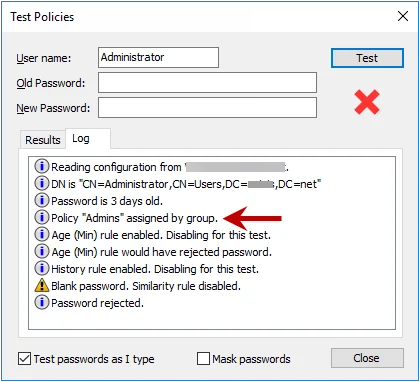
Use the Log tab in the Test Policies page to quickly determine which policy Password Policy Enforcer will enforce for a particular user.