Customization of Logon Prompt Extension
Overview
Customization of the Netwrix Logon Prompt Extension for Netwrix Password Reset is done via registry values in the following keys:
HKEY_LOCAL_MACHINE\SOFTWARE\[Wow6432Node]\NetwrixPassword Manager Self-service ClientHKEY_LOCAL_MACHINE\SOFTWARE\[Wow6432Node]\Policies\NetwrixPasswordManager
Most of these values are not created by the default installation. You can set values manually or by using any deployment software that can apply .reg files (SCCM, self-written scripts, etc.). The Policies key can also be configured via Group Policy by using the Netwrixprm.adm administrative template, which is located in the Netwrix Password Reset installation directory — it is described in the Administrator's guide.
The full list of values follows.
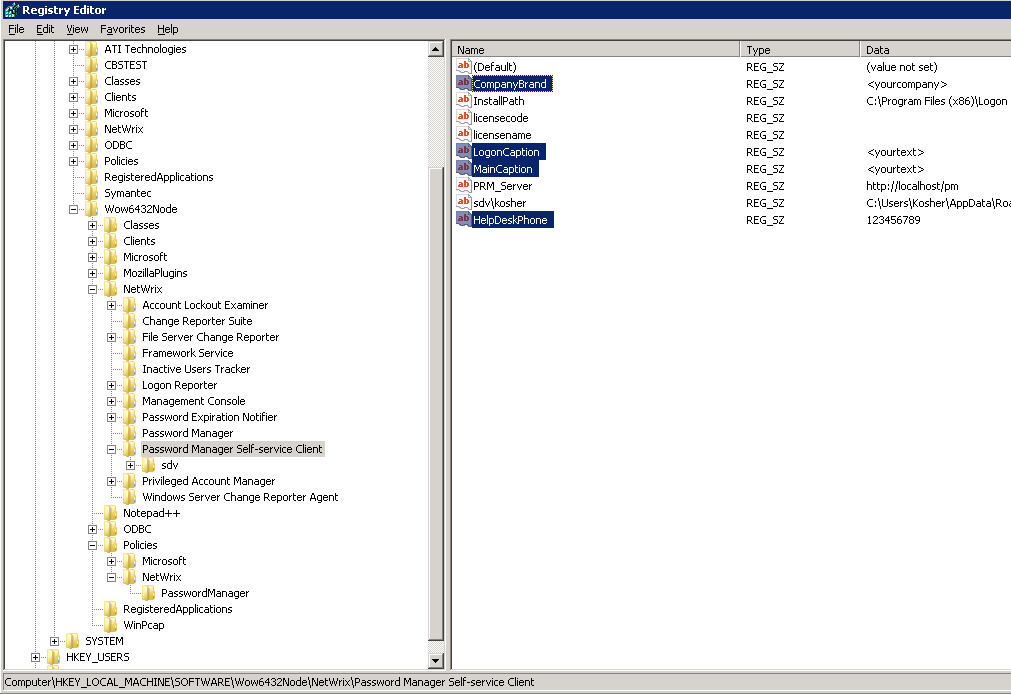
At HKEY_LOCAL_MACHINE\SOFTWARE\[Wow6432Node]\NetwrixPassword Manager Self-service Client
All values are string values (REG_SZ):
CompanyBrand— this value replaces "Netwrix" in all text of the Logon Prompt ExtensionHelpDeskPhone— this value is added at the end of all message boxes in the Logon Prompt Extension and Enrollment wizardLogonCaption— this value replaces the header of the Logon Prompt Extension password reset wizardMainCaption— this value replaces the header of the Enrollment wizard

At HKEY_LOCAL_MACHINE\SOFTWARE\[Wow6432Node]\Policies\NetwrixPasswordManager
String values (REG_SZ):
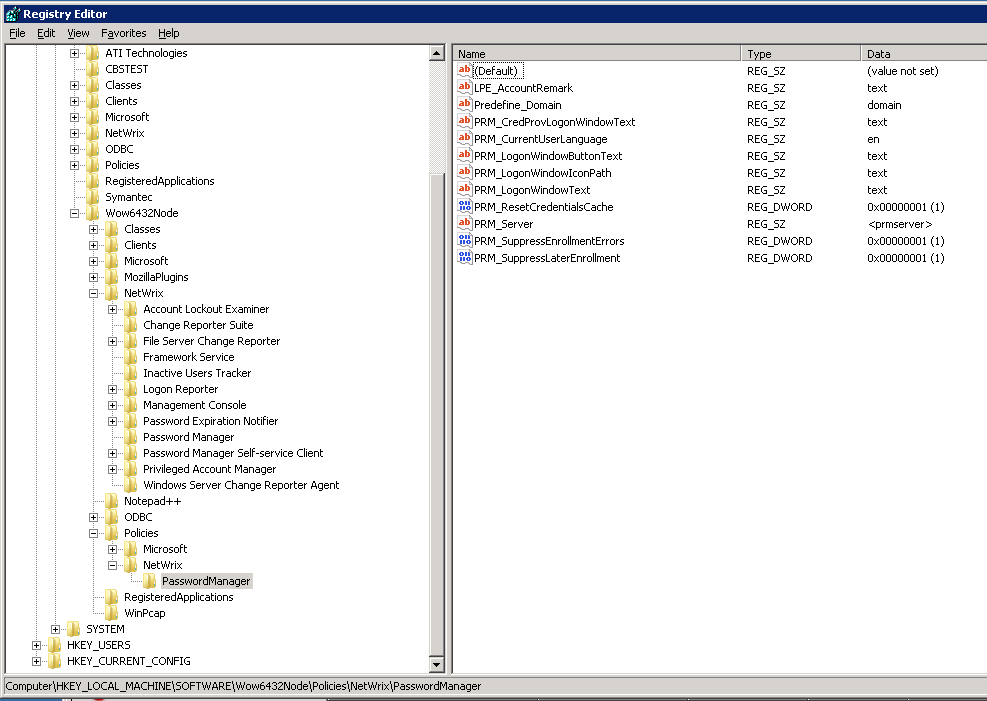
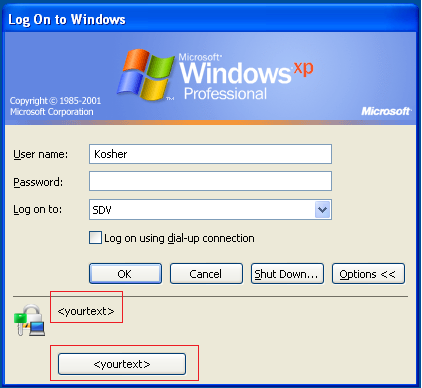
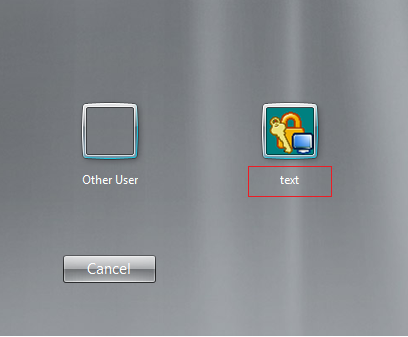
PRM_Server— URL to your Password Manager web sitePRM_LogonWindowText— replaces text of the LPE invite on WinXP/2003 logon screenPRM_LogonWindowButtonText— replaces text which is shown when you point to the button of the Logon Prompt Extension on the WinXP/2003 logon screenPRM_LogonWindowIconPath— contains path to an.icofile, with which the default icon of the Logon Prompt Extension will be replacedPRM_CredProvLogonWindowText— replaces text of the Logon Prompt Extension invite on WinVista/7/2008 logon screenPRM_CurrentUserLanguage— this value toggles the language of the Logon Prompt Extension and Enrollment wizard. Possible values are specified in the table below.PRM_CredentialDialogText— replaces the text in the credential prompt window of the Enrollment wizardPRM_CredentialDialogCaption— replaces the header in the credential prompt window of the Enrollment wizardLPE_AccountRemark— replaces the example text under the field used to enter the account namePredefine_Domain— this value sets a predefined domain name that will be used
DWORD values
DWORD values can be turned on (1) or off (0):
PRM_ResetCredentialsCache— allows the client to reset password in the local cache in disconnected mode.PRM_SuppressEnrollmentErrors— this option disables error messagesPRM_SuppressLaterEnrollment— this option makes the user unable to close the Enrollment wizard without completing the enroll procedure
Language values
Set PRM_CurrentUserLanguage to one of the following values:
| Value | Language |
|---|---|
| cn | Chinese |
| de | German |
| en | English |
| es | Spanish |
| fr | French |
| he | Hebrew |
| it | Italian |
| jp | Japanese |
| ko | Korean |
| pt | Portuguese |
| ru | Russian |
| sk | Slovak |
| zh | Traditional Chinese |