RecordSection
Record sections shape identity data for a given entity type, by grouping properties into sections, for example personal data, contract, or position.
Record sections impact the generation of identities' contexts which contain users' dimension values valid on a given period of time. The aim is to simplify the application of the role model' rules for provisioning.
Thanks to this data organization in sections, more than one context can model the identities of a given entity type over time, even simultaneously. This means that users can have more than one contract, or position, at a time, and that you can anticipate data changes.
See identity modeling for details.
Configuration recommendations:
Because you can't configure record sections without a context rule, NETWRIX recommends starting with the configuration of the context rule before configuring record sections.
NETWRIX recommends defining at least two record sections: a default section for the properties shared by all records, and another section for a given set of properties which differentiate between records. The default section must contain zero properties; the shared properties are those that the other sections don't define.
For example, to model several positions for a single user, configure the default record section to contain the properties shared by all positions such as personal data, and configure the position section to contain the properties specific to each position. Similar to the position section, you can also typically configure a section for contracts.
Examples
The following example models users from the Directory_User entity type with three sets of properties: user properties, contract properties and position properties. All created records are resources from the Directory_UserRecord entity type.
The properties from the contract (or position) section are the properties specific to each contract (or position). The properties from Directory_User that the record sections don't specify are the properties shared between all records, here user properties.
You must define each section with start and end dates, so that Identity Manager's engine can combine all periods of validity and apply the rules with the right input at any time.
Default section:
<RecordSection Identifier="Directory_UserRecord_Default" DisplayName_L1="User Properties" SourceEntityType="Directory_User" ResourceEntityType="Directory_UserRecord" StartProperty="StartDate" EndProperty="EndDate"> ...
</RecordSection>

Contract section:
<RecordSection Identifier="Directory_UserRecord_Contract" DisplayName_L1="Contract Properties" SourceEntityType="Directory_User" ResourceEntityType="Directory_UserRecord" StartProperty="ContractStartDate" EndProperty="ContractEndDate"> ...
  <Property Property="UserType"/>
  <Property Property="ExternalCompany"/>
  <Property Property="Subsidiary"/>
</RecordSection>

Position section:
<RecordSection Identifier="Directory_UserRecord_Position" DisplayName_L1="Position Properties" SourceEntityType="Directory_User" ResourceEntityType="Directory_UserRecord" StartProperty="PositionStartDate" EndProperty="PositionEndDate"> ...
  <Property Property="PositionIdentifier" />
  <Property Property="JobTitle" />
  <Property Property="OfficeNumber" />
  <Property Property="Organization" />
  <Property Property="Site"/>
  <Property Property="Title" />
  <Property Property="Office" />
  <Property Property="Manager" />
  <Property Property="IGAManager" />
  <Property Property="EffectiveIGAManager" />
  <Property Property="IsMainPosition" />
</RecordSection>
InstanceKeyExpression
The following example computes a unique key for each record section instance. This way, distinguish between contracts thanks to their identifiers, same for positions, and between user property sets thanks to a C# expression based on the start date.
Default section:
<RecordSection Identifier="Directory_UserRecord_Default" DisplayName_L1="User Properties" SourceEntityType="Directory_User" ResourceEntityType="Directory_UserRecord" StartProperty="StartDate" EndProperty="EndDate" InstanceKeyExpression="C#:record:return record.StartDate.HasValue ? record.StartDate.Value.ToString("yyyyMMdd") : string.Empty;">
</RecordSection>
Contract section:
<RecordSection Identifier="Directory_UserRecord_Contract" DisplayName_L1="Contract Properties" SourceEntityType="Directory_User" ResourceEntityType="Directory_UserRecord" StartProperty="ContractStartDate" EndProperty="ContractEndDate" InstanceKeyExpression="C#:record:return record.ContractIdentifier;">
<Property Property="UserType"/>
...
</RecordSection>
Position section:
<RecordSection Identifier="Directory_UserRecord_Position" DisplayName_L1="Position Properties" SourceEntityType="Directory_User" ResourceEntityType="Directory_UserRecord" StartProperty="PositionStartDate" EndProperty="PositionEndDate" InstanceKeyExpression="C#:record:return record.PositionIdentifier;">
<Property Property="PositionIdentifier" />
...
</RecordSection>
An instance key is required to uniquely identify a context, that is, when there are several simultaneous contexts.
For example, an instance key is required for the position section when users can have overlapping positions.
IsDefaultBoundariesSection
The following example uses the contract start/end dates as default boundaries in users' validity period, instead of those from the default section. It may be because, for example, HR services don't enter an end date for the personal data of users on permanent contracts. In this case, use the start and end dates of their contracts instead.
Contract section:
<RecordSection Identifier="Directory_UserRecord_Contract" DisplayName_L1="Contract Properties" SourceEntityType="Directory_User" ResourceEntityType="Directory_UserRecord" StartProperty="ContractStartDate" EndProperty="ContractEndDate" IsDefaultBoundariesSection="true">
  <Property Property="UserType"/>
  ...
</RecordSection>
Context extension
Time gaps may exist where no context is defined, for example with a position but no contract, or vice versa. Identity Manager lets you choose whether to extend an existing context to periods without context. When using another context and extending its values, which context should you use?
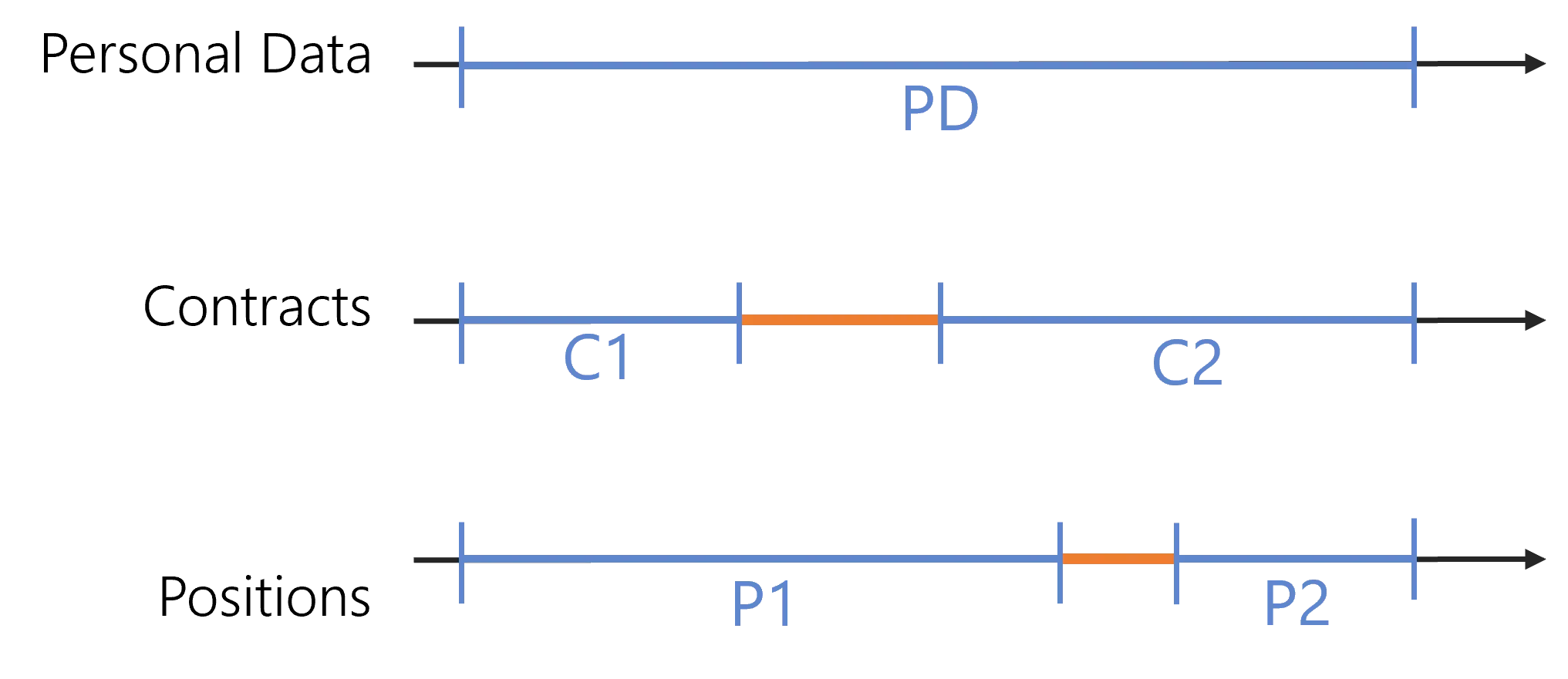
This example extends an existing contract to the gap, for example because Identity Manager builds users' email addresses using the contract type to add -ext for external users. Identity Manager doesn't extend the position.
In the following example, the contract section uses SortKeyExpression to establish between existing contracts a priority order that determines which contract to extend to the gap. Based on this C# expression that returns a value A, B or C, the ExtendedSortKey considers as extendable only the contracts whose expression returns C.
The position section uses ExtensionKind set to None to block the extension mechanism.
Contract section:
<RecordSection Identifier="Directory_UserRecord_Contract" DisplayName_L1="Contract Properties" SourceEntityType="Directory_User" ResourceEntityType="Directory_UserRecord" StartProperty="ContractStartDate" EndProperty="ContractEndDate" SortKeyExpression="C#:record:return record.Main.GetValueOrDefault() && record.UserType.Id == -018 ? "C" : (!record.Main.GetValueOrDefault() && record.UserType.Id == -018 ? "B" : "A");" ExtendedSortKey="C">
<Property Property="UserType"/>
...
</RecordSection>
Position section:
<RecordSection Identifier="Directory_UserRecord_Position" DisplayName_L1="Position Properties" SourceEntityType="Directory_User" ResourceEntityType="Directory_UserRecord" StartProperty="PositionStartDate" EndProperty="PositionEndDate" ExtensionKind="None">
<Property Property="PositionIdentifier" />
...
</RecordSection>
When you don't specify a sort key or an extended sort key, Identity Manager selects a context to extend to the gap. However, it may not be functionally the most meaningful context.
Properties
| Property | Details |
|---|---|
| BoundaryKind default value: 0 | Type: RecordBoundaryKind Description: Defines how Identity Manager computes the section dates for a resource, when the current start/end dates are null. 0 - None: start date and end date are equal respectively to the minimum value of StartProperty and maximum value of EndProperty when comparing the default sections of all records. 1 - Kept: start and end dates are equal respectively to the default start date (1900/01/01 00:00:00) and end date (2079/06/06 00:00:00). Info: the boundary has no effect on the default section which is the reference to compute the default dates in other sections. When the default section's start/end dates are null, then they equal the default start/end dates. |
| DisplayName_L1 required | Type: String Description: Display name of the section in language 1 (up to 16). |
| EndProperty optional | Type: Int64 Description: Date property among those from the ResourceEntityType which specifies the end of validity for all properties of the section. It can't be a property computed by an EntityPropertyExpression. |
| ExtendedSortKey optional | Type: String Description: Value used as a threshold for SortKeyExpression values to determine whether the property values of a given record section can be extended from a context where the values are defined to another context where no properties from the section are defined. This extension is enabled only when the value of SortKeyExpression of the section is higher (with an ordinal comparison) than ExtendedSortKey. |
| ExtensionKind default value: 0 | Type: RecordExtensionKind Description: Defines whether the section's property values can be extended (copied) from a context where the properties are defined to another context where no properties from the section are defined. 0 - Default: the section's property values can be extended. 4 - None: the section's property values can't be extended. |
| Identifier required | Type: String Description: Unique identifier of the section. |
| InstanceKeyExpression optional | Type: String Description: Expression returning a key to uniquely identify a context, i.e. distinguish between job positions for example when users can have several concurrent positions, or between contracts. See C# expressions for details. |
| IsDefaultBoundariesSection default value: false | Type: Boolean Description: true to use the start/end dates of this section as the default boundaries, i.e. the start/end dates of users' validity period. When no section has IsDefaultBoundaries set to true, the default section (the one without properties) is automatically selected. |
| ResourceEntityType required | Type: Int64 Description: Identifier of the entity type of the multiple records to be created. |
| SortKeyExpression optional | Type: String Description: C# expression used to compute a value for each record, to be used as a priority, following an ordinal comparison. See C# expressions for details. When a record section has ExtensionKind set to Default and a priority value higher than ExtendedSortKey, then the record property values can be extended from a context where the values are defined to another context where no properties from the section are defined. |
| SourceEntityType required | Type: Int64 Description: Identifier of the entity type of the parent resource. |
| StartProperty optional | Type: Int64 Description: Date property among those from the ResourceEntityType which specifies the beginning of validity for all properties of the section. It can't be a property computed by an EntityPropertyExpression. |
Child Element: Property
A record section is a set of record properties which belong to the resource entity type.
Examples
In the following example, the position section gathers the properties Organization, Location and Title, while the default section gathers all the other properties from Directory_UserRecord.
The property Location can be extended from a context where the location is defined to a context where it isn't. The two other properties can't be extended.
Default section:
<RecordSection Identifier="Directory_UserRecord_Default" DisplayName_L1="Contract Properties" SourceEntityType="Directory_User" ResourceEntityType="Directory_UserRecord" StartProperty="ContractStartDate" EndProperty="ContractEndDate">
</RecordSection>

Position section:
<RecordSection Identifier="Directory_UserRecord_Position" DisplayName_L1="Position Properties" SourceEntityType="Directory_User" ResourceEntityType="Directory_UserRecord" StartProperty="StartDate" EndProperty="EndDate">
    <Property Property="Organization" ExtensionKind="None" />
    <Property Property="Location"/>
    <Property Property="Title" ExtensionKind="None" />
</RecordSection>
Properties
| Property | Details |
|---|---|
| ExtensionKind default value: 0 | Type: RecordExtensionKind Description: Defines whether the property value can be extended (copied) from a context where the section properties are defined to another context where no properties from the section are defined. 0 - Default: the property value can be extended. 4 - None: the property value can't be extended. Note: a property value can be extended only if the section is extendable too. |
| IsExcluded default value: false | Type: Boolean Description: Excludes the given property from the section. This is used only in the default section to remove properties such as the RecordIdentifier that are always different between all the records and that are thus not interesting for the provisioning rules. |
| Property required | Type: Int64 Description: Identifier of the property from the record section's ResourceEntityType that is included in the section. |