UniverseDataModel
This scaffolding creates, within a universe, entity instances and association instances based on a predefined template.
The scaffolding generates entity instances with the following characteristics:
- as a display name, the display name of the corresponding navigation property, for example
Main Record; - as an identifier, the identifier of the corresponding navigation consisting of
<EntityType_Id>_<Property_Id>, for exampleDirectory_User_MainRecord.
Properties
| Property | Details |
|---|---|
| EntityType required | Type: String Description: Identifier of the entity type to represent in the universe (as an entity instance) with all its navigations. |
| Universe required | Type: String Description: Identifier of the universe in which the instances to be generated are going to exist. |
Child Elements
- ExcludedProperty (optional) to ignore a given property of the specified entity type.
- RootInstance (optional) to rename the core entity instance that is to be generated, and to avoid data duplication when using several scaffoldings in one universe.
- SourceEntityType (optional) Define the source EntityType
- UniverseTemplate (optional) to use a template different from the default one.
ExcludedProperty
| Property | Details |
|---|---|
| Property required | Type: String Description: Property of the specified entity type that is to be ignored for the generation of entity instances and association instances. |
A scaffolding doesn't use filters, but you can exclude parts of the entity model with the ExcludedProperty argument.
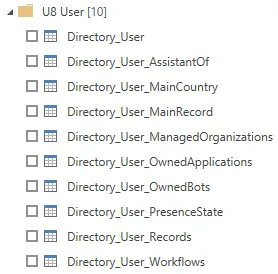
The following example generates a universe U8_Users based on the entity type Directory_User, similar to U1 but without the Guests property:
<Universe Identifier="U8_Users" DisplayName_L1="U8 - Users" ColumnNamesMode="Identifier" />
<UniverseDataModel Universe="U8_Users" EntityType="Directory_User" >
    <ExcludedProperty Property="Guests"/>
</UniverseDataModel>
When getting Identity Manager data in Power BI, the result shows:
RootInstance
| Property | Details |
|---|---|
| Instance required | Type: String Description: Identifier of the entity instance generated based on the EntityType property of the universe scaffolding. If not specified, the identifier of the entity instance is the identifier of the entity type. |
The following example generates a universe U2_UserRecords based on the entity type Directory_UserRecord, naming the entity instance REC:
<Universe Identifier="U2_UserRecords" DisplayName_L1="U2 - User Records" ColumnNamesMode="Identifier" />
<UniverseDataModel Universe="U2_UserRecords" EntityType="Directory_UserRecord" >
    <RootInstance Instance="REC" />
</UniverseDataModel>

When getting Identity Manager data in Power BI, the result looks like this:
RootInstance for several scaffoldings together
A universe can be made of several scaffoldings which need to be grouped together a specific way. One universe made of two scaffoldings will generate the two entity instances corresponding to the two specified entity types, with the entity and association instances corresponding to their navigation properties. To avoid data duplication in the universe model, use RootInstance to rename one of the entity instances and follow the existing naming rule explained in the introduction.
<Universe Identifier="U3_UserRecords" DisplayName_L1="U3 - User Records" ColumnNamesMode="Identifier" />
<UniverseDataModel Universe="U3_UserRecords" EntityType="Directory_User" />
<UniverseDataModel Universe="U3_UserRecords" EntityType="Directory_UserRecord" />
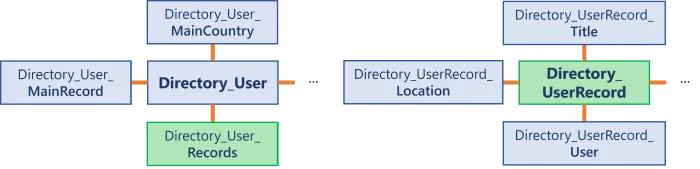
When getting Identity Manager data in Power BI, the result shows:
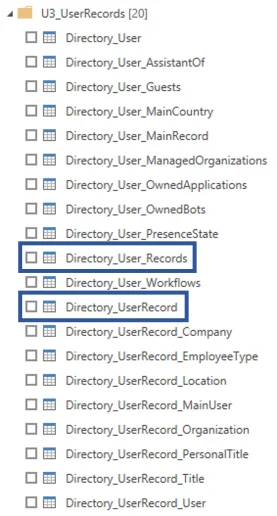 The output shows that
 Directory_User_Records and Directory_UserRecords represent the same entity instances.
The following example generates a better version of the universe U3_UserRecords based on the entity types Directory_User and Directory_UserRecord, renaming Directory_UserRecord as Directory_User_Records to follow the naming rule, and building the universe model with Directory_User as the core entity instance:
<Universe Identifier="U3_UserRecords" DisplayName_L1="U3 - User Records" ColumnNamesMode="Identifier" />
<UniverseDataModel Universe="U3_UserRecords" EntityType="Directory_User" />
<UniverseDataModel Universe="U3_UserRecords" EntityType="Directory_UserRecord" >
<b><RootInstance Instance="Directory_User_Records" /></b>
</UniverseDataModel>
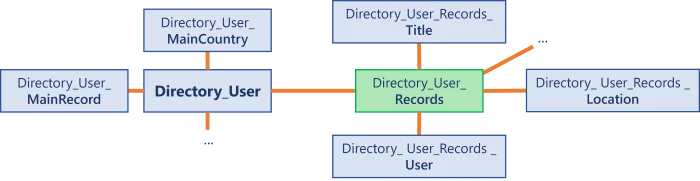
When getting Identity Manager data in Power BI, the result shows:
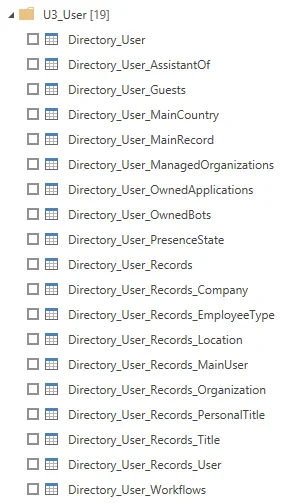 This approach removes the duplicated data, and the navigations of the model are easy to understand.
SourceEntityType
| Property | Details |
|---|---|
| Identifier optional | Type: String Description: The identifier's SourceEntityType |
UniverseTemplate
| Property | Details |
|---|---|
| Template required | Type: String Description: Represents the argument value. |
Default Template
When no template is specified, the scaffolding generates:
- an entity instance based on a given entity type;
- an association instance and an entity instance for each navigation property of the entity type.
The following example generates a universe U1_Users based on the entity type Directory_User:
<Universe Identifier="U1_Users" DisplayName_L1="U1 - Users" ColumnNamesMode="Identifier" />
<UniverseDataModel Universe="U1_Users" EntityType="Directory_User" />
It generates:
<Universe Identifier="U1_Users" DisplayName_L1="U1 - Users" ColumnNamesMode="Identifier" >

  One entity instance for the entity type Directory_User:
  <EntityInstance Identifier="Directory_User" DisplayName_L1="User" EntityType="Directory_User" />

  One association instance and one entity instance per navigation property:
  <AssociationInstance Association="Directory_User_MainCountry" Instance1="Directory_User" Instance2="Directory_User_MainCountry" Direction="From1To2" />
  <EntityInstance Identifier="Directory_User_MainCountry" DisplayName_L1="Main Country" EntityType="Directory_Country" />
  ...

</Universe>

When getting Identity Manager data in Power BI, the result shows:
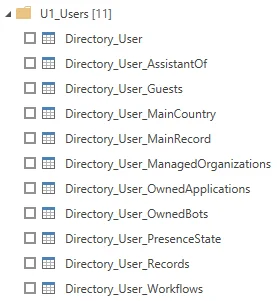
The output displays identifiers instead of display names due to ColumnNamesMode set to identifiers.
OwnedResourceTypes
The following example generates a universe U4_User based on the entity type Directory_User, displaying the resources assigned to users:
<Universe Identifier="U4_User" DisplayName_L1="U4 - User" ColumnNamesMode="Identifier"/>
<UniverseDataModel Universe="U4_User" EntityType="Directory_User">
<b><UniverseTemplate Template="OwnedResourceTypes"/></b>
</UniverseDataModel>
It generates:
<Universe Identifier="U4_User" DisplayName_L1="U4 - User" ColumnNamesMode="Identifier">
<em>One entity instance for the entity type Directory_User.</em>
<EntityInstance Identifier="Directory_User" DisplayName_L1="User" EntityType="Directory_User" />
<em>Association instances and entity instances about the AD_Entry_NominativeUser resource type:</em>
<EntityInstance Identifier="Directory_User_OwnedAssignedResourceTypes_AD_Entry_NominativeUser" DisplayName_L1="Assigned AD User (nominative)" EntityType="AssignedResourceType" FilterProperty="RoleId" FilterResourceType="AD_Entry_NominativeUser" />
<EntityInstance Identifier="Directory_User_OwnedAssignedResourceTypes_AD_Entry_NominativeUser_Resource" DisplayName_L1="AD User (nominative)" EntityType="AD_Entry" />
<AssociationInstance Association="AssignedResourceType.Resource" Direction="From1To2" Instance1="Directory_User_OwnedAssignedResourceTypes_AD_Entry_NominativeUser" Instance2="Directory_User_OwnedAssignedResourceTypes_AD_Entry_NominativeUser_Resource" />
<AssociationInstance Association="AssignedResourceType.Owner" Direction="From2To1" Instance1="Directory_User_OwnedAssignedResourceTypes_AD_Entry_NominativeUser" Instance2="Directory_User" />
<em>Same for all resource types.</em>
...
</Universe>
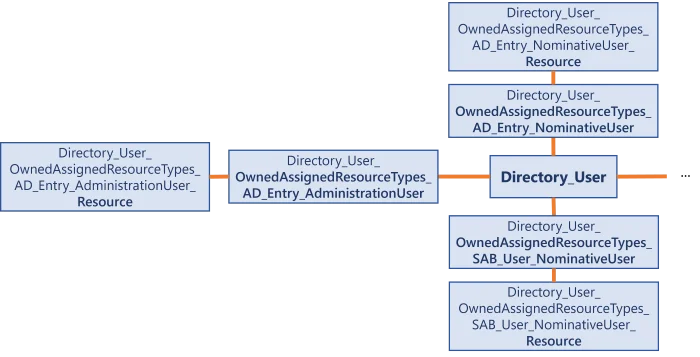
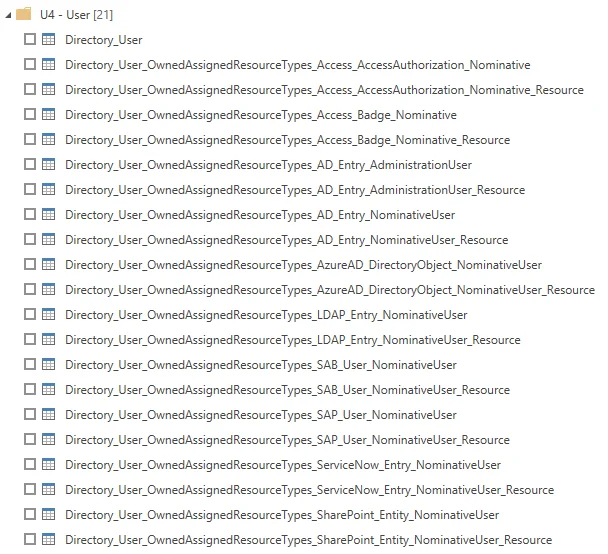
When getting Identity Manager data in Power BI, the result looks like this:
ResourceResourceTypes
The following example shows how to build a resource universe for resource types.
The following example generates a universe U5_AD based on the entity type AD_Entry, showing the owners of AD resources:
<Universe Identifier="U5_AD" DisplayName_L1="U5 AD" ColumnNamesMode="Identifier"/>
<UniverseDataModel Universe="U5_AD" EntityType="AD_Entry">
<b><UniverseTemplate Template="ResourceResourceTypes"/></b>
</UniverseDataModel>
The configuration generated by this snippet is similar to the one for OwnedResourceTypes.
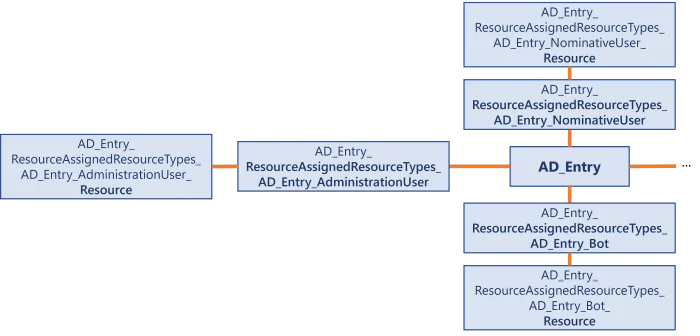
When getting Identity Manager data in Power BI, the result shows:
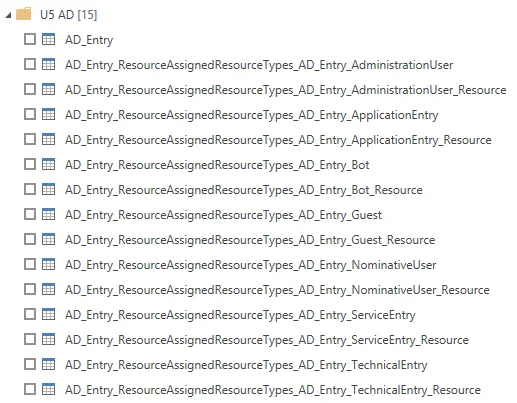
OwnedSingleRoles
The following example generates a universe U6_User based on the entity type Directory_User, showing the single roles assigned to users:
<Universe Identifier="U6_User" DisplayName_L1="U6 - User" ColumnNamesMode="Identifier"/>
<UniverseDataModel Universe="U6_User" EntityType="Directory_User">
<b><UniverseTemplate Template="OwnedSingleRoles"/></b>
</UniverseDataModel>
It generates:
<Universe Identifier="U6_User" DisplayName_L1="U6 - User" ColumnNamesMode="Identifier">
<em>One entity instance for the entity type Directory_User.</em>
<EntityInstance Identifier="Directory_User" DisplayName_L1="User" EntityType="Directory_User" />
<em>One entity instance containing data about role assignments, and one association instance linking it to Directory_User:</em>
<EntityInstance Identifier="Directory_User_OwnedAssignedSingleRoles" DisplayName_L1="Assigned Composite Roles" EntityType="AssignedSingleRole" />
<AssociationInstance Association="AssignedSingleRole.Owner" Direction="From1To2" Instance1="Directory_User" Instance2="Directory_User_OwnedAssignedSingleRoles" />
<em>One entity instance containing the single roles, and one association instance linking it to the role assignment data:</em>
<EntityInstance Identifier="Directory_User_OwnedAssignedSingleRoles_Role" DisplayName_L1="Composite Role" EntityType="SingleRole" />
<AssociationInstance Association="AssignedSingleRole.Role" Direction="From1To2" Instance1="Directory_User_OwnedAssignedSingleRoles" Instance2="Directory_User_OwnedAssignedSingleRoles_Role" />
</Universe>

When getting Identity Manager data in Power BI, the result shows:

OwnedCompositeRoles
The following example generates a universe U7_User based on the entity type Directory_User and the composite roles assigned to users:
<Universe Identifier="U7_User" DisplayName_L1="U7 - User" ColumnNamesMode="Identifier"/>
<UniverseDataModel Universe="U7_User" EntityType="Directory_User">
<b><UniverseTemplate Template="OwnedCompositeRoles"/></b>
</UniverseDataModel>
The configuration generated by this snippet is similar to the one for OwnedSingleRoles.

When getting Identity Manager data in Power BI, the result shows:

Mixed Example
Scaffoldings can be adjusted with universe configuration.
The following example generates a universe U9_AccessControl aiming to create reports displaying users and their profiles. In this scenario, profiles are assigned to AD accounts based on a given context. The universe is based on the entity types AD_Entry, AssignedProfile, and ProfileContext. The context has 10 dimensions, but only dimensions 0 and 1 are used, so the others are excluded. Resource types and single roles that aren't needed for this scenario are also excluded.
<Universe Identifier="U9_AccessControl" DisplayName_L1="U9_AccessControl" ColumnNamesMode="Identifier">
    <EntityInstance EntityType="AD_Entry" Identifier="AssignedProfile_User"/>
</Universe>

<UniverseDataModel Universe="U9_AccessControl" EntityType="AssignedProfile"/>

<UniverseDataModel Universe="U9_AccessControl" EntityType="ProfileContext">
    <RootInstance Instance="AssignedProfile_Context"/>
    <ExcludedProperty Property="AssignedProfiles"/>
    <ExcludedProperty Property="Category"/>
    <ExcludedProperty Property="CompositeRole"/>
    <ExcludedProperty Property="Dimension2"/>
    <ExcludedProperty Property="Dimension3"/>
    <ExcludedProperty Property="Dimension4"/>
    <ExcludedProperty Property="Dimension5"/>
    <ExcludedProperty Property="Dimension6"/>
    <ExcludedProperty Property="Dimension7"/>
    <ExcludedProperty Property="Dimension8"/>
    <ExcludedProperty Property="Dimension9"/>
    <ExcludedProperty Property="Dimension10"/>
    <ExcludedProperty Property="ResourceType"/>
    <ExcludedProperty Property="SingleRole"/>
</UniverseDataModel>
When getting Identity Manager data in Power BI, the result looks like this:
