System
This configuration tab contains the settings related to system health, operation, and logging. Each option has an associated information popup (the “i” symbol next to the option name) which describes what the setting does and how it works.
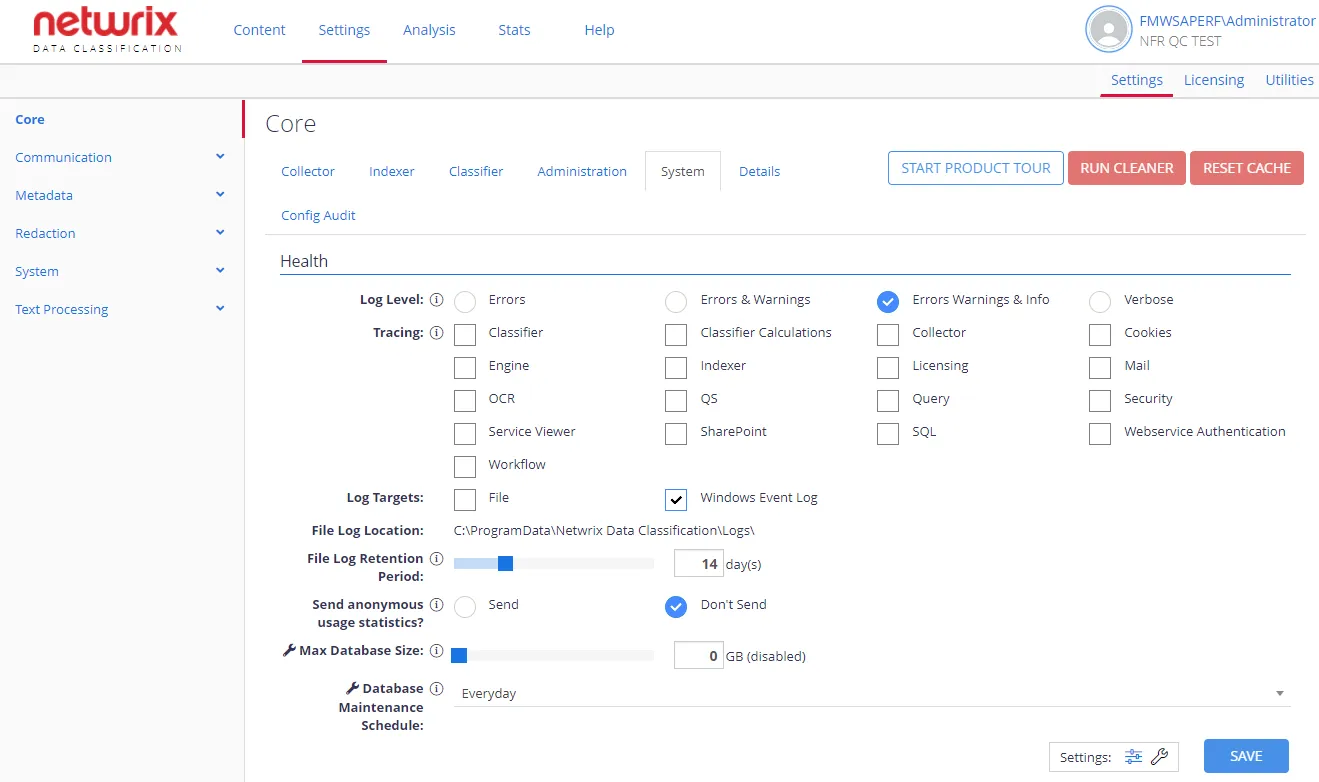
Health
| Option | Description | Comment |
|---|---|---|
| General settings | ||
| Log Level | Defines the logging level to persist to the log targets. Supported levels:
| |
| Tracing | Controls which components of the system persist logs to the log targets. | Applies to selected components (none by default) |
| Log Targets | Select where to write the log: to a CSV file, to Windows Event Log, or both. | |
| File Log Location | Shows the default file log location. You can't modify this value. | The default location is C:\ProgramData\Netwrix Data Classification\Logs |
| File Log Retention Period | Number of days to keep a file log after its last write before deleting it. | To keep all logs (without automatic deletion), specify 0 . |
| Send anonymous usage statistics? | Disabled by default. When you enable this option, the program sends a small amount of information about how you use the product — to improve the product and future offerings. | Netwrix doesn't send personal information or company data. |
| Advanced settings | ||
| Max Database Size | Specifies the max size (in GB) that the SQL database grows to. | When the database reaches this value, the system suspends the Collector and Indexer components. Default is 0 (no limit). |
| Database Maintenance Schedule | Specify the schedule for running database maintenance (including the rebuilding of database indexes) | Default is Everyday. |
Configuration Export
You may need to export the current configuration to send to the support team for debugging. Go to System Configuration > Config > Settings > Core > System and in the Configuration Export section click Export button.