Add Single Database
Use the Database source configuration screen to configure the crawling and classification of content stored in your Microsoft SQL Server, MySQL, PostgreSQL, and Oracle databases.
Configure and crawl content either with the configured service accounts (IIS Application Pool User, Windows Services) or with specific connection details.
When crawling the data, the product doesn't support Unicode table names or Unicode primary keys. It supports primary keys only with the Latin alphabet.
After connecting, you can create an intelligent content mapping, crawling certain fields as unstructured index text, and other fields as mapped metadata. See the Database Configuration Wizard section for instructions on configuring field mappings.
If you want to make other configuration changes before collection of the source occurs, select the Pause source on creation checkbox.
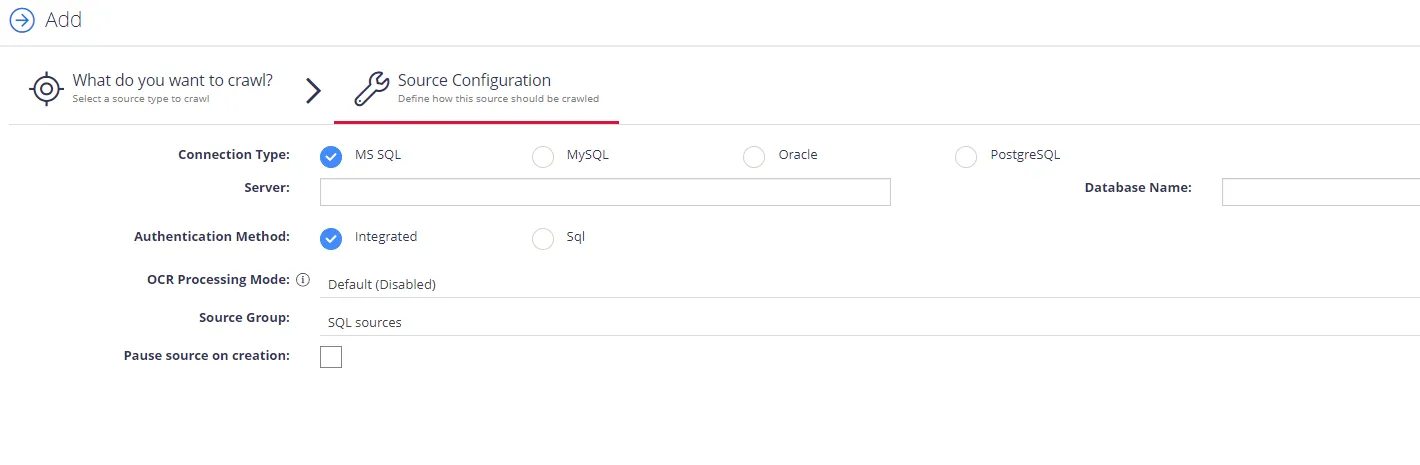
Complete the following fields:
| Option | Description |
|---|---|
| Connection Type | Select your connection type: MS SQL, MySQL, PostgreSQL, or Oracle. |
| Server | Specify the server name of the database system you want to crawl (use "." to indicate the local server). |
| Database Name | Specify the name of the database you want to crawl. You can configure multiple databases from the same server. |
| Authentication Method | Select authentication method: Integrated or SQL.
|
| OCR Processing Mode | Select processing mode for images in the documents:
|
| Source Group | If you want to add the database source to a source group, select an existing source group or create a new one. |
| Pause source on creation | Pauses the source upon creation to allow for further configuration before collection begins. |
After you complete the source configuration, the program prompts you to launch the SQL crawling configuration wizard. See Database Configuration Wizard for instructions on mapping fields and configuring crawling.