Features and Benefits
Netwrix Data Classification is a platform that identifies data that’s important for your organization, helping you reduce risk and realize the full value of this data.
Using unique compound term processing technology, it enriches your enterprise content with accurate and consistent metadata, empowering you to work with data more confidently. By seeing which data is valuable, you can organize it in a way that promotes productivity and collaboration. By knowing where sensitive or regulated data is, you can reduce the risk of breaches and satisfy security and privacy requirements with less effort and expense. And by locating and removing redundant and obsolete data, you can reduce storage and management costs.
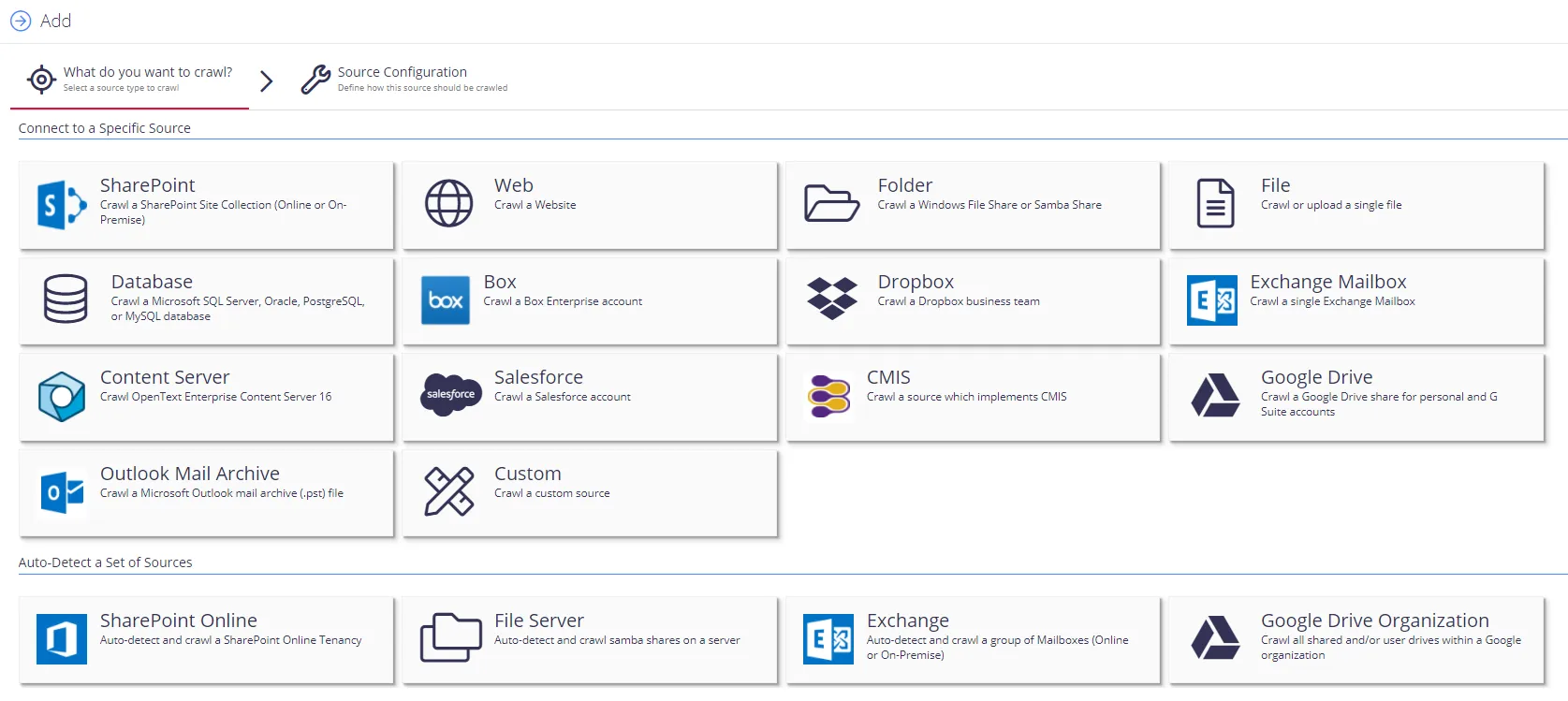
Netwrix Data Classification includes applications for Windows File Servers, Nutanix Files, Dell EMC, NetApp, SharePoint, Office 365, Exchange, SQL Server, Oracle Database, Box, Dropbox, Google Drive, and MySQL. The platform provides a single panoramic view of your enterprise content, whether it’s located in structured or unstructured data stores, on premises or in the cloud.
Major benefits:
- Identify sensitive information and reduce its exposure
- Improve employee productivity and decision making
- Reduce costs and risks by removing unneeded data
- Meet privacy and compliance requirements for information governance
- Respond to legal requests without disrupting your business
How It Works
Netwrix Data Classification identifies and classifies sensitive and business-critical content across your organization, mitigating the risk of data breaches. The program also helps you meet compliance requirements with less effort and expense.
The following figure shows the app architecture and components.
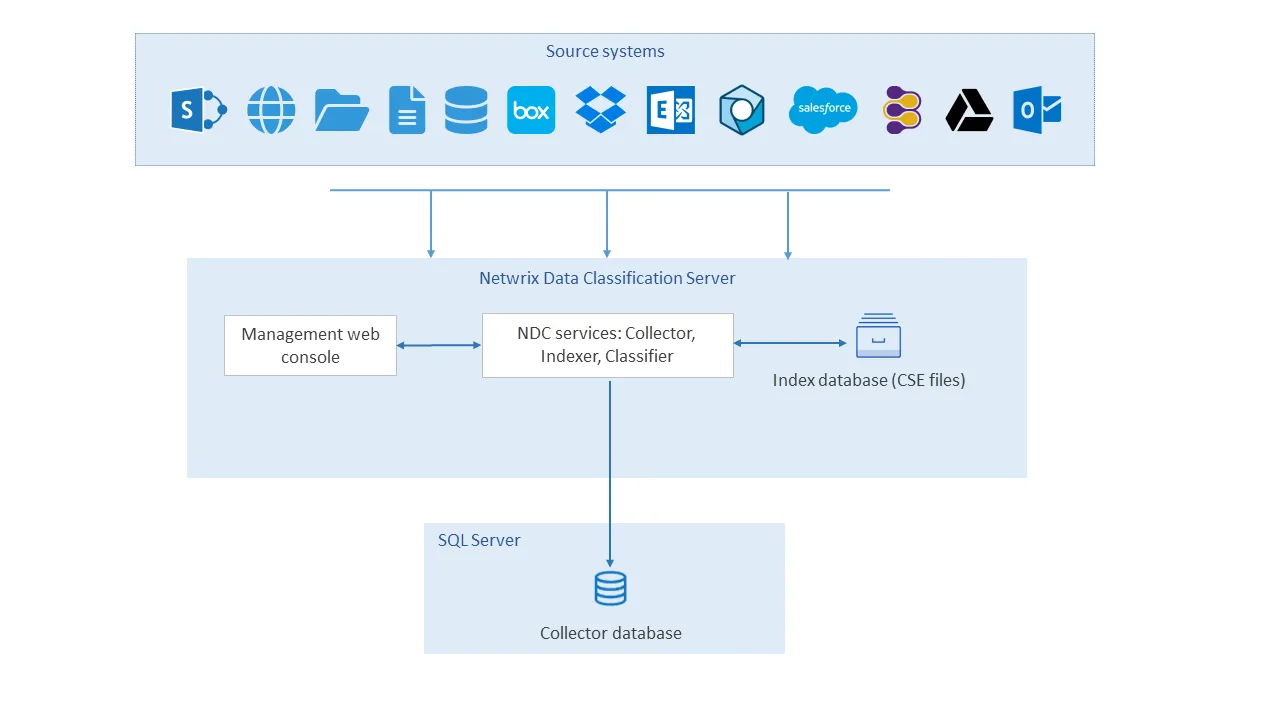
- The user adds data sources using the NDC Management web console (Netwrix Data Classification program).
- Netwrix Data Classification saves the configured data sources to the NDC SQL database.
- The NDC Collector service crawls the data files in each data source, converting documents into plain text and populating file metadata in the NDC SQL database.
- The NDC Indexer service builds and maintains a full-text search index (NDC Index) based on the content and metadata of the collected files.
- The NDC Classifier service performs data classification by matching collected files against pre-built taxonomies (the Netwrix compliance taxonomies) and customer-created taxonomies.
- If you enable Classification Writing, the Classifier writes the assigned classification labels to the custom metadata columns for supported document types.
- If you define and enable Workflows, the Classifier runs them on documents that meet the workflow conditions.
QueryServer
All interaction between the application and Netwrix Data Classification is via the QueryServer and consists of high-level XML transactions over a Web Services interface.
The QueryServer primarily satisfies retrieval requests from the proprietary probabilistic index (also known as the NDC Index Database). However, the QueryServer also handles all indexing requests and stores these in the SQL Database for processing by the conceptCollector and Indexer.
NDC Collector
The NDC Collector imports new documents into the system.
In addition to collecting documents the NDC Collector also performs the following:
- conversion of documents to text format
- automatic language detection
The NDC Collector manages the queue of documents awaiting indexing and outputs its results via the SQL database.
The NDC Collector runs as a Microsoft Windows Service.
Indexer
The Indexer takes each new document the NDC Collector collected and indexes terms from the extracted text within the NDC Index.
The index supports concurrent reads during the indexing process. However, significant indexing activity can lead to a corresponding drop in index performance. In this case, run the Indexer during quiet periods (e.g. overnight) or perform indexing separately with a batch process updating the live index periodically.
If you want the Indexer to update the live index as a background task, run it on the same server where you store the NDC Index Database.
The Indexer runs as a Microsoft Windows Service.
For file system and SharePoint/OneDrive sources, event handlers/file watchers dynamically schedule documents for crawling on creation or modification. You only need to set up reindexing for those sources to catch documents that the event handlers miss.
For File Share scans, the source watchers will queue up new and updated documents for crawling automatically. This function even operates when a source is paused. If you want to stop adding any content from specific file shares, add the path for those files shares to the Source Watcher Exclusions.
NDC SQL Database
The NDC SQL Database manages the queue of documents being indexed. The application can also use it to store any application-specific information independently from Netwrix Data Classification.
The QueryServer also retrieves selected information for the current hitlist, such as the document title and body text, from the SQL Database. However, the QueryServer always requests this information using a primary key, which makes it very efficient. The QueryServer always constructs and ranks the hitlist using information contained in the proprietary conceptDatabase.
The current release of Netwrix Data Classification supports SQL Server 2008 R2 or later and PostgreSQL 16 or later.
NDC Index
The NDC Index contains a probabilistic index for all documents the system has indexed. The index files use the extension “.cse”, but the system uses temporary files (extension “.tmp”) when merging changes into the index.
Store the NDC Index files on the same server as the Netwrix Data Classification server because the query and indexing processes can be highly disk-intensive.
Netwrix Data Classification doesn't supply "text.cse" — it creates the file automatically when the Collector collects the first documents.
Classifier
The Classifier classifies collected documents against NDC taxonomies. It can use the built-in taxonomies and any custom taxonomies you create, and you can link it to SharePoint termsets to classify against them as well. It also runs user-configured workflows against any documents that meet the conditions of the workflow, and it performs Data Subject Access Requests.
The Classifier runs as a Microsoft Windows Service.