Configuration Backup
Only available for ‘Superusers’
The Backup utility allows for the migration of complex Netwrix Data Classification instance configurations.
Use this feature to safely design and test a Netwrix Data Classification configuration in a development environment, then copy the configuration, or specific parts of it, to a different environment (for example, production).
The tool supports text replacement to allow user defined URL's to be replaced by the equivalent destination URL. The following configuration options are available for import / export:
-
Source Registrations
-
SharePoint Termset Registrations
-
Workflow Configurations
-
Core Configuration Options:
- Files Excluded
- Files Included
- Mapped Metadata Fields
- Mapped Metadata Values
- Supported Languages
- Pages Excluded
- Pages Included
- SharePoint Excluded
- Text Patterns
To create configuration backup:
Step 1 – Go to Settings > Config > Utilities.
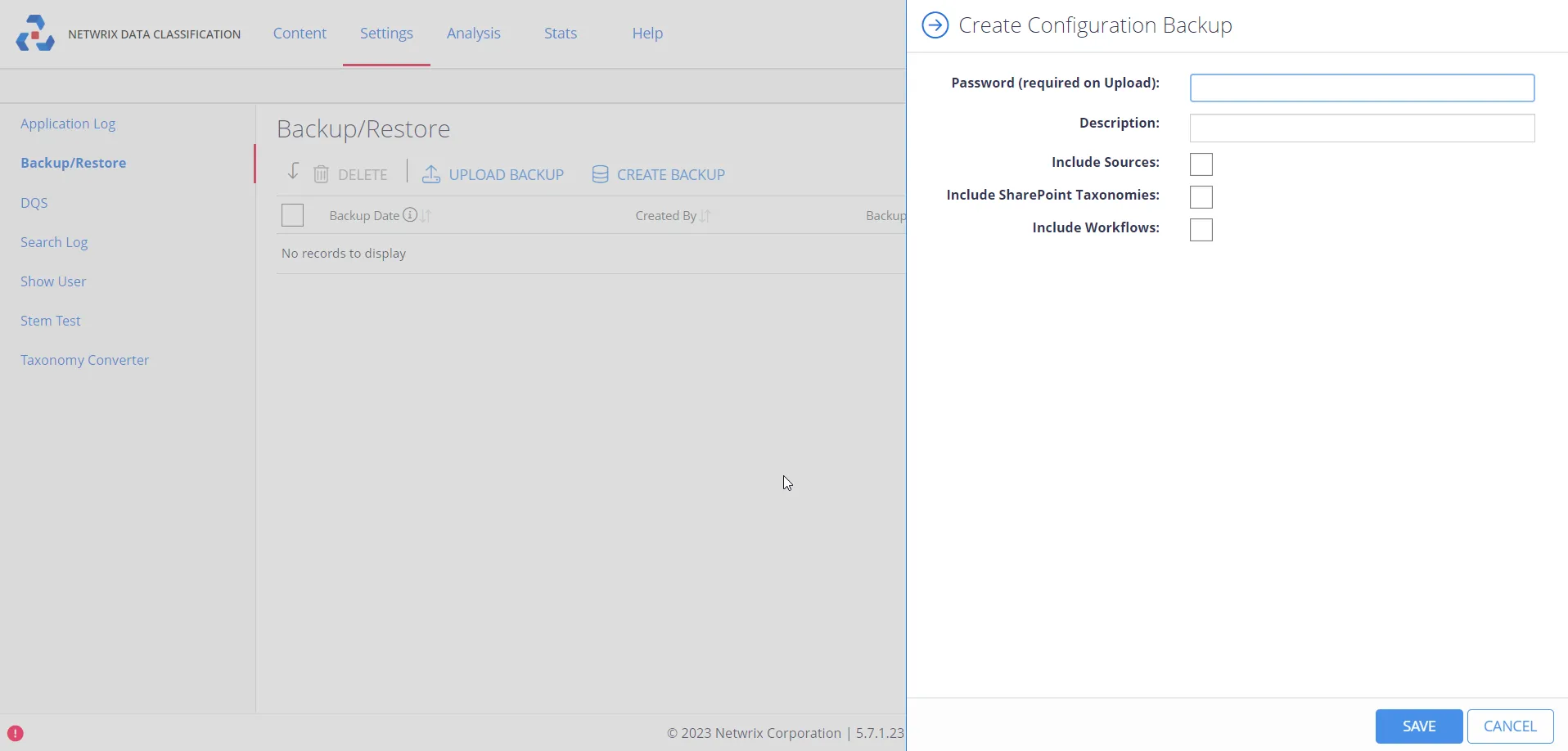
Step 2 – From the navigation menu on the left, click Backup/Restore.
Step 3 – Click Create Backup and select the elements that you want to include (sources, SharePoint taxonomies, or workflows).
The backup password will be required if you export a backup to XML and re-import to a different environment. This option is required on Upload Backup step.
Step 4 – Click Save.
Upon import, the system skips any items that already exist.