System Configuration Settings
This section contains information on additional configuration settings specific to different source types.
AD Domains Excluded
Use the AD Domains Excluded list to prevent Active Directory expansion for certain domain names. This is useful in multi-domain forests, where the Netwrix Data Classification server doesn't have access to all domains within the forest.

Attachments Excluded
When indexing files that potentially contain attachments (SharePoint List Items), use the Attachments Excluded list to define which file locations to ignore. View and modify these definitions in the Attachments Excluded form:

The system ignores any file with a path matching one of these patterns. Use wildcards anywhere in the pattern definition:
- The asterisk character (*) matching any sequence of characters
- The question mark character (?) matching any single character
No Index
To remove selected documents from all search results, specify No Index entries.
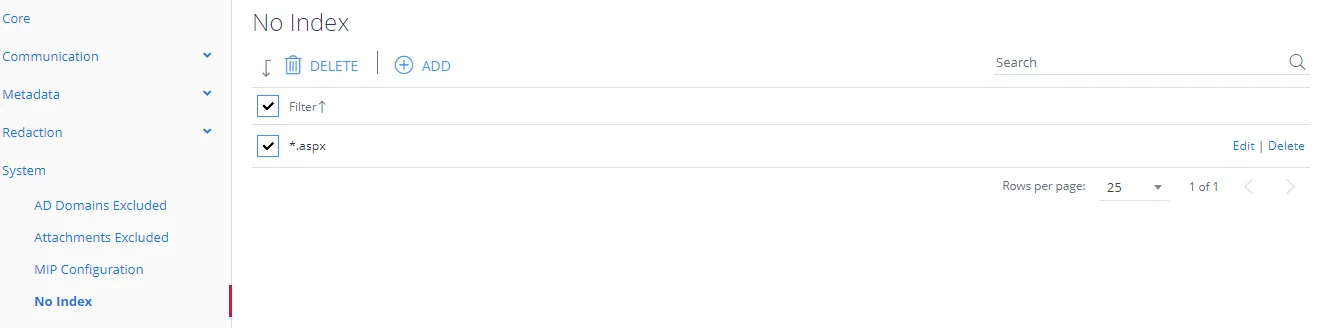
Enter any number of URLs or filenames, and the system will never display them in search results. Use wildcards anywhere in the pattern definition:
- The asterisk character (*) matching any sequence of characters
- The Question mark character (?) matching any single character
Proxy Server
Use the Proxy Server form to define a proxy server for crawling websites. The proxy server isn't used for SharePoint crawling.

Set Bypass Local to Yes to bypass the proxy server for local addresses (such as localhost).
Define any other exclusions in the Exceptions list — URLs that shouldn't go through the proxy server.
Suspend Services (Scheduler)
All Netwrix Data Classification services run as Windows services. They are responsible for building the search index and classifying documents against the registered taxonomies.
Suspending services prevents them from impacting query performance during peak hours. You can suspend services for lower-priority sources while allowing them to continue processing higher-priority sources.
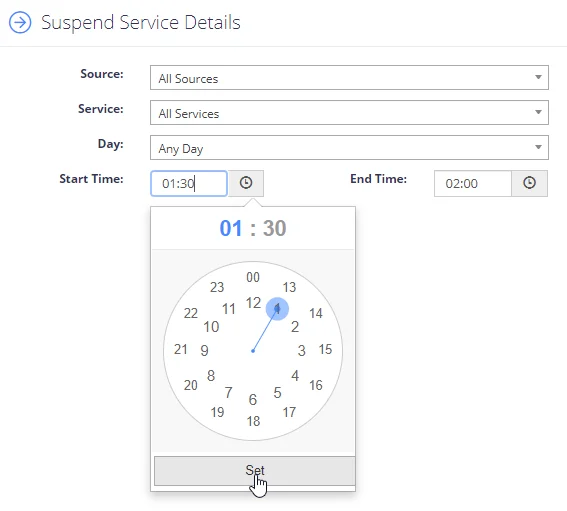
Configure service suspensions by specifying:
- Source—Which source types the suspension is in place for: all source types, specific source types (SharePoint, Web etc) or specifically against Re-Indexing operations.
- Service—Which services are affected by the suspension: All Services or a choice of: NDC Collector, NDC Indexer, NDC Classifier.
- Day/Times—Allows the configuration of which days and times the suspension will be in place.