SharePoint
The SharePoint section lets you queue one or more site collections for processing with the same crawling credentials.
The following versions of SharePoint are supported: 2010, 2013, 2016, 2019, and SharePoint Online.
If you want to make other configuration changes before collection of the source occurs, ensure you select the Pause source on creation checkbox.
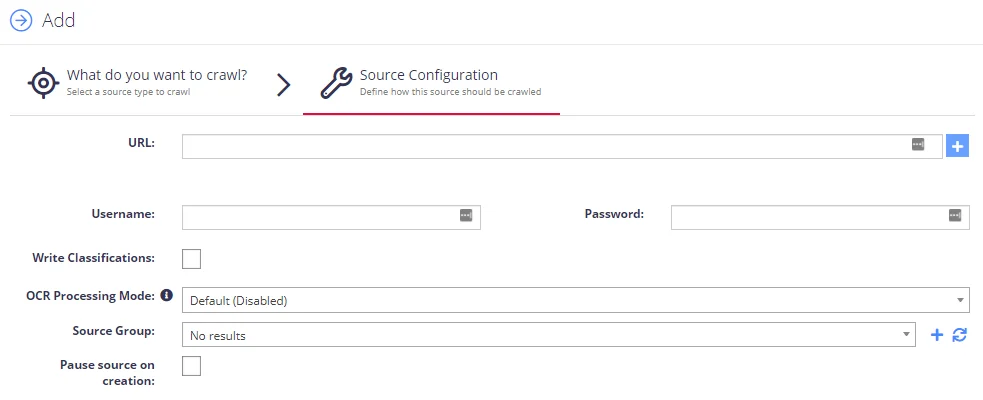
Complete the following fields:
| Option | Description |
|---|---|
| SharePoint URL | - The root of the site collections to be added, by clicking the “(Multiple Urls)” link you can add multiple SharePoint Site Collections to be crawled against the same credentials. |
| Username | Enter username in the following formats: DOMAIN\USERNAME and USERNAME@DOMAIN. |
| Write Classifications | Enables synchronization of classifications back to the SharePoint managed metadata fields. The written classifications will be subject to the classification configuration for the site collection. |
| OCR Processing Mode | Select documents' images processing mode: - Disabled – documents' images will not be processed. - Default – defaults to the source settings if configuring a path or the global setting if configured on a source. - Normal – images are processed with normal quality settings. - Enhanced – upscale images further to allow more. |
| Re-Index Period | Specifies how often the source should be checked for changes. The number specifies the period in days. NOTE: Netwrix Data Classification monitors site collections to detect when a document is added/modified. These are queued for reprocessing. The source is checked for changes based on the re-index period in case any updates aren't received. See Manage Sources and Control Data Processing for more information. |
| Document Type | Specify a value to restrict queries when using the Netwrix Data Classification search index. |