Add Database Source
Use the Database source configuration screen to enable crawling and classification of content stored in your Microsoft SQL Server, MySQL, and Oracle databases.
Content must either be configured / crawled using the configured service accounts (IIS Application Pool User, Windows Services) or by using specific connection details.
Once connected, you can create an intelligent content mapping, crawling certain fields as unstructured index text, and other fields as mapped metadata. For more information, see the Database Configuration Wizard section.
To make other configuration changes before the initial collection starts, select the Pause source on creation checkbox.
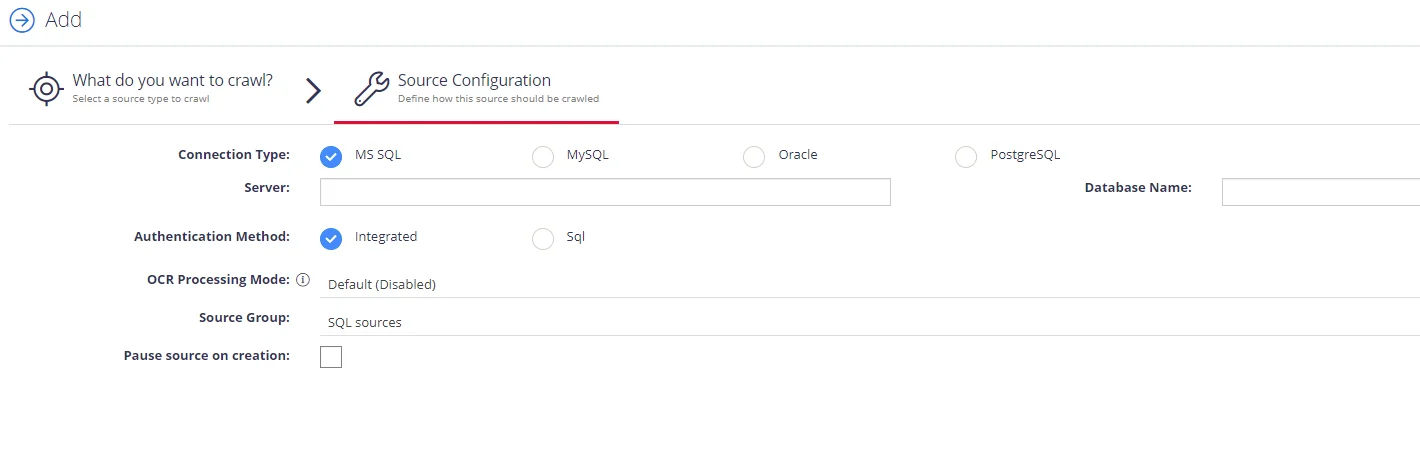
Complete the following fields:
| Option | Description |
|---|---|
| Connection Type | Select your connection type: MS SQL, MySQL, or Oracle. |
| Server | Specify the server name of the database system to be crawled (use "." to indicate the local server). |
| Database Name | Specify the database that will be crawled. You can configure multiple databases from the same server. |
| Authentication Method | Select authentication method: Integrated or SQL. - With Integration option selected, the database is accessed under the logged-on account. - With SQL option selected, specify the user name and password to use when accessing the database. |
| OCR Processing Mode | Select processing mode for images in the documents: - Disabled – documents' images aren't processed. - Default – defaults to the source settings if configuring a path or the global setting if configured on a source. - Normal – images are processed with normal quality settings. - Enhanced – upscale images further to allow more accurate results. This provides better accuracy but can lead to longer processing time if the images don't contain text. |
| Source Group | If you want to add database to a source group, select existing, or create a new one. |
| Pause source on creation | Select to make other configuration changes before the initial data collection starts. |
After the source configuration is completed, you will be prompted to lauch SQL crawling configuration wizard. See Database Configuration Wizard for more information.