Sync Service Administration
For most use cases of the Sync Service, installation is all the configuration and administration required. For advanced setups, the configuration file offers additional options, listed at the end of this document.
ServiceNow Features
The ServiceNow integration has additional features due to it's popularity.
Configure Device Discovery
Instead of maintaining a list of all your servers, desktops, and switches in ServiceNow and Change Tracker, you can synchronize configuration items from ServiceNow to Change Tracker as devices. Not only does this give you a single place to maintain that list (ServiceNow), it also speeds up initial setup of Change Tracker.
When Change Tracker creates devices via Device Discovery from ServiceNow, it matches the configuration items from Requests for Change (RFCs) to devices in Change Tracker by their ServiceNow ID, ensuring a perfect match.
Agentless monitoring (via a proxy agent or Splunk) has always required you to manually create devices to link change events to. Device discovery removes this manual step.
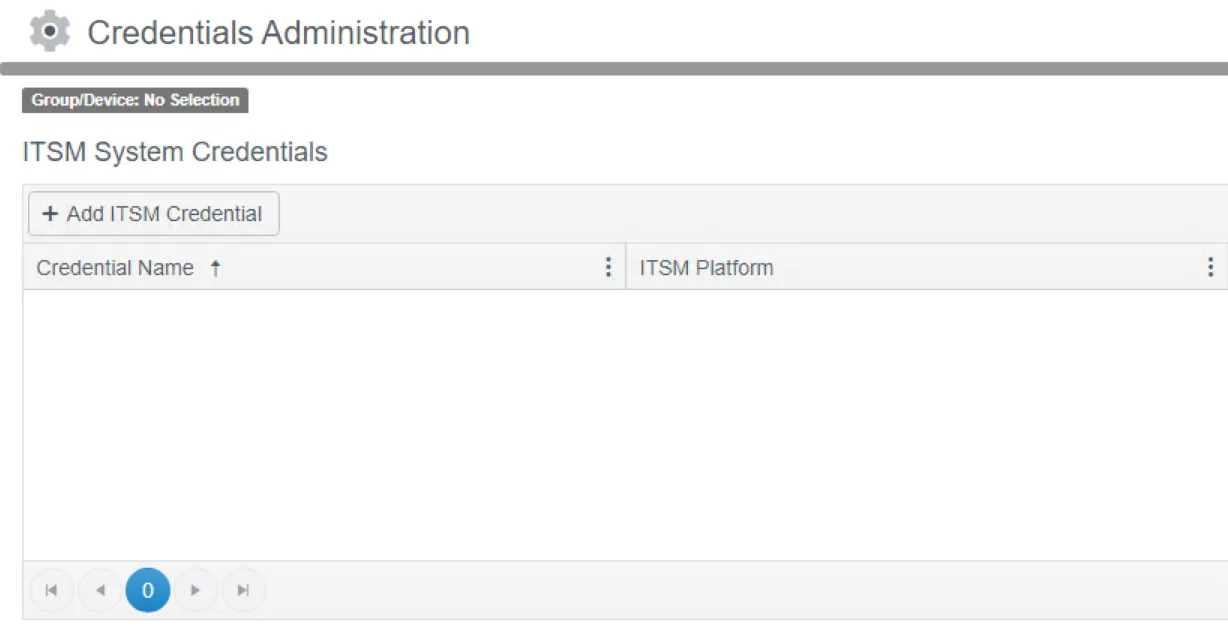
Step 1 – From the Settings menu, select Credentials, scroll to the ITSM System Credentials section and click Add ITSM Credential.
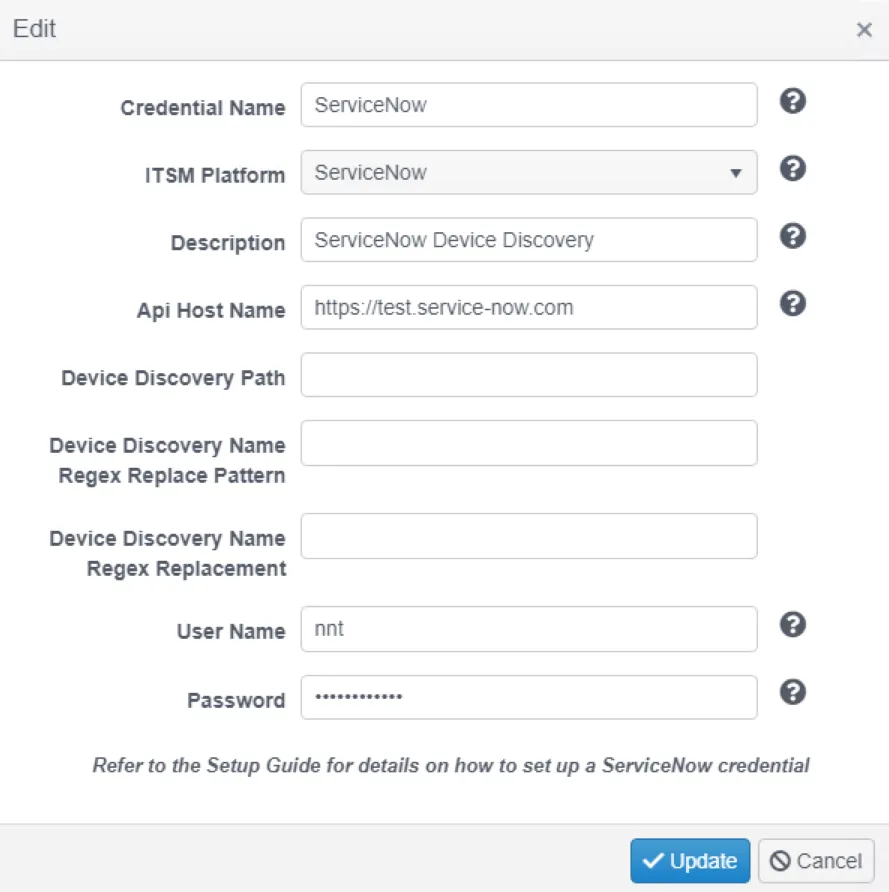
Step 2 – Select ServiceNow from the initial dropdown and enter the details of the ServiceNow instance to connect to.
By default Change Tracker will look for devices in the cmdb_ci_computer table in ServiceNow's Configuration Management Database (CMDB). Use the Device Discovery Path field to specify a different table to pull devices from.
Use the Device Discovery Name Regex Replace Pattern field to define a regex pattern that identifies text in device names you want to exclude or replace when Change Tracker creates the devices. This is useful when device names in the change events don't exactly match device names in ServiceNow.
The Device Discovery Name Regex Replacement field defines the value that replaces the pattern defined in the Device Discovery Name Regex Replace Pattern field. If you leave this field empty, Change Tracker trims the matched pattern from device names it creates.

Step 3 – Select a device to act as the proxy for the calls made to ServiceNow. The agent on the same host as the Hub is often a good choice here.
Step 4 – Select the credentials created earlier.
Step 5 – Select the group to put the discovered devices into.
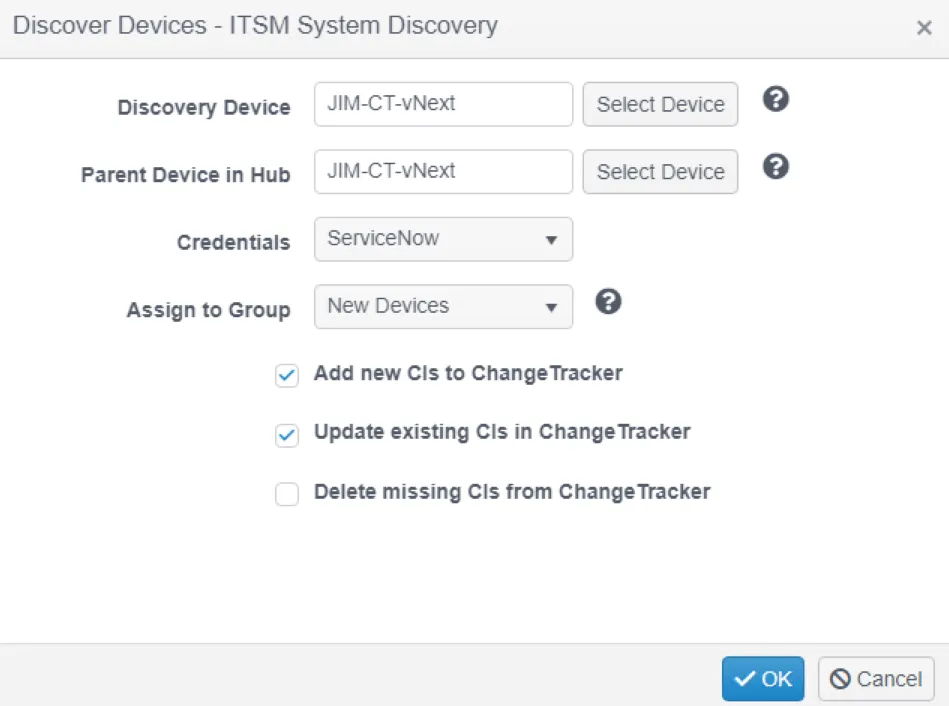
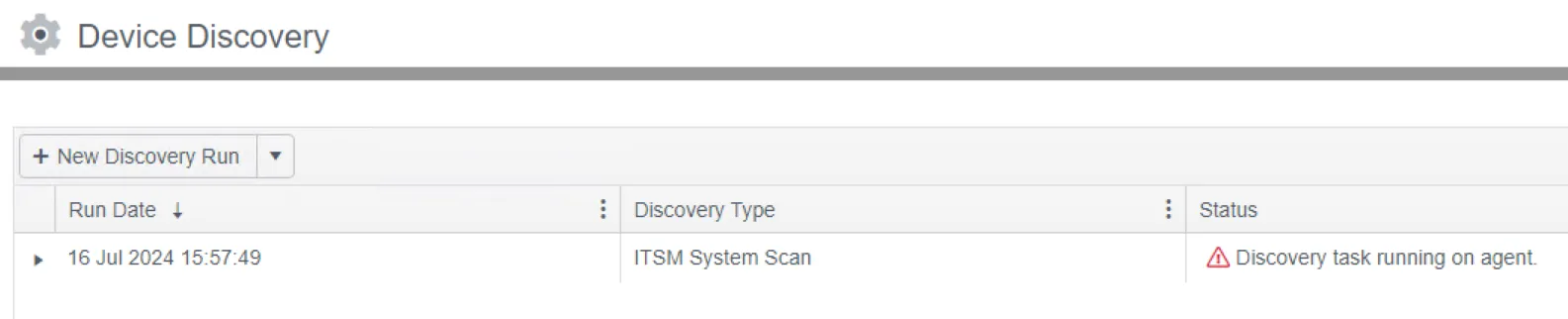
Step 6 – Click OK. A discovery task will start and create the devices.
Raise a ServiceNow Incident
When an unplanned change occurs, someone who can act on it must know about it so they can investigate and resolve it. Raising an incident in ServiceNow is one way to alert the owner of the matching configuration item and provide a workflow to resolve the situation.

Step 1 – From the Settings menu, select System Settings and scroll to the ServiceNow Integration section. Insert the URL and credentials of the ServiceNow instance to raise incidents to. The test button will raise a test incident to prove connectivity.

Step 2 – Select the device group you want to raise incidents for (All devices is the common choice), select the Un-planned Change Notification Type and select ServiceNow as the notification Method.
Configuration Options
| Key | Notes |
|---|---|
| restSyncProvider.retryTimes | Byte (default: 3, max: 255) Determines how many times the service retries a failed REST request before abandoning it. |
| restSyncProvider.retryMilliseconds | Integer (default: 250) Determines the delay in milliseconds between retries of failed REST requests. |
| restSyncProvider.startSyncTimeUtc | DateTime (default: current UTC date / time written by installer e.g., “2023-03-27T17:56:30”) SyncAdapters typically use this value as a chronological start point when first requesting incremental changes. |
| changeTracker.getEventsStartTimeSpan | TimeSpan (default: 7.00:00:00, equivalent to 7 days) When submitting or re-submitting events for a Planned Change whose Start Time you set to continuous, this determines the actual Start Time used. |
| changeTrackerPlannedChangeRestSyncAdapter.usePlannedChangeRulesetName | String (e.g., “MyRuleSet”) Nominates a planned change ruleset to use as the criteria when matching events to planned changes. By default, Change Tracker matches events by date and device. This setting lets you match events on any field — for example, matching the event's Who Made The Change (WMTC) to the planned change's Assigned To field to ensure the person expected made the change. |
| changeTrackerPlannedChangeInstanceRestSyncAdapter.requireMembers | Boolean (default: false) Determines whether Change Tracker requires linked members (Devices or Groups) before it creates a Planned Change. Netwrix recommends leaving this setting at its default (false) while you confirm the service works correctly. Note: in production, set this to true, because a Planned Change with no linked members never captures events and becomes redundant. |
| changeTrackerRestSyncProvider.baseUrl | String (e.g., “https://localhost:5001/api”) The base URL for the REST API endpoint. The Sync Service sends all REST requests relative to this URL. |
| changeTrackerRestSyncProvider.userName | String (e.g., “itsm”) The username of the account used to connect to Change Tracker. Note: Change Tracker creates an “itsm” role with the appropriate permissions, but doesn't assign a user to it by default. |
| changeTrackerRestSyncProvider.password | String (e.g., “password”) The password of the account used to connect to Change Tracker. Note: The service encrypts this setting and writes it back to the config file under the key “E. changeTrackerRestSyncProvider.password” |
| serviceNow.deviceClassNames | String (e.g., “cmdb_ci_win_server,cmdb_ci_linux_server”, default: “”) Optional comma-separated whitelist of Configuration Item (CI) class names (sourced from the cmdb_ci.sys_class_name property) which restricts which CIs Change Tracker can map to a device. |
| serviceNow.groupClassNames | String (default: “”) Optional comma-separated whitelist of Configuration Item class names (sourced from the cmdb_ci.sys_class_name property) which restricts which CIs Change Tracker can map to a group. A value of DO_NOT_MATCH disables the group lookup if Change Tracker doesn't find the device name. |
| serviceNow.timeZone | String (e.g., “Eastern Standard Time”, default: “”) Optional time zone taken from this list, which should match the time zone of the account used to connect to ServiceNow. Note: use this setting when you can't set the account to use GMT. |
| serviceNowChangeRequest.createplannedchangepertask | Boolean (default: false) When true, any RFC in ServiceNow that has tasks against it will result in a planned change for each task. If start or end times are missing on the tasks, the task inherits them from the parent RFC. |
| serviceNowChangeRequestRestSyncAdapter.changesUrl | String (e.g., “https://site.service-now.com/api/now/table/change_request”, default: “”) Optional absolute URL for the REST API endpoint from which to retrieve Change Requests. |
| serviceNowChangeRequestRestSyncAdapter.taskCiUrl | String (e.g., “https://site.service-now.com/api/now/table/task_ci”, default: “”) Optional absolute URL for the REST API endpoint from which to retrieve Configuration Items linked to Change Requests. |
| serviceNowChangeRequestRestSyncAdapter.getIncrementalChangesFilter | String (e.g., “approvalINapproved,withdrawn,reverted”, default: “”) Optional filter that restricts the Change Requests retrieved from ServiceNow during periodic polling for modified entries. |
| serviceNowImportJob.intervalMilliseconds | Integer (default: 30000, equivalent to 30 seconds) Optional setting that determines the frequency of periodic polling for modified entries. |
| serviceNowRestSyncProvider.baseUrl | String (e.g., “https://site.service-now.com/api”) The base URL for the REST API endpoint. The Sync Service sends all REST requests relative to this URL, unless you specify “serviceNowChangeRequestRestSyncAdapter.changesUrl”, “serviceNowChangeRequestRestSyncAdapter.taskCiUrl”, or “serviceNowRestSyncProvider.accessTokenUrl” (which take precedence as absolute URLs) |
| serviceNowRestSyncProvider.authType | Integer, Enum (default: 0) Determines which type of authentication Change Tracker uses when connecting to ServiceNow: · 0 = Basic Authentication (requires userName and password) · 1 = OAuth2 Password Grant (requires userName, password, clientId, and clientSecret) · 2 = OAuth2 Client Credentials Grant (requires clientId and clientSecret) |
| serviceNowRestSyncProvider.userName | String (e.g., “itsm”) Optional, depending on “authType”. The username of the account used to connect to ServiceNow. |
| serviceNowRestSyncProvider.password | String (e.g., “password”) Optional, depending on “authType”. The password of the account used to connect to ServiceNow. Note: The service encrypts this setting and writes it back to the config file under the key “E.serviceNowRestSyncProvider.password” |
| serviceNowRestSyncProvider.accessTokenUrl | String (e.g., “https://site.service-now.com/oauth_token.do”) Optional, depending on “authType”. Absolute URL for the REST API endpoint from which to retrieve OAuth2 tokens. |
| serviceNowRestSyncProvider.clientId | String (e.g., “8b466c8147bd21609527f6e9a0ef4301”) Optional, depending on “authType”. The client ID of the OAuth application, defined in ServiceNow. |
| serviceNowRestSyncProvider.clientSecret | String (e.g., “0aZbfubF7A”) Optional, depending on “authType”. The client secret of the OAuth application, defined in ServiceNow. Note: The service encrypts this setting and writes it back to the config file under the key “E.serviceNowRestSyncProvider.clientSecret” |
| serviceNowRestSyncProvider.origin | String (e.g., “ServiceNow”) Optional. The service uses this value to tag any entities it creates. |