HubDetails.xml File
The Hub controls the Agent configuration settings during operations, but initial registration requires a basic config file to register with the Hub.
The HubDetails.xml file includes details unique to your deployment of Change Tracker, so you must review the settings to ensure they're correct.
The key tags within the file are as follows:
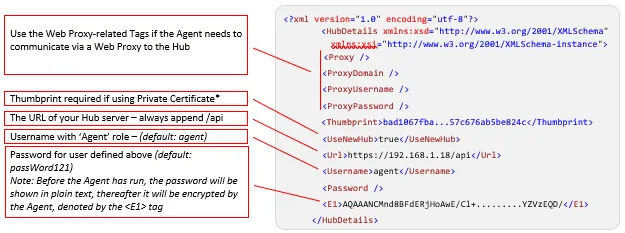
An unencrypted password means the Agent didn't initialize, which usually indicates a bad installation or a .NET Framework issue. The Agent on Windows requires .NET Framework V3.5, and Linux/Solaris requires the latest NNT Mono runtime. The Gen 7 Agent also supports two additional nodes: NamePrefix and NameSuffix.
*The Thumbprint uniquely identifies the Web Server certificate. See the Microsoft How to: Retrieve the Thumbprint of a Certificate article for more information.
Step 1 – Open IIS.
Step 2 – Select the server from the list on the left hand side.
Step 3 – Select Server Certificates.
Step 4 – Double click your certificate in the list to open the certificates permissions.
Step 5 – Open the Details tab.
Step 6 – Scroll to the bottom of the list and highlight the Thumbprint field.
Step 7 – Copy the displayed thumbprint value to your HubDetails.xml file.
Next, verify network connectivity from the Agent's host to the Hub URL.
If you install the Change Tracker Hub on a Windows/IIS platform, the Hub URL is https://192.168.1.36.