Cloud Policy Tab
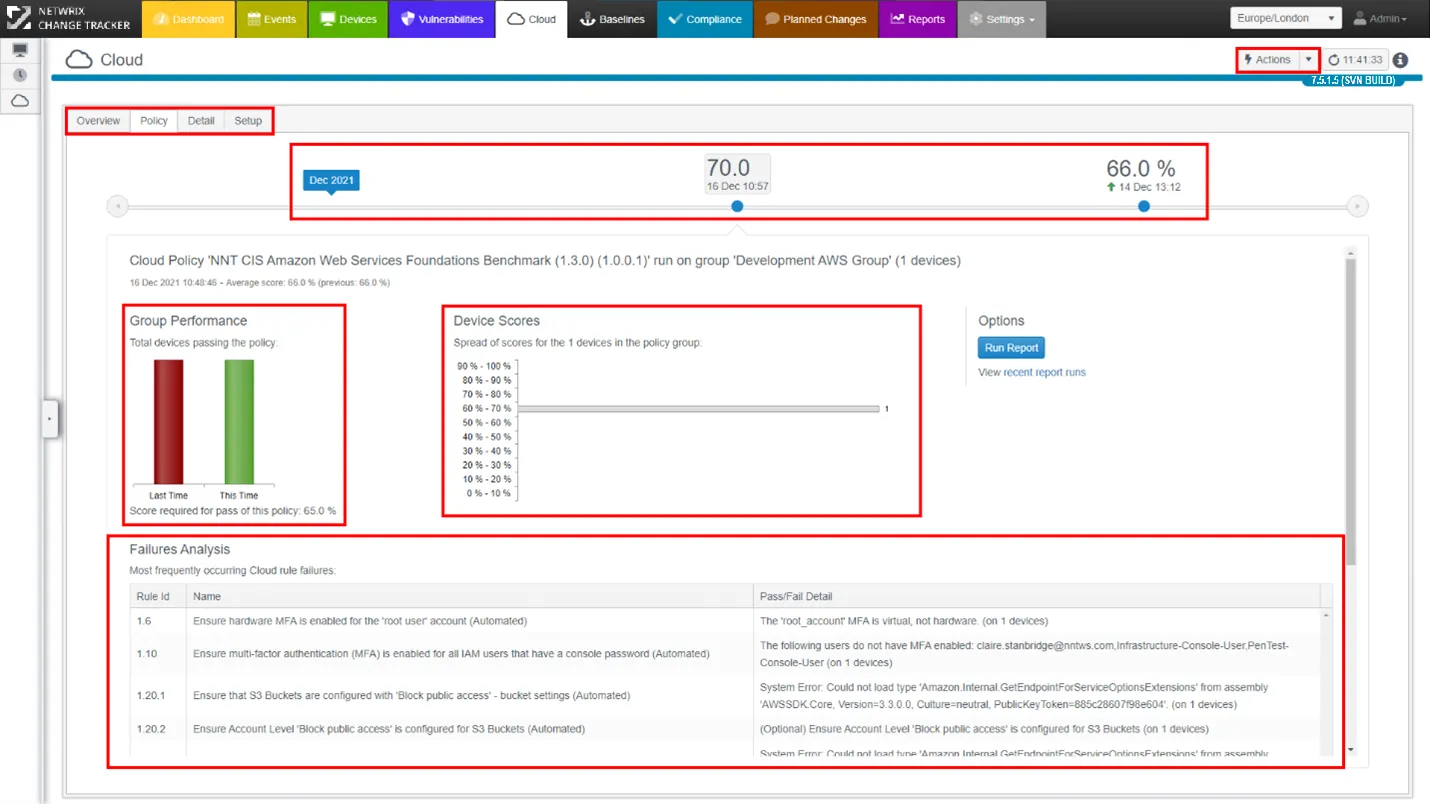
Cloud Tab: Key Points
Actions button:
To create a new Cloud Policy, use the Actions button in the top-right corner of the Cloud tab. Change Tracker prompts you for a name for the new Cloud Policy, then starts the Cloud Setup Wizard.
Cloud Policy Sub-Tabs:
Switch between:
- Overview: See all Policies in operation
- Policy: Current and Past performance against Policy
- Detail: See individual Cloud instance scores or filter by score range
- Setup: Change settings for the current policy
Cloud Compliance Time Machine:
View previous report results and configuration states for the selected Cloud Group and Policy.
Group Performance:
Visual representation of current and previous report results for the group. Click to view the next level of detail.
Device Scores:
Visual representation of compliance across the Cloud instances within the Group under review. Each bar represents a subset of Cloud instances for the Compliance Score range.
Failures Analysis:
The most commonly occurring checks that fail compliance rules appear here, ordered by incidence count.