Baseline Overview Tab
After you build your Baseline Policy and set up the Baseline Report to run on a schedule, you can switch to the other Baseline Center tabs for general routine operation. You are ready to enforce compliance with your Baseline Configuration Standard.
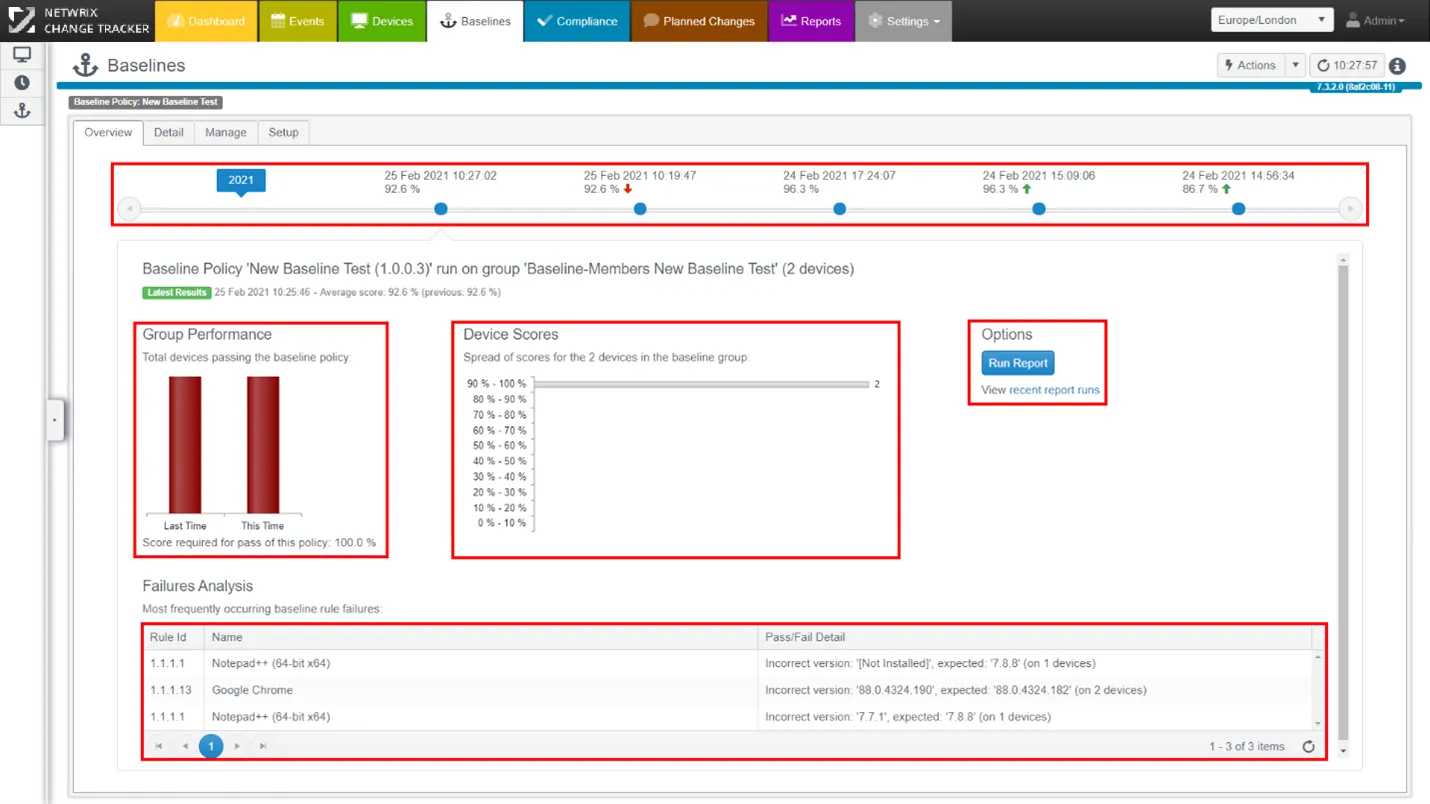
The Timeline:
Each dot represents a different report run and you can review results and see how compliance with the Baseline Policy has changed over time.
Group Performance:
This provides a high-level view of how well the entire estate of devices adheres to your baseline configuration policy. The chart is active, and you can click to view the next level of detail on the Detail tab.
Device Scores:
This shows a deeper analysis of device compliance with the Baseline Policy, giving you an at-a-glance view of the distribution of device numbers in each decile band of compliance score. This information helps you determine your remediation strategy by identifying the number of devices in each band of compliance drift.
Failures Analysis:
This shows identified failures and their relative levels of incidence, and provides metrics for determining your remediation strategy, for example, which patches are most important to apply.
For the next level of detail about failures, click through on any of the charts, or go directly to the Detail tab. For full report details, including all passes and failures, view the report: click recent report runs to go directly to the Report Center and use the 'Compliance Detail' report.