Live Tracking
Live Tracking captures all changes in real time. You can enable it when configuring a tracking policy. See the Policy Templates: FIM File Integrity topic for additional information.
Windows
The Gen 7 Agent minifilter driver is a small, lightweight kernel driver used to collect real-time file I/O changes. When a Gen 7 Agent is configured for live tracking on a Windows server, it relies on the file I/O monitoring that the minifilter driver provides. Installing the Gen 7 Agent also installs the driver. The driver registers with the Windows Filter Manager when live tracking is required. See Microsoft's article Filter Manager Concepts for additional information.
The Windows Filter Manager calls all registered drivers sequentially when any I/O activity occurs (see the following diagram). It calls drivers in order of their altitude value, from lowest to highest. Microsoft allocated an altitude value of 388790 to the Netwrix Gen 7 Agent minifilter driver when Netwrix submitted the driver for approval, as seen here Allocated filter altitudes – see the Activity Monitor section (NNTInfo.sys).
Common minifilter drivers that are installed on a given Windows server are those associated with Virus Scanning, Encryption, and/or Continuous Backup. Many of these can lock files whilst processing the request and in some cases, such as Encryption, modify the request.
The Gen 7 Agent minifilter driver doesn't lock files or modify the I/O request; it only monitors changes.
The driver only logs changes for files that meet the filter requirements of the Change Tracker Policy Tracking Template applied to the running Gen 7 Agent.
For I/O changes that are part of the Tracking Template, the driver logs the change to a memory buffer. The installed Gen 7 Agent monitors this memory buffer, querying and emptying it every 100 milliseconds.
Neither the server nor the agent requires a restart after you enable live tracking.
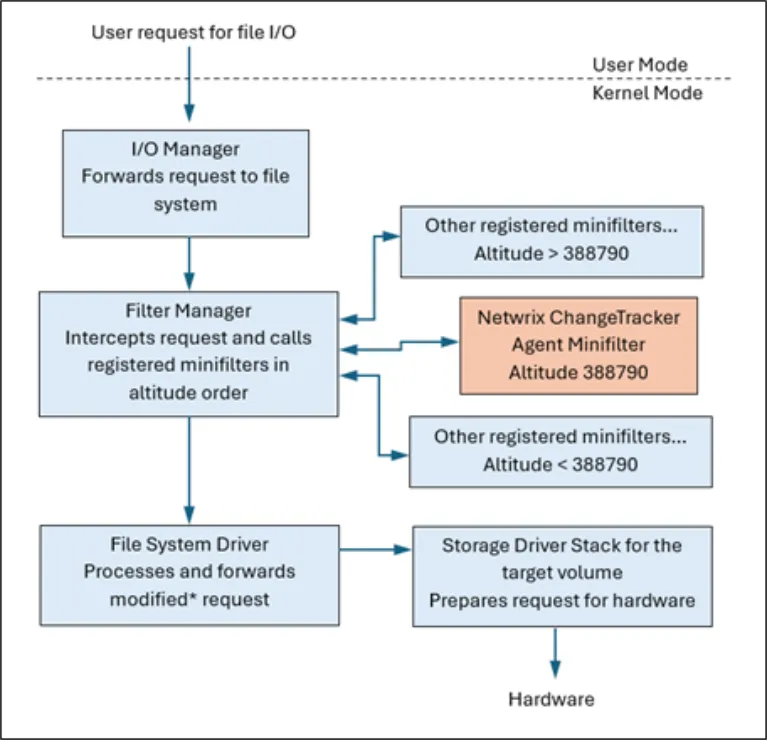
The Change Tracker minifilter doesn't make any alterations to user requests; it only monitors I/O activity.
As an alternative to the kernel mini-filter driver, the Gen 7 Agent can use Netwrix Activity Monitor as the source of file change attribution on Windows. This is useful in environments where you can't load the kernel driver. See Netwrix Activity Monitor Integration for configuration details.
Linux
On Linux devices, the Gen 7 Agent uses Sysdig to capture low level data like who made the change. See GitHub's article Sysdig for additional information.