Policy Templates: Processes and Services
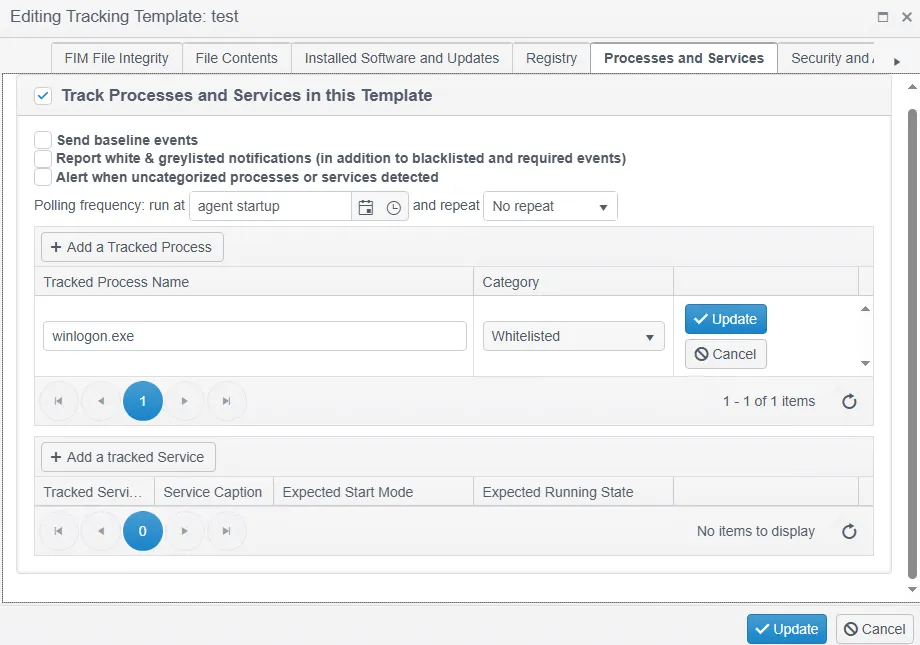
The Processes and Services tab lets you define Processes and/or Services (Windows only) and their states within your Configuration Policy as either Whitelisted or Blacklisted.
A key indicator of breach or malware activity is the existence of new processes or services. Likewise, configuration hardening and vulnerability mitigation always require you to remove or disable unnecessary services and daemons. Therefore, tracking process lists, services, and their states is important.
Mark unnecessary Services, or Services you're generally unconcerned about, as Ignore State.
-
Uncategorized Process/Service Action – Use this option to receive alerts for any new, uncategorized processes or services. In some situations, you may also want alerts for missing key processes.
-
Polling Frequency – See the Polling Frequency setting described in the other Policy Template topics for details.
-
Define Process (Service) Name – Define Processes/Services as either Required, Blacklisted, Whitelisted, or Graylisted.
- Required – The Process/Service must be in the required state; Change Tracker raises an alert if it isn't.
- Whitelisted – The Process/Service can be present, but its presence isn't mandatory.
- Blacklisted – The Process/Service must never be present; Change Tracker raises an alert if it is.
- Graylisted – The default category for a Process/Service that doesn't yet belong to another category.