Policy Templates: Process/Command Output
Where required, Netwrix Change Tracker can also execute commands on the endpoint device.
Commands require pre-approval before use.
Change Tracker pre-approves all standard commands used in Compliance Reports and the built-in Policy Templates, but new commands you add may require admin approval. See Allowed Commands for additional information.
-
Agent-Based Monitoring – For Agent-based monitoring, the Agent executes the commands directly and stores the initial baseline in the local Agent database, reporting any subsequent changes back to the Hub. The Agent runs the commands using whichever service account is assigned to it. On Windows, commands run from the standard
Windows\System32shell, so you may need to specify a full executable path, for example:cmd /C %systemroot%\system32\inetsrv\appcmd list VDIR /text:VDIR.NAME
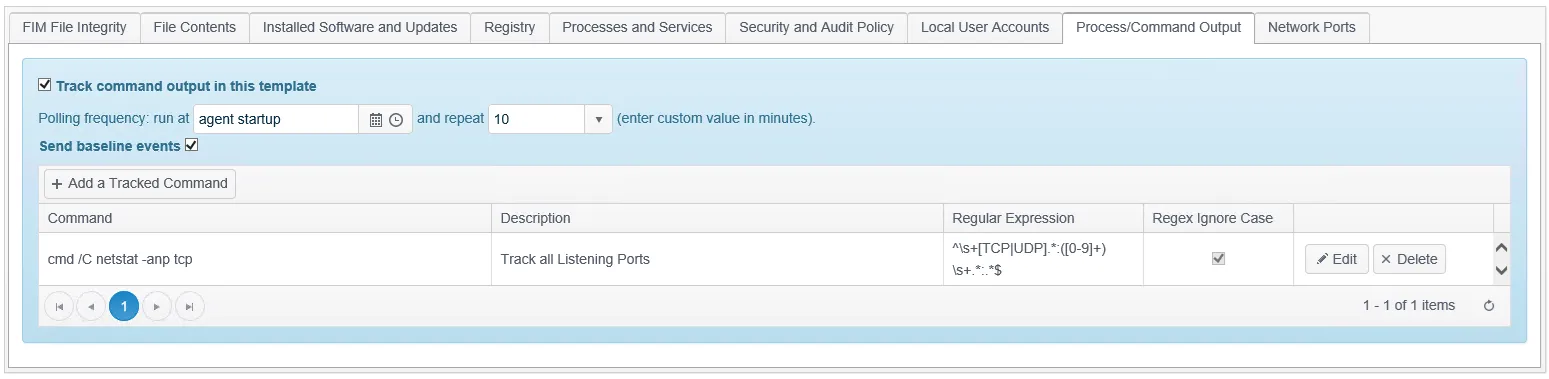
- Agentless Monitoring – The Master Proxy Agent in use executes commands indirectly and stores the initial baseline in the Proxy Agent database, reporting any subsequent changes back to the Hub. It runs the commands using whichever service account is assigned in the Credentials.
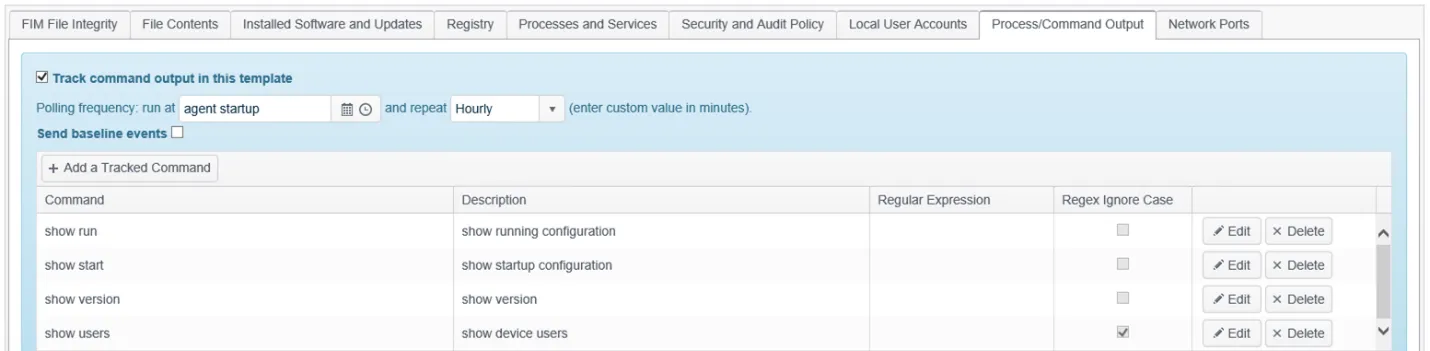
- Use of RegEx – Whether using Agent-based or Agentless Command Output Trackers, you can apply a
regular expression to the command output to filter or match specific keywords or patterns. You can
still use any device-offered RegEx capability, such as
egrepon Linux, instead of or in addition to the Agent's regex.
The Agent only trusts a signed Configuration Template issued from its assigned Hub. Contact Netwrix Support for additional information.