Policy Templates: FIM File Integrity
File System Integrity Monitoring is crucial for security, and most security policies and standards, such as PCI DSS, mandate the use of this control. Netwrix Change Tracker monitors and alerts on any file or folder change, whether it's a new file appearing (such as a Trojan added to the System32 folder) or an application hack or modification.
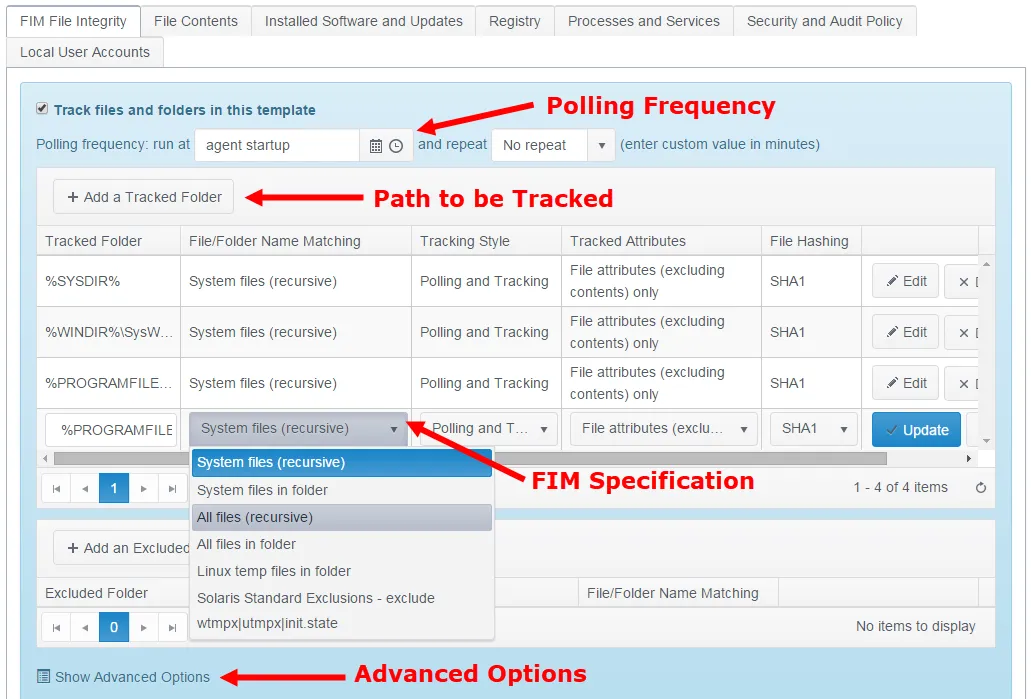
-
Polling Frequency – The default setting is to run a full poll (effectively a new baseline operation) only after the Agent restarts (for example, after a reboot), but the Agent can also run in a 'polling-only' mode. This disables live tracking (set the Tracking Style attribute for the Tracker to Polling) and means that Change Tracker only detects changes when the scheduled poll runs. Although this loses the benefits of real-time change detection, it can be desirable in sensitive environments where you need to minimize server resource loads at all times.
-
Define Path – Click + Add a Tracked Folder to add a new folder/path to track. Change Tracker provides a range of tokens (conceptually similar to Windows environment variables), so template definitions apply universally regardless of the OS installation volume, for example, when the OS is installed on drive D: instead of drive C:
%SYSDIR% = \Windows\System32%WINDIR%\SysWOW64 = \Windows\SysWOW64%PROGRAMFILES% = \Program Files%PROGRAMFILES(x86)% = \Program Files (x86) -
Tracking Specification:
-
Tracked Folder – File Hashing – Specifies the Cryptographic Hash Algorithm that Change Tracker uses to record a DNA Fingerprint for each file. This option records a secure hash value for the tracked files and uses it as a definitive metric for file integrity.
-
File/Folder Name Matching – System files recursive limits tracking to *.exe, *.dll, *.sys, and *.drv files for this folder and any subfolders. All files tracks all files with or without an extension.
-
Tracking Style – See Polling Frequency for details about the Poll Period. Options are tracking only, polling and tracking, or poll only.
-
Tracked Attributes – Options are:
-
File Attributes – Excluding contents only
noteContents tracking is defined under the File Contents tab
-
Folder/Directory Attributes – Only or All File and Folder Attributes. The default is File Attributes only, because tracking folder-level changes in Windows can produce spurious events due to how the Windows file system behaves.
-
-
File Hashing – Specifies the Cryptographic Hash Algorithm that Change Tracker uses to record a DNA Fingerprint for each file. This option records a secure hash value for the tracked files as a definitive metric for file integrity. Options are:
- None
- MD5
- SHA1
- SHA256
- SHA384
- SHA512.
-
Change Tracker tracks all significant attributes for each file and detects any change to any attribute. The secure hash checksum provides a DNA Fingerprint of a file, so that even if a Trojan file looks identical to a legitimate system file, Change Tracker still identifies it as a changed file.
You configure exclusions the same way as inclusive tracking.
For Advanced Options: see Appendix B for more information.