Policy Templates: File Contents
The File Contents Tracker tracks configuration settings stored in config files directly. Like the File Integrity Monitoring (FIM) Tracker, it can track changes continuously to provide real-time notifications, or through a periodically scheduled poll. Netwrix Change Tracker supports a regular expression-based data-extraction operation to precisely focus the tracking on salient entries only.
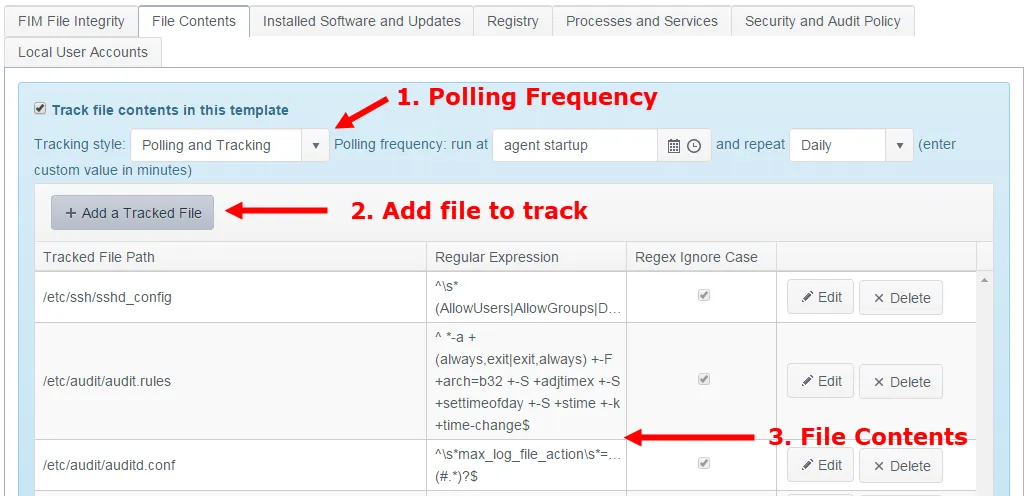
Step 1 – Polling Frequency. The default setting is to run a full poll (effectively a new baseline operation) only after the Agent restarts (for example, after a reboot), but the Agent can also run in a 'polling-only' mode. This disables live tracking (set the Tracking Style attribute for the Tracker to 'Polling') and means that Change Tracker only detects changes when the scheduled poll runs. Although this loses the benefits of real-time change detection, it can be desirable in sensitive environments where you need to minimize server resource loads at all times.
Step 2 – Define Path. Click + Add a Tracked Folder to add a new folder or path to track.
Step 3 – Tracking Specification:
- Tracked File Path – File Hashing. Specifies the Cryptographic Hash Algorithm that Change Tracker uses to record a DNA Fingerprint for each file. This option records a secure hash value for the tracked files and uses it as a definitive metric for file integrity.
- Regular Expression. If left blank, Change Tracker records and tracks the entire contents of the file. Using a regular expression instead focuses tracking on the content isolated by the regex, which is useful when you only need to track certain elements of a file's contents.
- RegEx Ignore Case. If using a Regular Expression, this ensures that tracking is case insensitive.