Agent Configuration
There are multiple ways to set values in an agent's configuration file on installation. After you configure an agent and it successfully registers with the Hub, you can manage its configuration remotely from the Agent Updates tab. See the Agent Installation topic for additional information.
Update the agent hub configuration:
Step 1 – Select Agent Updates from the Settings menu, then click Actions to display the options for Upload an Agent Update and Update HubDetails. HubDetails is the name of the config file used for agents.

Step 2 – Select Update HubDetails to open the Update agent hub details window.
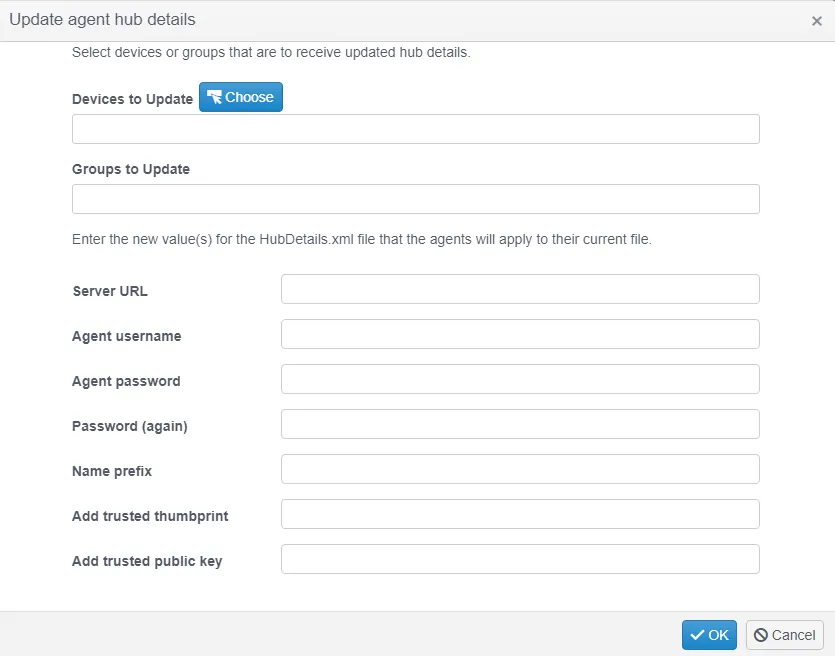
Step 3 – Select the devices or groups of devices to configure and then enter the values you want.
Altering the URL could cause the agent to be unable to communicate with the Hub and require direct manual intervention to resolve.
Altering the agent username or password could cause the agent to be unable to communicate with the Hub if a matching user account doesn't exist. This too would require direct manual intervention to resolve.
Altering the username or password of the user account used by any agent renders those agents incapable of communicating with the Hub. The Hub can't broadcast a corrective password to the now offline agents, so you must resolve this manually.
For most fields, leaving a value blank keeps the current values in the target agent's configuration files unchanged. Leaving the Name prefix field blank removes any existing prefix for the target devices.
Step 4 – Click OK to broadcast the new configuration to the agents on the target devices.

This should take less than a minute to apply.