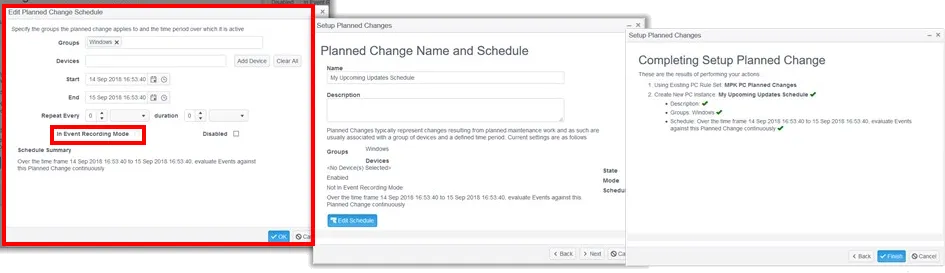
Planned Change Wizard
The Planned Change wizard guides you through setting up a new Planned Change Schedule and Rule Set in a single process. The wizard creates a Planned Change Schedule either with or without a Rule Set assigned.
You can reuse a previously created Rule Set or create a new one.
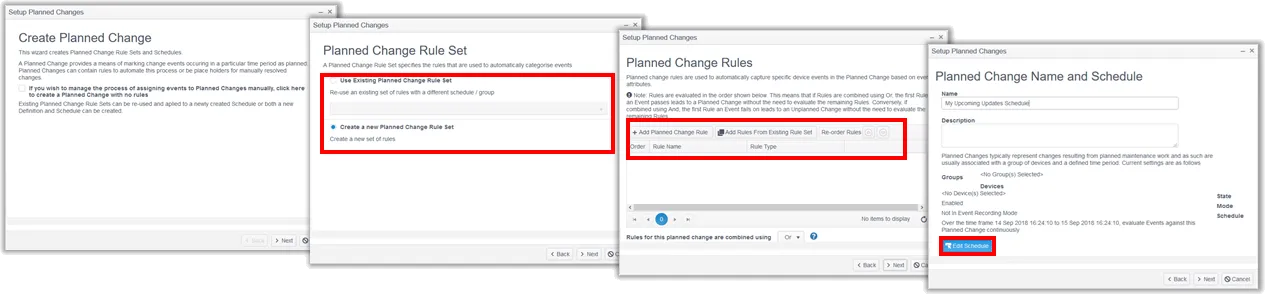
The following example shows the sequence of steps to create a new schedule with a new ruleset.
In Step 2, you can re-use rulesets where available or choose to create a new set. Rules can be created manually in Step 3 or again selected from the list of available rulesets.
In Step 4, click Edit Schedule to add Groups or Devices to the schedule.
If you want to let Netwrix Change Tracker self-learn rules by recording change activity during the schedule, check the In Event Recording Mode box.