Registry Inclusion/Exclusion Match Rules
Similar to Folder/File Match Rules, Registry Key/Value Match Rules can be defined and used to precisely track only keys and values of interest.
For example, tracking the 'WinLogon' registry key and values is important because this key defines a number of session management security controls. However, in certain environments, the 'DCacheUpdate' values may change, causing spurious alerts that aren't significant from a security perspective (DCacheUpdate stores domain names in binary form for internal Winlogon programming code to use). You can track all keys and values below the Winlogon key while excluding DCacheUpdate changes.
The 'All Registry Values' Match Rule is available by default. To define the 'Isolate DCacheUpdate Value Changes' exclusion, add the following Custom PathMatch Definition:
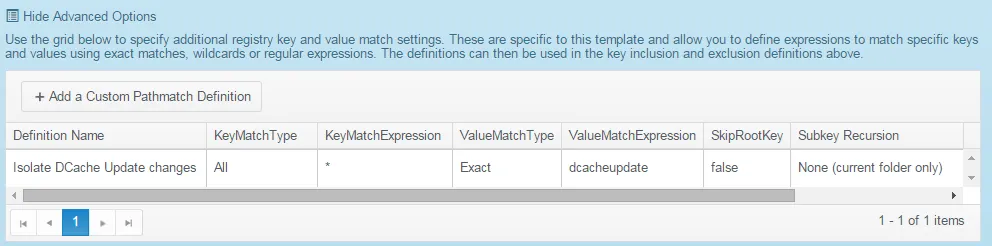
Step 1 – KeyMatchType - Available options are:
- All;
- Exact;
- Wildcards;
- Regex.
Step 2 – KeyMatchExpression. Available options are:
- If using 'All', then use "";
- If using 'Exact', then specify an exact "keyname";
- If using 'Wildcards', then specify a separated wildcards list eg "key_abc*|key_def*";
- If using 'Regex', then specify a regular expression eg
"^S-1-5-21-[0-9]+-[0-9]+-[0-9]+-[0-9]{4,}\\Software\\Policies\\Microsoft\\Windows\\Control Panel\\Desktop".
Step 3 – ValueMatchType. oAvailable options are:ptions the same as for the 'foldermatchtype' (All|Exact|Wildcards|Regex).
Step 4 – ValueMatchExpression – Available options are:
- If using 'All', then use "";
- If using 'Exact', then specify an exact "filename";
- If using 'Wildcards', then specify a separated wildcards list eg "*.exe|*.dll";
- If using 'Regex', then specify a regular expression eg "^audit[0-9]*.(log|txt)$".
Step 5 – SkipRootKey – Available options are: true or false
Step 6 – Subkey Recursion. Available options are:
- Unlimited;
- None (operate on specified folder only);
- "n" = recurse through 1, 2, or 3 subfolders.