File and Folder Match Filters for Inclusion and Exclusion Rules
Netwrix Change Tracker Enterprise includes a range of prebuilt match filters for precision monitoring of only the required attributes, including prebuilt exclusion filters for popular antivirus (AV) packages that update often and create lots of 'change noise'. Paths often contain a mix of files to monitor and files to ignore, so you need multidimensional rules for includes and excludes.
For example, to monitor all files within a specified path and all sub-paths, use the built-in 'All files (recursive)' match filter.
You can also reduce 'noise' from the route path by applying an exclusion for temporary file changes, for example, swp, swx, or ~ file variants. Change Tracker provides a built-in Pathmatch Definition for this, called 'Linux temp files in folder'.
The following Custom Pathmatch Definition example provides this policy:
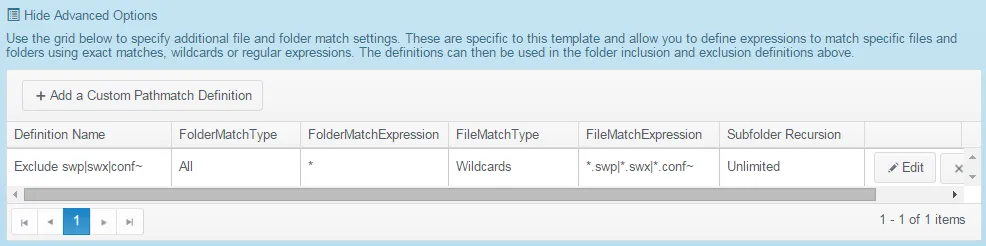
Step 1 – FolderMatchType - Available options are:
- All|Exact
- Wildcards
- Regex
Step 2 – FolderMatchExpression - Available options are:
- If using 'All', then use ""
- If using 'Exact', then specify an exact "foldername"
- If using 'Wildcards', then specify a separated wildcards list eg "backup*|old*"
- If using 'Regex', then specify a regular expression e.g., "^backup"
Step 3 – FileMatchType – options the same as for the 'foldermatchtype' (All, Exact, Wildcards, Regex);
Step 4 – FileMatchExpression – Available options are:
- If using 'All', then use ""
- If using 'Exact', then specify an exact "filename"
- If using 'Wildcards', then specify a separated wildcards list eg "*.exe|*.dll"
- If using 'Regex', then specify a regular expression eg "^audit[0-9]*.(log|txt)$".
Step 5 – SubfolderRecursion – Available options are:
- Unlimited
- None (operate on specified folder only)
- 'n' — recurse through 1, 2, or 3 subfolders.