Advanced Configuration
Advanced Prompt Configuration – Using RegEx
Use Regular Expression (RegEx) syntax to define the Prompts. By default, when any of the Prompt strings defined in the Credentials key match part of a prompt that the monitored device displays, Change Tracker treats it as a full prompt and moves to the next step in the Logon script.
You can also define more complex RegEx-based prompts to wildcard sections of the prompt and to define the Prompt more precisely with a new line prefix. Use this approach when a simple prompt (for example, a single > or $) might appear elsewhere in the tracked data and trigger an early termination of the tracking operation.
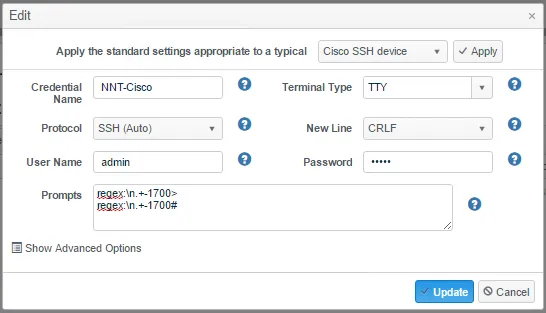
This prompt definition matches a sequence of ‘new line’’any characters’’-1700>’. Contact Netwrix Support if you have any challenging prompt or logon script issues.