Security
By default, Netwrix Auditor API uses HTTPS for sending requests to its endpoints. Netwrix encrypts data with a self-signed automatically generated SSL (Secure Sockets Layer) certificate and strongly recommends that you replace it with a new secured certificate acquired from any reliable source.
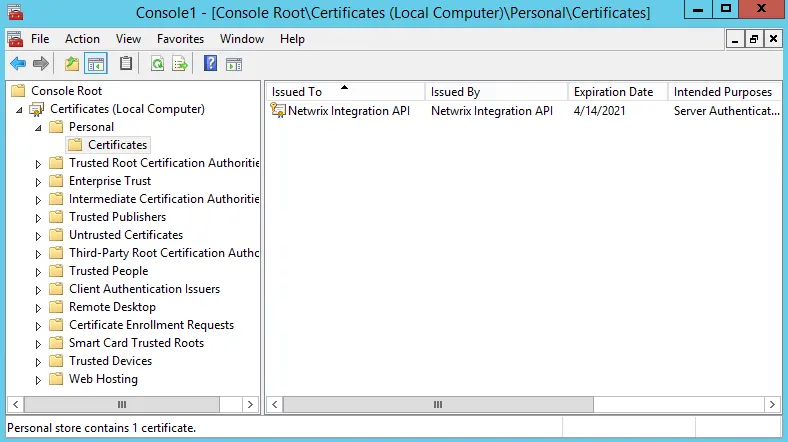
The automatically generated Netwrix API certificate resides in the Personal store. To enable trust on remote computers, install this certificate in the Trusted Root Certification Authorities store.
Manage API security settings with APIAdminTool.exe
Netwrix provides a command-line tool for managing Integration API. Use the tool to switch between HTTP and HTTPS, assign new certificates, and manage other API settings.
-
On the computer where Auditor Server resides, start the Command Prompt.
-
Navigate to the Netwrix Auditor installation folder, inside the Audit Core folder, and run the tool. For example:
C:\>cd C:\Program Files (x86)\Netwrix Auditor\Audit CoreC:\Program Files (x86)\Netwrix Auditor\Audit Core>APIAdminTool.exe -
Execute one of the following commands depending on your task. Review the tips for running the tool:
- Some commands require parameters. Provide parameters with values (parameter= value) to use
non-default values. E.g.,
APIAdminTool.exe api http port= 4431. - Append
helpto any command to see available parameters and sub-commands. E.g.,APIAdminTool.exe api help.
- Some commands require parameters. Provide parameters with values (parameter= value) to use
non-default values. E.g.,
| To... | Execute... |
|---|---|
| Disable API | APIAdminTool.exe api disable This command duplicates the checkbox on the Integrations page in Netwrix Auditor. |
| Switch to HTTP | APIAdminTool.exe api http Netwrix recommends switching to HTTP only in safe intranet environments. To use a non-default port (9699), append the port parameter with a value to this command (e.g., port= 4431). |
| Switch to HTTPS | APIAdminTool.exe api https Run this command to continue using the Netwrix-generated certificate. To use a non-default port (9699), append the port parameter with a value to this command (e.g., port= 4431). |
| Assign a new SSL certificate | APIAdminTool.exe api https certificate Run this command to apply a new certificate instead of the default. You must add a certificate to the store before running this command. Provide parameters to specify a certificate:
|
| Set the minimum TLS version | APIAdminTool.exe api https minTlsVersion Use this command to set the minimum TLS (Transport Layer Security) version for connections (e.g., minTlsVersion= 1.2) |
API access permissions
API access follows the same role-based permissions as the rest of Netwrix Auditor. See the Role-Based Access and Delegation topic for details on configuring per-user access.