Prerequisites
Netwrix Auditor Integration API uses HTTPS (Hypertext Transfer Protocol Secure) with the automatically generated certificate for communication. The default communication port is 9699.
See Security for instructions on how to disable HTTPS and manage other API settings.
Configure Integration API settings
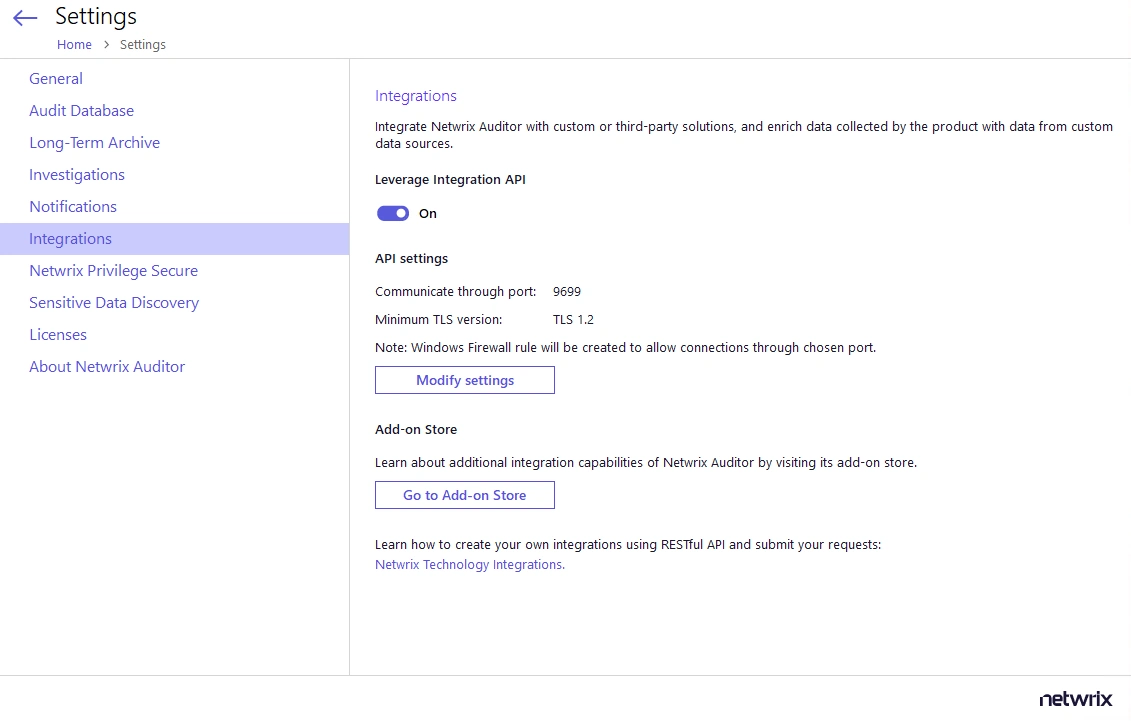
On this page, you can view the current port settings and restrictions on the TLS (Transport Layer Security) version for encrypted connections.
- In the Netwrix Auditor main window, navigate to the Integration tile.
- Ensure the Leverage Integration API option is enabled.
- Click Modify settings under the API settings section.
- Specify a port number. The product automatically creates a Windows firewall rule.
- Select the minimum TLS version from the list. For a new installation, this defaults to 1.2.
- If you use a third-party firewall, create a rule for inbound connections manually.
Configure Audit Database settings
When you first configure the Audit Database settings in Netwrix Auditor, the product also creates
several databases for special purposes, including Netwrix_Auditor_API. This database stores data
imported from other sources through Netwrix Auditor Integration API.
Ensure you've configured the Audit Database settings in Netwrix Auditor. To check or configure these settings, navigate to Settings > Audit Database.
Netwrix Auditor Integration API requires a configured Audit Database.
See Audit Database for instructions on how to configure SQL Server settings.