Long-Term Archive
Netwrix Auditor configures the Long-Term Archive by default, irrespective of your subscription plan and the settings you specified when configuring a monitoring plan. To review and update your Long-Term Archive settings, navigate to Settings > Long-Term Archive and click Modify.
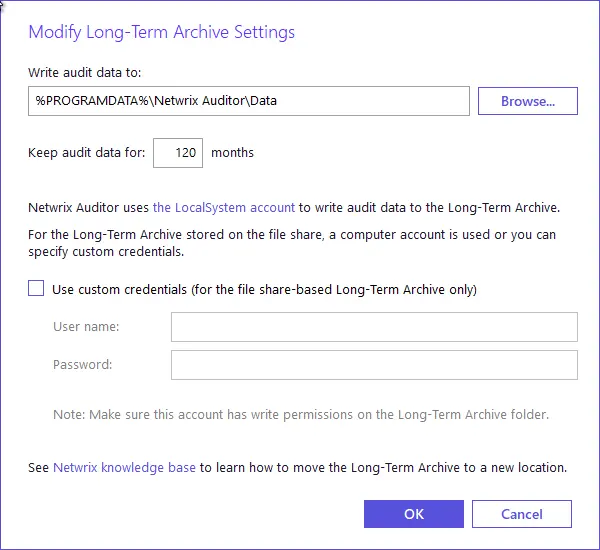
Review the following for additional information:
| Option | Description |
|---|---|
| Long-Term Archive settings | |
| Write audit data to | Specify the path to a local or shared folder where Netwrix Auditor will store your audit data. By default, the path is "C:\ProgramData\Netwrix Auditor\Data". By default, Netwrix Auditor uses the LocalSystem account to write data to the local-based Long-Term Archive and the computer account for the file share-based storage. Netwrix Auditor also uploads subscriptions created in the Auditor client to file servers under the Long-Term Archive service account. Netwrix doesn't recommend storing your Long-Term Archive on a system disk. To move the Long-Term Archive to another location, see the Netwrix Knowledge base article: How to move Long-Term Archive to a new location. |
| Keep audit data for (in months) | Specify how long Netwrix Auditor stores data. The default is 120 months. |
| Use custom credentials (for the file share-based Long-Term Archive only) | Select the checkbox and provide user name and password for the Long-Term Archive service account. You can specify a custom account only for the Long-Term Archive stored on a file share. You can grant the custom Long-Term Archive service account the following rights and permissions: - Advanced permissions on the folder where Netwrix Auditor stores the Long-Term Archive: - List folder / read data - Read attributes - Read extended attributes - Create files / write data - Create folders / append data - Write attributes - Write extended attributes - Delete subfolders and files - Read permissions - On the file shares where Netwrix Auditor saves report subscriptions: - Change share permission - Create files / write data folder permission Netwrix Auditor also uploads subscriptions created in the Auditor client to file servers under the Long-Term Archive service account. See the Subscriptions topic for additional information. |
Setting Recording Settings
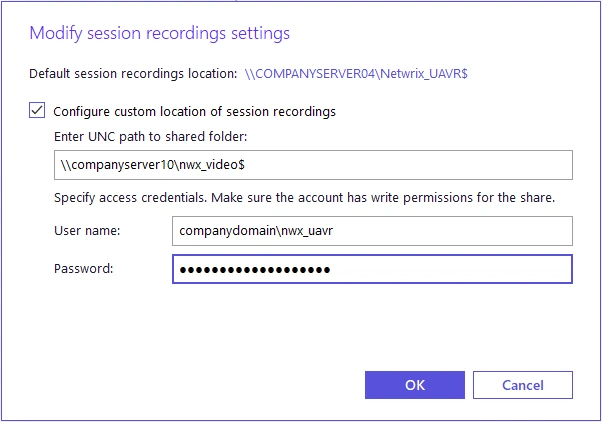
| Configure custom location of session recordings | The default location for storing session recordings is "\<NetwrixAuditorServerName>\Netwrix_UAVR$". However, storing extra files on the Auditor Server may produce additional load on it, so consider using this option to specify another location where Netwrix Auditor stores session recordings. |
| Enter UNC path to shared folder: | Specify the Universal Naming Convention (UNC) path to the shared folder where Netwrix Auditor will store user session video recordings. You can use server name or IP address, for example: \172.28.6.33\NA_UserSessions Netwrix doesn't recommend using a local folder for that purpose, as storing extra files on the Auditor Server produces additional load on it. ensure the specified shared folder has enough capacity to store the video files. You can adjust the retention period for the video files in the related monitoring plan settings (targeted at User Activity data source); default retention is 7 days. See the User Activity topic for additional information. After you specify and save settings for session recordings, leave them unchanged. Otherwise — if you change the storage location while using Netwrix Auditor for User Activity — be aware of possible data loss, as Auditor will not automatically move session recordings to a new location. |
| User name / Password | Provide user name and password for the account that Netwrix Auditor will use to store session recordings to the specified shared folder. ensure the account has at least the Write permission for that folder. |
Auditor informs you if you are running out of space on the system disk where Auditor stores the Long-Term Archive by default. You will see events in the Netwrix Auditor System Health log when the free disk space starts approaching the minimum level. When the free disk space is less than 3 GB, Auditor stops the Netwrix services responsible for audit data collection.