Nutanix AHV
Netwrix Auditor is a visibility platform for user behavior analysis and risk mitigation that enables control over changes, configurations, and access in hybrid IT environments to protect data regardless of its location. The platform provides security analytics to detect anomalies in user behavior and investigate threat patterns before a data breach occurs.
Nutanix AHV is a virtualization platform within the Nutanix Enterprise Cloud architecture. It provides facilities for VM deployment, operation, and centralized management. Nutanix AHV is a fully integrated component of the Nutanix Enterprise Cloud.
Virtualization teams, Managed Service Providers and other IT professionals need to detect who does what in the Nutanix Hyperconverged infrastructure. This requires a unified audit trail that supports detailed Nutanix monitoring and effective response to changes.
For that purpose, you can use a specially designed add-on that supports audit for Nutanix AHV and Nutanix Prism/Element. The add-on works in collaboration with Auditor, supplying data about operations on your Nutanix AHV to Netwrix database. Aggregating data into a single audit trail simplifies analysis, makes activity monitoring more cost-effective, and helps you keep track of your IT infrastructure.
Major benefits:
- Gain a high-level view of the data you store
- Detect unauthorized activity that might threaten your data
How it works
The add-on is implemented as a Syslog service that collects activity data from Nutanix infrastructure and sends it to Netwrix Auditor using the Integration API.
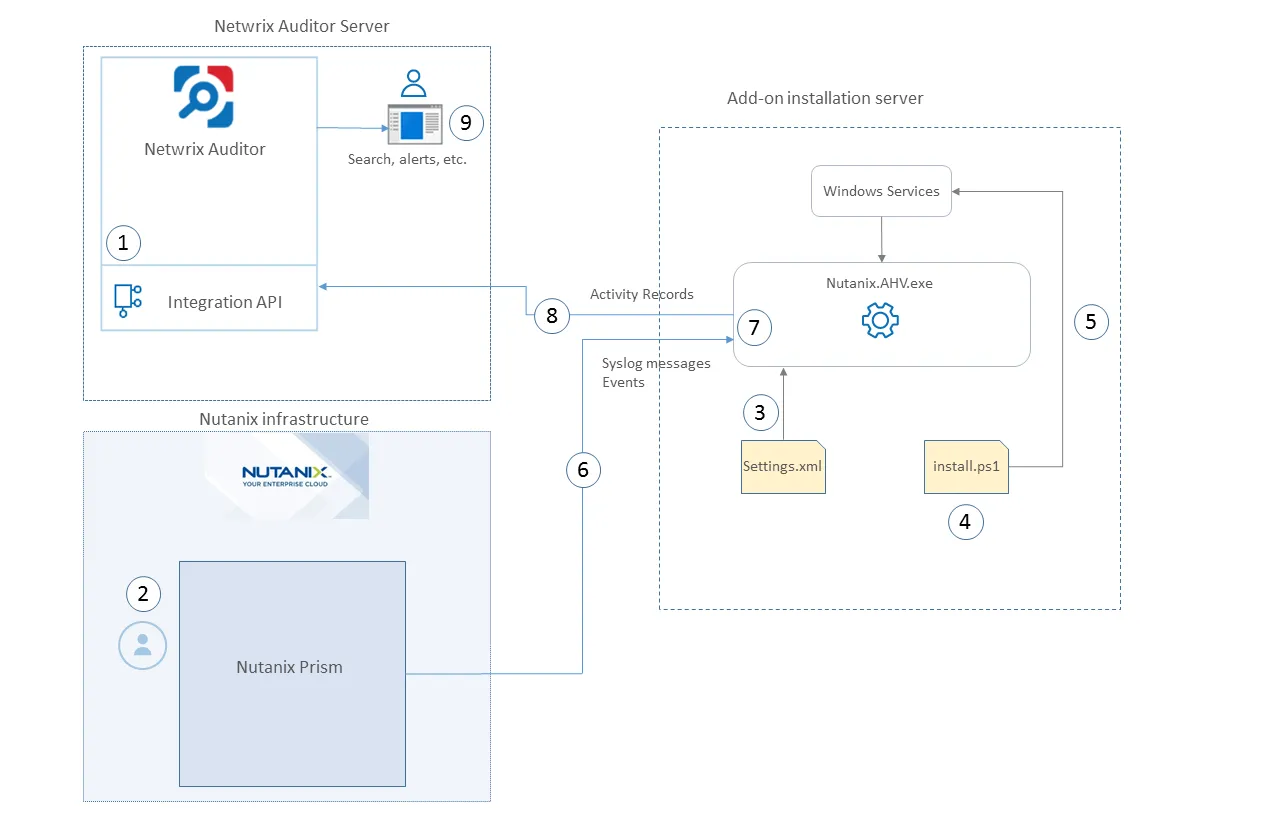
On a high level, the solution works as follows:
-
An IT administrator configures the Integration API settings to enable data collection and storage to Netwrix database for further reporting, search, etc.
Netwrix recommends creating a dedicated monitoring plan in Netwrix Auditor and adding a dedicated item of Integration type to it — then you can filter data in reports and search results by monitoring plan/item name.
-
On Nutanix side, the IT administrator prepares a dedicated user account for accessing Nutanix Prism Central/Element and configures Syslog server (IP, port, etc.).
-
The administrator installs the add-on using the MSI installer and launches Wizard.exe to configure the connection settings for both Nutanix Prism and Netwrix Auditor. Credentials for Prism are encrypted and stored securely by the wizard.
-
The MSI installer deploys and starts the Netwrix Auditor Add-on for Nutanix AHV Windows service — the main add-on component, responsible for audit data collection and forwarding.
-
The add-on starts collecting and forwarding activity data from Nutanix Prism: it listens to the specified UDP port and captures Syslog event messages, and also collects activity data using the Nutanix REST API.
Syslog event data communication uses the UDP version of the Syslog protocol. See the Monitoring Scope topic for the default list of supported events.
-
The add-on processes the incoming Syslog messages and REST API data into Netwrix Auditor-compatible format (Activity Records). Each Activity Record contains Who-What-When-Where-Action information (initiator's account, time, action, and other details).
-
Using the Integration API, the add-on sends the activity records to Auditor Server, which writes them to the Audit Database and Long-Term Archive. Data is sent periodically — by default, every second.
See the Integration API topic for additional information on the Activity Record structure and capabilities of the Integration API.
-
Users open Auditor Client to work with collected data:
- Search for file changes using certain criteria
- Export data to PDF or CSV files
- Save search results as reports
- Subscribe to search results
- Configure and receive alerts
Add-on Delivery Package
The add-on is delivered as an MSI installer (Netwrix_Auditor_Addon_NutanixAHV.msi) that deploys
the add-on service and the configuration wizard.
Prerequisites
Before running the add-on, ensure that all the necessary components and policies are configured as follows:
| Where | Prerequisite to check |
|---|---|
| Auditor Server side | - Netwrix Integration API and Audit Database settings are configured properly in Netwrix Auditor. See the Prerequisites and Audit Database topics for additional information. - The TCP 9699 port must be open on Windows firewall for inbound connections. - User account under which data will be written to the Audit Database requires the Contributor role in Auditor. See the Role-Based Access and Delegation topic for additional information. Alternatively, you can grant it the Global administrator role, or add that account to the Netwrix Auditor Administrators group. |
| The machine where the add-on will be installed | - Windows Server 2019 or later. - The UDP 514 port (default Syslog port) must be open on Windows firewall for inbound connections. |
Accounts and rights
It is recommended to create a dedicated account for the Netwrix Auditor Add-on for Nutanix AHV service. The service connects to Auditor Server using this account, so at least the Contributor role in Auditor is required. See the Role-Based Access and Delegation topic for additional information.
This service account also requires the User Admin role in Nutanix Prism. You will be prompted for these credentials in Wizard.exe after installation. See the Deploy the Add-On topic. Credentials for connection to Nutanix Prism are encrypted and stored securely.
Considerations and limitations
- By default, the add-on is targeted at a single Nutanix Prism Central/Element server.
- Netwrix add-on must be deployed in the same subnet as Nutanix Prism Central/Element server.
- Monitoring of actions performed on the add-on installation server isn't supported.
Upgrade Path
To upgrade from a previous version, do the following:
- Download the new add-on MSI installer.
- Run the MSI installer — it will stop the existing service, update the files, and restart the service automatically.
- Launch Wizard.exe to verify or update configuration settings if needed.
Compatibility notice
The add-on is compatible with Nutanix Prism Central and Nutanix Prism Element.