Requirements
This topic provides the requirements for the server where Netwrix Auditor will be installed. See the following topics for additional information:
- Supported Data Sources
- Hardware Requirements
- Software Requirements
- Requirements for SQL Server to Store Audit Data
Architecture Overview
Netwrix Auditor provides comprehensive auditing of applications, platforms, and storage systems. The product architecture and component interactions are shown below.
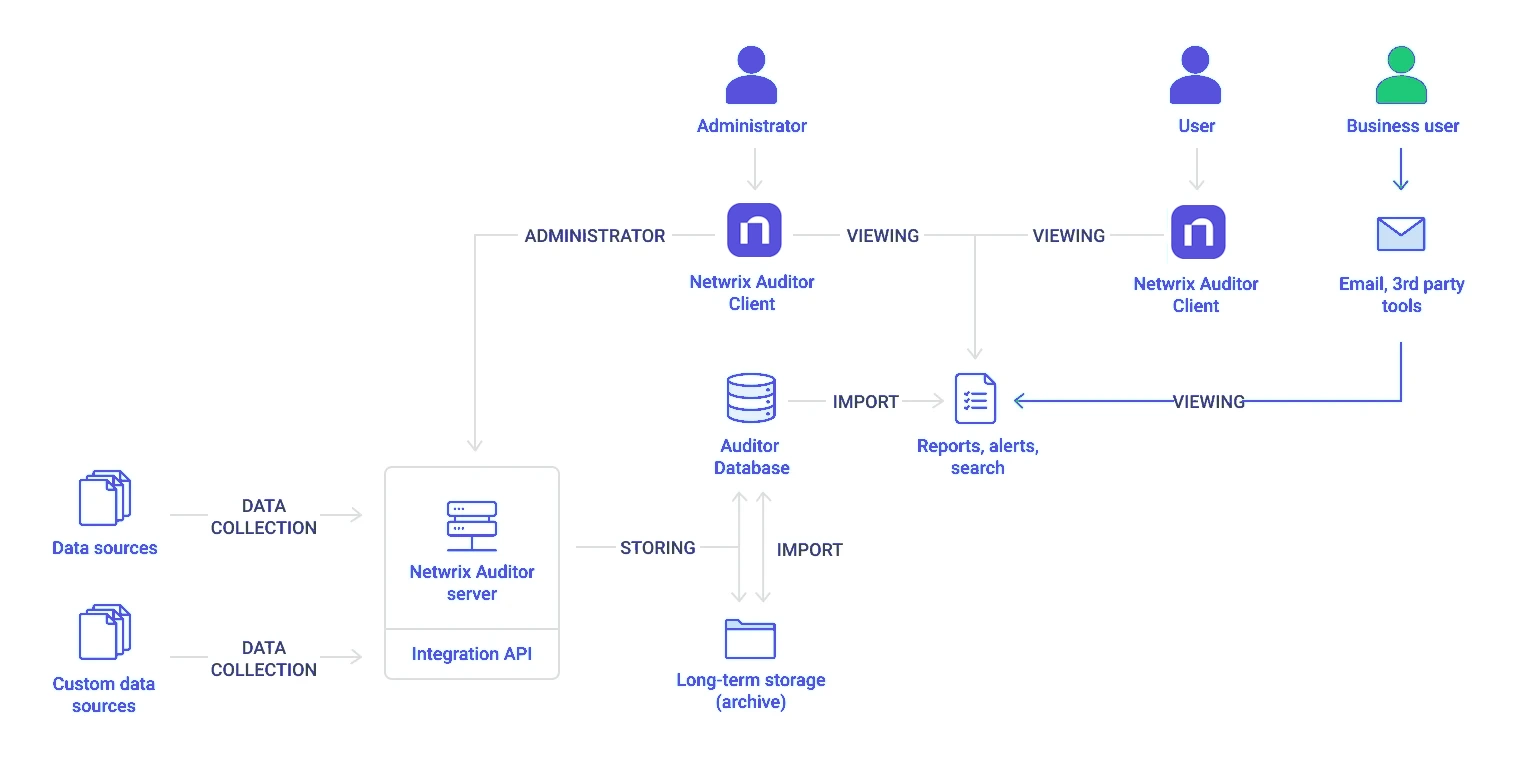
- Netwrix Auditor Server — the central component that handles the collection, transfer, and processing of audit data from various data sources (audited systems). Data from sources without built-in support is collected using the RESTful Integration API.
- Netwrix Auditor Client — a component that provides an interface for authorized personnel to manage product settings, examine alerts, reports, and search results using the console UI. Other users can obtain audit data via email or third-party tools—for example, reports can be provided to the management team through an intranet portal. The Client can be installed on other hosts using the same installer as the server.
- Data sources — entities that represent the types of audited systems supported by Netwrix Auditor (for example, Active Directory, Exchange Online, NetApp storage system, and so on), or the areas you are interested in (Group Policy, User Activity, and others).
- Long-Term Archive — a file-based storage repository that keeps the audit data collected from all your data sources or imported using Integration API in a compressed format for a long period of time. Default retention period is 120 months.
- Audit databases — these are Microsoft SQL Server databases that serve as operational storage where you can browse recent data, run search queries, generate reports, and create alerts. Typically, data from a particular data source (for example, Exchange Server) is stored in a dedicated Audit database and the long-term archive. You can configure as many databases as needed, one for each data source. The default retention period for data in the Audit database is 180 days.
NOTE: When auditing Active Directory domains, Exchange servers, expired passwords, and inactive users, the data sent by the product can be encrypted using Signing and Sealing. See the following Netwrix knowledge base article for additional information on how to secure Netwrix Auditor: Best Practices for Securing Netwrix Auditor.
Workflow Stages
The general workflow stages are as follows:
-
Authorized administrators prepare IT infrastructure and data sources they are going to audit, as recommended in Netwrix Auditor documentation and industry best practices; they use the Netwrix Auditor Client (management UI) to set up automated data processing.
-
Netwrix Auditor collects audit data from the specified data source (application, server, storage system, and so on).
- To provide a coherent picture of changes that occurred in the audited systems, the product can consolidate data from multiple independent sources (event logs, configuration snapshots, change history records, etc.). This capability is implemented with Netwrix Auditor Server and Integration API.
- See the Integration API topic for additional information on custom data source processing workflow.
-
Audit data is stored to the Audit databases and the repository (Long-Term Archive) and preserved there according to the corresponding retention settings.
-
Netwrix Auditor analyzes the incoming audit data and alerts appropriate staff about critical changes, according to the built-in alerts you choose to use and any custom alerts you have created.
-
Authorized users use the Netwrix Auditor Client to view pre-built dashboards, run predefined reports, conduct investigations, and create custom reports based on their searches. Other users obtain the data they need via email or third-party tools.
-
To enable historical data analysis, Netwrix Auditor can extract data from the repository and import it to the Audit database, where it becomes available for search queries and report generation.