Configure Partner Server
To start monitoring files and folders on Nutanix File Server, you should configure Netwrix Auditor Server as a partner server for Nutanix File Server.
This configuration procedure involves creation of API requests and assumes that you have a good understanding of REST API concept, as well as experience in working with JSON-formatted requests in some API client. To get acquainted with Nutanix REST API Explorer client, refer to Nutanix documentation
To create a partner server for Nutanix File Server via API:
-
Open the File Server REST API Explorer REST API client using the following URL:
https://<fileserver_ip>:9440/api/nutanix/v3/api_explorer/index.html#/here
<fileserver_ip>- IP address of the Nutanix File Server to be audited.
If you select to launch the RestAPI Explorer from the Prism menu, the RestAPI Explorer for Prism server will be opened.
-
In the username and password fields, enter the credentials of the Create User Account to Access Nutanix REST API you have created.
-
Click Explore.
-
Locate the POST request for partner_servers endpoint:
POST /partner_servers

- In the request body, enter the following JSON-formatted structure:
{

"spec": {

"name": "<NAME_OF_PARTNER_SERVER>",

"resources": {

"usage_type": "NOTIFICATION",

"vendor_name": "netwrix",

"server_info": {

"server_type": "PRIMARY",

"address": {

"ip": "<IP_OF_THE_NETWRIX_AUDITOR>",

"port": 9898

}

}

}

},

"api_version": "3.0",

"metadata": {

"kind": "partner_server"

}

}
here:
<NAME_OF_PARTNER_SERVER> - enter the Netwrix Auditor server name
<IP_OF_NETWRIX_AUDITOR> - enter the Netwrix Auditor server IP address
This address must be visible from the Nutanix File Server network.
-
Send the request, clicking Try it out.
-
Get the response -
Response Codeshould be 200. In the response body, locate theuuidof the created partner server. -
To check that a new partner server was included in the list of existing partner servers, retrieve the list of servers, sending the POST request to the following endpoint:
POST /partner_servers/list
The request body must be empty - for that, enter empty brackets as the value for
get_entities_request parameter: { }
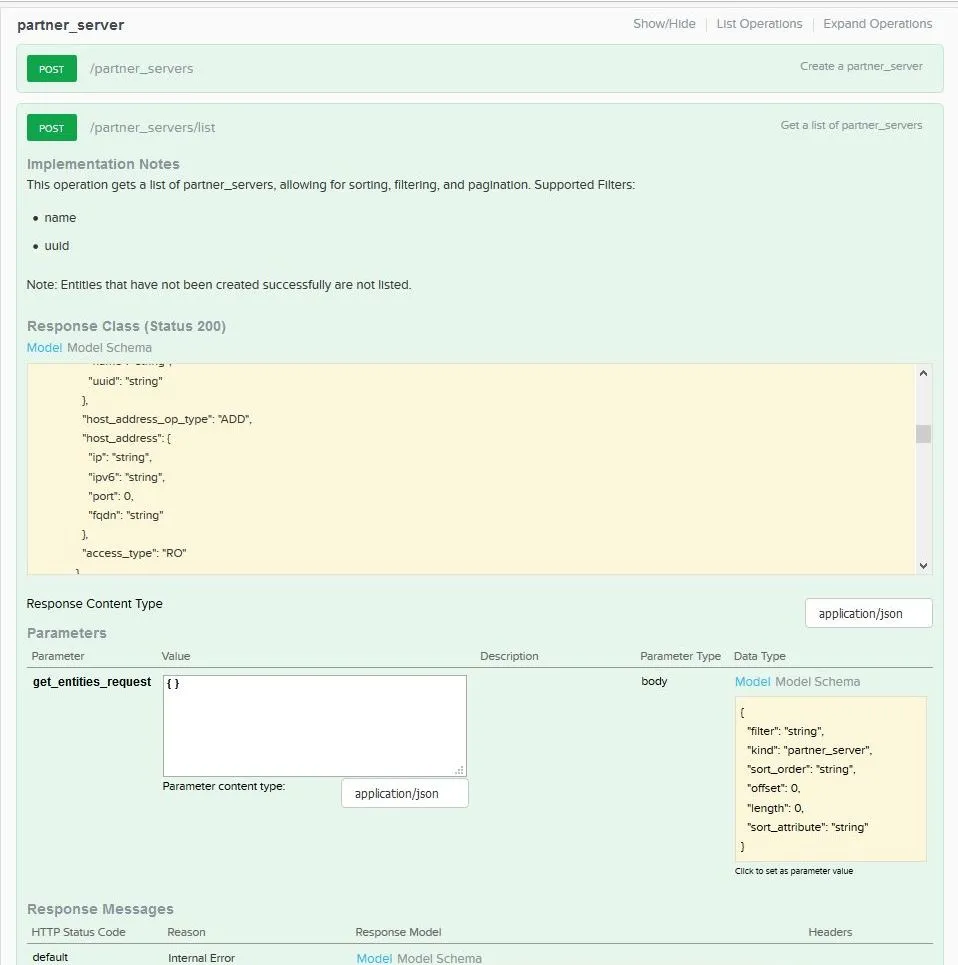
- The response body should contain the list of servers, including new partner server name and other settings.