Review Behavior Anomalies Dashboard
To review the Behavior Anomalies dashboard, process, and filter anomalies in user profiles, you must be assigned the Global administrator or Global reviewer role in the product. See the Role-Based Access and Delegation topic for additional information.
You can add any elements (a dashboard, report, alert, risk, etc.) to the Auditor Home screen to access them instantly. See the Navigation and Customize Home Screen topics for additional information.
To review the Behavior Anomalies dashboard:
On the main Auditor page, click
 on the left.
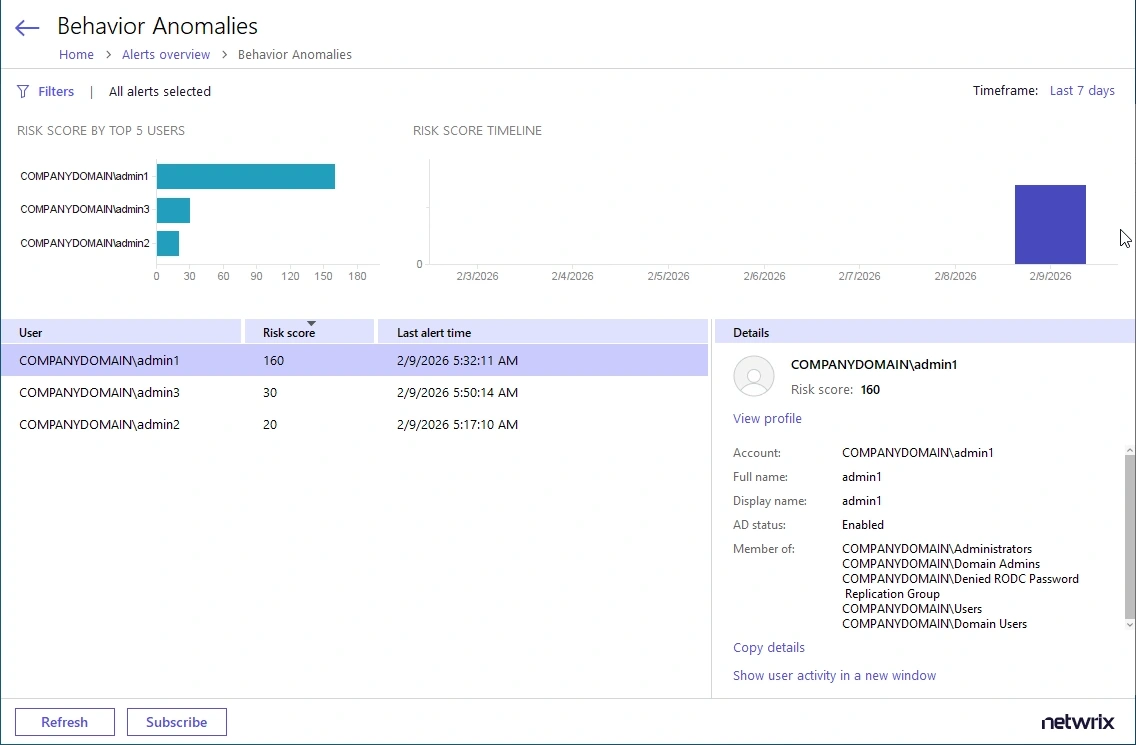
The dashboards includes the following sections:
- The Risk score timeline that helps you review anomaly surges over time.
- The Risk score by top five users chart that helps you identify the most active users. To see the chart, click the pie chart icon in the upper left corner of the page.
- The user list with all users who provoked alerts and their total risk scores.
After you review the general anomaly trend and identify users that merit special attention, review their profiles and process anomalies. Click View Profile next to a user name to explore user activity and investigate each action in detail. Review User Profiles and Process Anomalies