Splunk
Netwrix Auditor is a visibility platform for user behavior analysis and risk mitigation that enables control over changes, configurations, and access in hybrid IT environments to protect data regardless of its location. The platform provides security analytics to detect anomalies in user behavior and investigate threat patterns before a data breach occurs.
Splunk is a log management solution that enables search and visualization of data collected from the company's IT assets.
Netwrix Auditor add-on for Splunk works as an integration solution for both products: it instructs Splunk to pull the audit data collected by Netwrix Auditor and stored to the audit databases in Netwrix-compatible form (activity records). This data is saved in the event log format recognized by Splunk and also mapped to the CIM data models — for normalization and better correlation with other log sources. With that automated flow, you can use Splunk Enterprise as your single pane of glass for aggregated data analysis. This makes the IT infrastructure monitoring more efficient and helps you keep tabs on your IT assets.
The major benefits are:
- Aggregated audit data from the variety of sources available from a single console
- Efficient search through the audit data
Supported data sources
Netwrix Auditor add-on for Splunk supports and provides CIM data models mapping for the following Netwrix Auditor data sources:
| Data source | CIM data models |
|---|---|
| Active Directory | Authentication, Change |
| Exchange | Change, Email |
| Exchange Online | Change, Email |
| File Servers | Change, Endpoint |
| Entra ID | Authentication, Change |
| SharePoint | Change |
| SharePoint Online | Change |
| SQL Server | Authentication, Change |
| VMware | Authentication, Change |
| Windows Server | Change |
See CIM Data Model Mapping for details.
How It Works
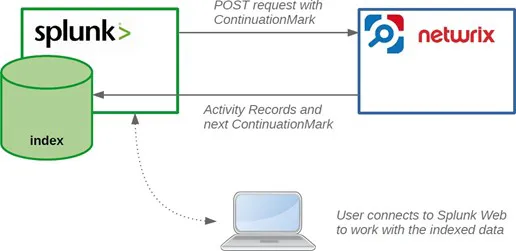
Netwrix Auditor add-on for Splunk allows pulling activity records data from the Netwrix Auditor via its Integration API. Data is retrieved in JSON format, transferred over HTTPS and stored to Splunk index.
See the Activity Records topic for additional information.
For this data to be provided to Splunk, it adds a new Splunk source type, performing additional data parsing and field extraction. The audit data is also mapped into the Common Information Model (CIM) data models — for normalization and better correlation with other log sources.
On a high level, the solution works in the following steps.
Step 1 – An IT administrator configures Netwrix Auditor Integration API settings to enable sharing Netwrix Auditor data with external applications.
Step 2 – On the Splunk side, the IT administrator installs and configures the add-on, providing the necessary parameters for its operation: Netwrix Auditor Integration API host and account to access it with sufficient access rights.
Step 3 – The IT administrator prepares a Splunk index to store the data that will be collected from Netwrix Auditor.
Step 4 – Splunk starts pulling activity records via Netwrix Auditor Integration API by sending POST requests with Continuation Mark. Data is received in JSON format and stored in the specified Splunk index — to make it available for further search by Splunk.
Step 5 – When search is performed, Splunk attempts to extract additional information available in the audit data and to map it to CIM data models.
Step 6 – User opens Splunk Enterprise to work with collected data:
- Search for the activity records in the specified index or data model
- Create reports and dashboards in Splunk
Report and dashboard creation in Splunk is outside the scope of this guide.
Prerequisites
Before running the add-on, ensure that all the necessary components and policies are configured as follows.
Auditor Server side
- Auditor version is 9.96 or higher.
- Netwrix Auditor Integration API and Audit Database are configured. Ensure that Netwrix Auditor Integration API is configured to use HTTPS protocol.
See the Prerequisites and Audit Database topics for additional information. - The user retrieving data from the Audit Database is granted the Global reviewer role in Auditor or is a member of the Netwrix Auditor Client Users group. It is recommended to create a dedicated account for that purpose.
Alternatively, you can grant the Global administrator role or add the user to the Netwrix Auditor Administrators group. In this case, this user will have the most extended permissions in the product.
See the Role-Based Access and Delegation topic for additional information.
Splunk Enterprise side
- Splunk version is 8.0.6 or higher.
- Splunk Common Information Model add-on version is 4.17.0 or higher.
- Splunk Administrator or any other account with permissions to add add-ons, create indexes and data inputs.
- The TCP 9699 port must be open on firewalls between Splunk and the Netwrix Auditor server.
HTTPS certificate requirements
Starting with version 1.7.0, the Netwrix Auditor add-on for Splunk requires the HTTPS certificate used by the Netwrix Auditor Integration API to be trusted by the Splunk add-on. If the certificate isn't trusted, the add-on will not be able to retrieve data from the Integration API.
You can satisfy this requirement using one of the following options:
Option 1 — Use a certificate issued by a trusted Certificate Authority
Configure the Netwrix Auditor Integration API to use an HTTPS certificate issued by a trusted public Certificate Authority (CA). This is the recommended approach. See the Security topic for additional information.
Option 2 — Add the Netwrix Auditor certificate to the add-on trust store
If the Integration API uses a self-signed certificate or a certificate issued by a private CA, add the certificate to the add-on trust store before configuring the add-on and creating data inputs. To do this, append the Netwrix Auditor certificate contents (Base-64-encoded X.509 certificate) to the following file on the Splunk system:
$SPLUNK_HOME\etc\apps\TA-netwrix-auditor-add-on-for-splunk\bin\ta_netwrix_auditor_add_on_for_splunk\aob_py3\certifi\cacert.pem
After updating the trust store, proceed with add-on configuration.
Considerations and limitations
- If the information isn't available in the activity record received from Auditor, it will also not be available in Splunk.
- CIM might not have data models for some of the activity records received from Auditor; such information can only be accessed in Splunk using search by index.