Create Alerts for Non-Owner Mailbox Access Events
If you have a monitoring plan configured to audit Exchange, you can configure alerts to be triggered by non-owner mailbox access events (e.g., opening a message folder, opening/modifying/deleting a message) using the event log alerts. To enable monitoring of non-owner mailbox access events, you need to create a monitoring plan for auditing event logs.
Create Alerts for Non-Owner Mailbox Access Events
The procedure below describes the basic steps required to create a monitoring plan for collecting data on non-owner mailbox access events. See Event Log Manager for additional information.
-
Create a monitoring plan in Netwrix Auditor Event Log Manager.
-
Ensure that the Enable event log collection checkbox is selected. Specify a name for the new plan, for example, "Non-owner mailbox access auditing".
-
Navigate to the Monitored computers list and add the server where your Exchange organization resides.
-
On the General tab, click Configure next to Alerts. Ensure the predefined alerts are disabled and click Add to create an alert for non-owner mailbox access events.
-
In the Alert Properties wizard, specify the alert name and enter an alert description (optional). Specify the number of alerts per email. Grouped alerts for different computers will be delivered in separate email messages. This value is set to 1 by default, which means each alert will be delivered as a separate email message.
-
Specify the alert recipient if you want the alert delivered to a non-default email address.
-
Navigate to Event Filters and click Add to specify an event that will trigger the alert.
-
Complete the Event Filter dialog.
- In the Event tab, specify the filter name and description. In the Event Log field, enter "Netwrix Non-Owner Mailbox Access Agent".
-
In the Event Fields tab, complete the following fields:
-
Event ID—Enter the identifier of a specific event that you want to be alerted on. You can add several IDs separated by comma. Review the event IDs available in the Netwrix Non-Owner Mailbox Access Agent event log:
ID Description Access Type (as displayed in XML view of event details) 1 A folder was opened actFolderOpen 2 A message was opened actMessageOpened 3 A message was sent actMessageSubmit 4 A message was changed and saved actChangedMessageSaved 5 A message was deleted actMessageDeleted 6 A folder was deleted actFolderDeleted 7 The entire contents of a folder was deleted actAllFolderContentsDeleted 8 A message was created and saved actMessageCreatedAndSaved 9 A message was moved or/and copied actMessageMoveCopy 10 A folder was moved or/and copied actFolderMoveCopy 14 A folder was created actFolderCreated -
Source—Enter "Netwrix Non-Owner Mailbox Access Agent".
-
In the Insertion Strings tab, select Consider the following event Insertion Strings to receive alerts on events containing a specific string in the EventData. Click Add and specify the Insertion String.
-
-
Click OK to save the changes and close the Event Filters dialog.
-
In the Netwrix Auditor Event Log Manager wizard, navigate to Notifications and specify the email address where notifications will be delivered.
RECOMMENDED: Click Send Test Email. The system will send a test message to the specified email address and inform you if any problems are detected.
-
Click Edit next to Audit Archiving Filters step. In the Inclusive Filters section, clear the filters you don't need, click Add, and specify the following information:
- The filter name and description (e.g., Non-owner mailbox access event)
- In Event Log, enter "Netwrix Non-Owner Mailbox Access Agent"
- In Write to, select Long-Term Archive. The events will be saved to the local repository.
-
Click Save. When an event occurs that triggers an alert, an email notification will be sent immediately to the specified recipients.
Review Event Description
Review the example of the MessageOpened event in the XML view:
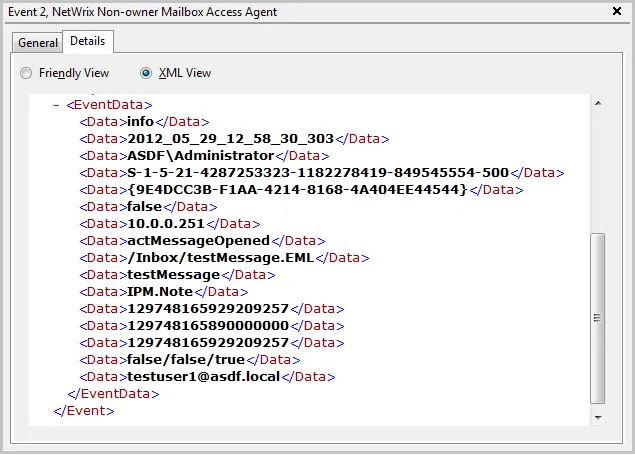
Depending on the event, the strings in the description may vary. The first eight strings are common for all events:
| String | Description |
|---|---|
| String1 | The event type: info or warning |
| String2 | The event date and time in the following format: YYYY_MM_DD_hh_mm_ss_000 |
| String3 | The name of the user accessing mailbox |
| String4 | The SID of the user accessing mailbox |
| String5 | The GUID of the mailbox being accessed |
| String6 | Shows whether the user accessing mailbox is the owner: it is always false |
| String7 | The IP of the computer accessing the mailbox |
| String8 | The access type |
The following strings depend on the non-owner access type, represented by different Event IDs:
| Event ID | Access type (String 8) | Strings | Description |
|---|---|---|---|
| 1 | actFolderOpen | String9 | The internal folder URL |
| 2 | actMessageOpened | String9 | The internal message URL |
| String10 | The message subject | ||
| String11 | The message type: IPM.Note—Email, IPM.Contact – contact, etc. | ||
| 3 | actMessageSubmit | String9 | The internal message URL |
| String10 | The message subject | ||
| String11 | Email addresses of the message recipients, separated by a semicolon | ||
| String12 | The message type: IPM.Note—Email, IPM.Contact – contact, etc. | ||
| 4 | actChangedMessageSaved | String9 | The internal message URL |
| String10 | The message subject | ||
| String11 | The message type: IPM.Note – Email, IPM.Contact – contact, etc. | ||
| 5 | actMessageDeleted | String9 | The internal message URL |
| String10 | The message subject | ||
| String11 | The message type: IPM.Note—Email, IPM.Contact – contact, etc. | ||
| 6 | actFolderDeleted | String9 | The internal folder URL |
| 7 | actAllFolderContentsDeleted | String9 | The internal folder URL |
| 8 | actMessageCreatedAndSaved | String9 | The internal message URL |
| 9 | actMessageMoveCopy | String9 | The message being moved/copied—the final part of the message URL, e.g., /Inbox/testMessage.EML |
| String10 | The action – copy or move | ||
| String11 | The folder URL the message is copied/moved from | ||
| String12 | The destination folder URL | ||
| String13 | The message type: IPM.Note—Email, IPM.Contact – contact, etc. | ||
| 10 | actFolderMoveCopy | Strings 9 -13 | The string descriptions for the folder are similar to those for messages. |
| 14 | actFolderCreated | String9 | The new folder URL |
With different Exchange versions and/or different email clients, the same non-owner action (e.g., copying a message) may generate different events: e.g., actMessageMoveCopy with one server/client or actMessageCreatedAndSaved with another.
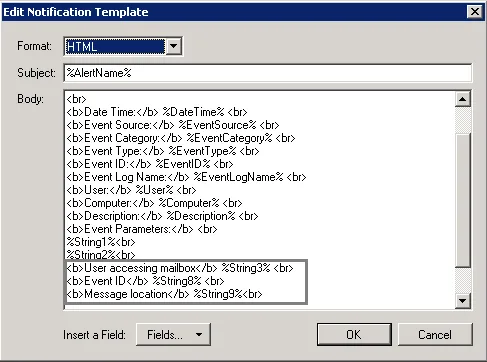
You can add the required strings contained in % symbols for your own custom alert separated by
a <br> tag in <b>Event Parameters:</b>. Event parameter descriptions can also be added.
In the example below, the following information has been added:
- The description for String 3—User accessing mailbox
- String 8 with the description
- String 9 with the description