Change Log Level
The AccessInformationCenter.Service.exe.Config file is located in the Logs folder of the Access
Reviews installation directory:
...\Netwrix\Access Reviews
- Open the
AccessInformationCenter.Service.exe.Configfile in a text editor, e.g. Notepad.
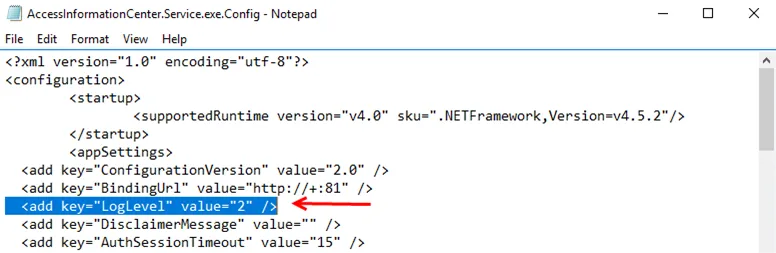
- The level value is set in the
LogLevelparameter, where "2" is the default level. As the logging level increases from 0 to 3, the types of information and level of detail included within the log file also increase. Change to the log level:
-
Error level is when
value="0" -
Warning level is when
value="1" -
Info level is when
value="2" -
Debug level is when
value="3"- Debug logging can be enabled from the Diagnostics page of the Configuration interface
- Save and close the
AccessInformationCenter.Service.exe.Configfile.
Once troubleshooting has finished, it is recommended to return the log level to the default level, Info = 2, to prevent the log file from growing too large.