Qumulo Tab
The Qumulo tab lets you modify settings after a Qumulo host has been configured. Once a Qumulo host is added to the monitored hosts table, the configuration can be edited in the host Properties.
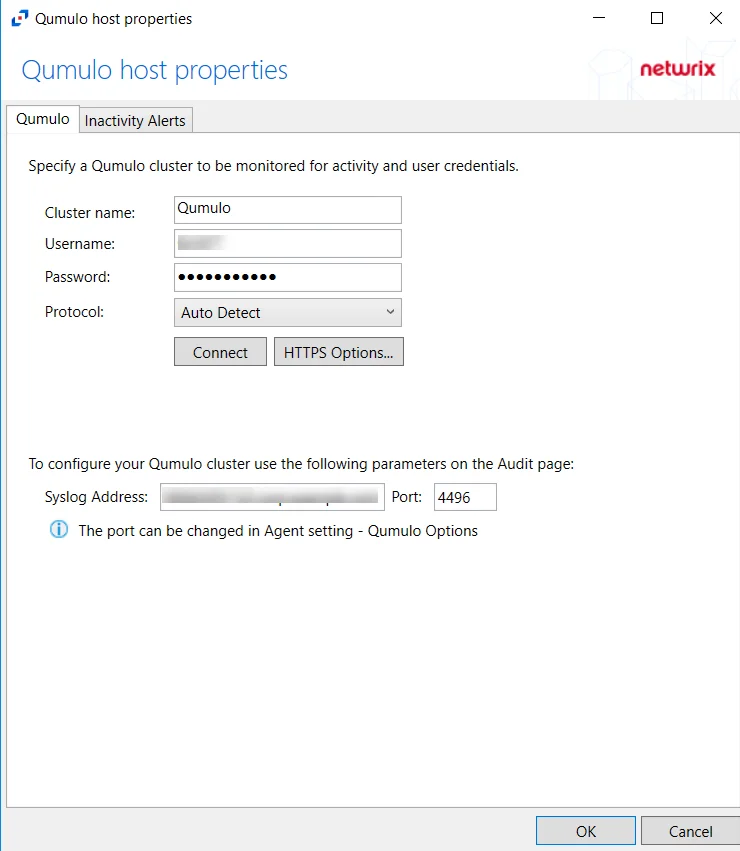
The configurable options are:
-
Cluster name – Enter the name of the filer
-
Username – Enter the user name for the Qumulo user
-
Password – Enter the password for the user name
-
Protocol – Select one of the following protocols from the dropdown menu:
- Auto Detect
- HTTPS
- HTTPS, ignore certificate errors
-
Connect – Click to connect using the selected protocol and validate the connection with Qumulo
-
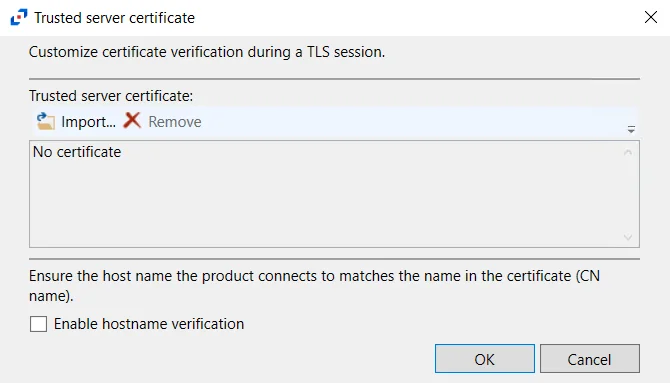
HTTPS Options – Opens the Trusted server certificate window to customize the certificate verification during a TLS session
-
Import – Click to browse for a trusted server certificate
-
Remove – Click to remove the selected trusted server certificate
-
Enable hostname verification – Select this checkbox to ensure that the host name the product connects and matches the name in the certificate (CN name)
-
Click OK to close the window and save the modifications.